Consejos, Conversaciones
Hacks ocultos de WhatsApp: 7 trucos que no sabías sobre nosotros

WhatsApp ha existido desde 2009. Desde entonces, la aplicación ha añadido numerosas funcionalidades nuevas para sus usuarios. Tantas, de hecho, que puede que ni siquiera las conozcas todas. Por eso hemos reunido siete hacks y trucos de WhatsApp que probablemente no sabías que existían.
Incluso si usas WhatsApp a diario — como hace la mayoría de los usuarios de WhatsApp — probablemente aún haya muchas funcionalidades ocultas de las que nunca has oído hablar. Para ser justos, en realidad es muy difícil de seguir las constantes y múltiples actualizaciones de WhatsApp.
¡Por eso hemos decidido seleccionar siete trucos y consejos de WhatsApp que no son tan conocidos, pero que son muy útiles una vez que los descubres!
La mayoría de los “trucos de WhatsApp” no son trucos en absoluto. Son solo funcionalidades integradas que la mayoría de la gente nunca activa. Pero ten cuidado, algunos “trucos” que circulan por ahí son en realidad solo estafas que podrían hacer que suspendan tu cuenta. Esta de las guías separa ambos para que puedas usar WhatsApp sin poner tu cuenta en riesgo.
¿Qué son los trucos de WhatsApp?
Cuando la gente habla sobre nosotros los trucos de WhatsApp, por lo general hablan de una de estas tres cosas.
Lo primero son las funcionalidades integradas y los atajos, algunos de los cuales puedes explorar a continuación. También puedes ver que los llaman trucos de WhatsApp o funcionalidades de WhatsApp. Son seguros, cuentan con asistencia y te pueden hacer guardar tiempo o hacer que usar la aplicación sea más fácil o agradable.
Pero también hay amenazas de seguridad y estafas: técnicas con diseño para robar el acceso a tu cuenta, tus datos personales o de contacto. Estas incluyen estafas de códigos de verificación, un ataque de ingeniería social, acceder con códigos QR falsos o intentos de suplantación de identidad. No son seguras y pueden resultar en la pérdida de tu cuenta o en el robo de tus datos.
Por último, hay algunos “trucos” que en realidad son solo aplicaciones de terceros o mods no oficiales, y no están permitidos. Aplicaciones como GB WhatsApp, WA Tweaker y WhatsApp Plus prometen funcionalidades adicionales que no se encuentran en la aplicación oficial, pero no están autorizadas por WhatsApp, a menudo violan las condiciones de servicio y conllevan importantes riesgos de seguridad y privacidad.
¿Qué debes hacer si hackean tu cuenta de WhatsApp?
Actúa rápido. Revisa los logs de tu cuenta e intenta volver a iniciar sesión de inmediato con tu número de teléfono. Es la forma más rápida de volver a controlar la situación revisando logs y cerrar automáticamente la sesión del atacante.
Paso 1: Vuelve a iniciar sesión en tu cuenta para comprobar tus logs
- Utiliza las aperturas de WhatsApp
- Introduce tu número de teléfono
- Haz una solicitud para pedir un nuevo código de verificación de 6 dígitos
- Introduce el código
Si es exitoso, a cualquier persona que esté usando tu cuenta, en los logs de la misma, se le cerrará la sesión automáticamente.
Paso 2: Gestiona los bloqueos de la verificación en dos pasos
Si te piden un PIN que no pudiste establecer, es posible que el atacante haya podido activar la verificación en dos pasos. Es posible que tengas que esperar hasta 7 días en tus logs antes de poder iniciar sesión sin el PIN. Después de eso, puedes intentar nuevamente recuperar tu cuenta.
Paso 3: Ponte en contacto con WhatsApp si no puedes recuperar el acceso
Intenta comunicarte a través del centro de ayuda de WhatsApp para enviar un informe de que tu cuenta ha sido comprometida. Esto es especialmente importante si no puedes verificar tu número o recuperar el acceso.
Paso 4: Protege tu cuenta inmediatamente
Una vez que vuelvas a entrar en tu cuenta, hay algunos pasos que puedes seguir para asegurarte de que no te vuelvan a hackear.
- Activa la verificación en dos pasos
- Comprueba el dispositivo vinculado y procede a eliminar cualquier cosa desconocida
- Debes revisar tu cuenta en busca de actividad sospechosa
Paso 5: Advierte a tu contacto
Si tu cuenta se usó para enviar mensajes, infórmale a la gente que tu cuenta fue comprometida por estos envíos. Diles que ignoren cualquier solicitud inusual, especialmente si es de dinero o códigos de acceso.
Consejos de seguridad para evitar ser hackeado
Aquí hay algunas formas en que puedes proteger tu cuenta para evitar ser hackeado.
Añade la verificación en dos pasos
Establecer esto evita el acceso no autorizado a tu cuenta, te ayuda a proteger frente a hackeos de intercambio de SIM y asegura tus conversaciones personales. Es fundamental para la seguridad de tu cuenta si alguien roba tu tarjeta SIM o te engaña para que compartas tu código de verificación por SMS.
- Ve a Ajustes 🡪 Cuenta 🡪 Verificación en dos pasos
- Procede a establecer un PIN
NUNCA compartas tu PIN con nadie. Permite acceso completo a tu cuenta.
Comprueba cada dispositivo vinculado
Un dispositivo vinculado muestra mediante los logs cualquier lugar donde hayas iniciado sesión en WhatsApp, como tu teléfono o una computadora. Es donde puedes comprobar si alguien ha accedido a tu cuenta desde su dispositivo sin que lo sepas (lo cual no podrán hacer una vez que actives la verificación en dos pasos) y proceder a eliminar a esa persona para que no pueda acceder más a tu cuenta.
- Ajustes 🡪 Dispositivo vinculado
- Toca el dispositivo desconocido para proceder a eliminar su acceso
[Cuadro de llamada] No escanees códigos QR si no sabes hacia dónde dirigen al cliente potencial. Podría ser alguien intentando hackear cuentas de WhatsApp.
No escanees códigos QR si no sabes hacia dónde dirigen al cliente potencial. Podría ser alguien intentando hackear cuentas de WhatsApp.
8 trucos, consejos y secretos de WhatsApp
Ahora viene la parte divertida. Una vez que hayas protegido tu cuenta, puedes probar estos trucos seguros para que usar WhatsApp sea aún mejor.
1. Sal de un chat de grupo sin que nadie se dé cuenta
Uno de los trucos de WhatsApp más geniales es salir de un grupo sin salir de verdad. Seamos sinceros, todos tenemos al menos un chat de grupo en WhatsApp que nos parece muy molesto, pero no queremos ofender a nadie saliendo del grupo públicamente. ¡Hay varias soluciones!
Ve al grupo del que deseas salir en secreto y debes seleccionar los tres puntos del menú (Android) o tocar el nombre del grupo (iOS) para las aperturas de los ajustes del grupo. Aquí, debes escoger una de las opciones de «silenciar notificación» y «para siempre». Vuelve a tu resumen de chat y mueve este chat de grupo en particular a tus chats archivados.
Esto no solo silenciará la notificación, sino que también va a eliminar el grupo de tu resumen de chat, por lo que realmente queda fuera de la vista y fuera de la mente. Al mismo tiempo, como nunca saliste del grupo, no habrá una nota pública diciendo que lo hiciste, y cuando quieras volver al grupo, lo puedes recuperar de tus conversaciones archivadas. ¡Brillante!
2. Responde de forma privada a un mensaje de chat grupal con tus mensajes
Tener un chat grupal con amigos, compañeros de trabajo o familiares en WhatsApp es genial. Sin embargo, a veces no quieres compartir todos los detalles de los preparativos de la fiesta o de la noche salvaje con cada uno de los miembros.
¡Por eso puedes enviar mensajes y responder de forma privada a un mensaje de chat grupal! Simplemente mantén presionado el mensaje al que quieres responder a través de un chat privado. Luego, procede a seleccionar los tres puntos o el menú en la parte superior de tu chat grupal. Esto causa las aperturas de un menú con la opción de «responder en privado».

Esto te lleva automáticamente a un chat privado con esa persona, pero incluye la captura de pantalla del mensaje grupal, lo que facilita continuar la conversación pública de mensajes en privado.
3. Limita qué imágenes y vídeos de WhatsApp aparecen en tu galería
Puedes seleccionar la opción de no guardar los archivos multimedia de chats privados o grupales específicos en la galería de tu teléfono. ¿Se acabó la molestia por los cientos de imágenes de buenos días y vídeos de «que tengas un día maravilloso» de WhatsApp que aparecen en la galería de tu teléfono? Después de todo, su recepción es agradable, pero la mayoría de las personas no quieren que ocupen espacio de almacenamiento ni que tu galería se vea desordenada.
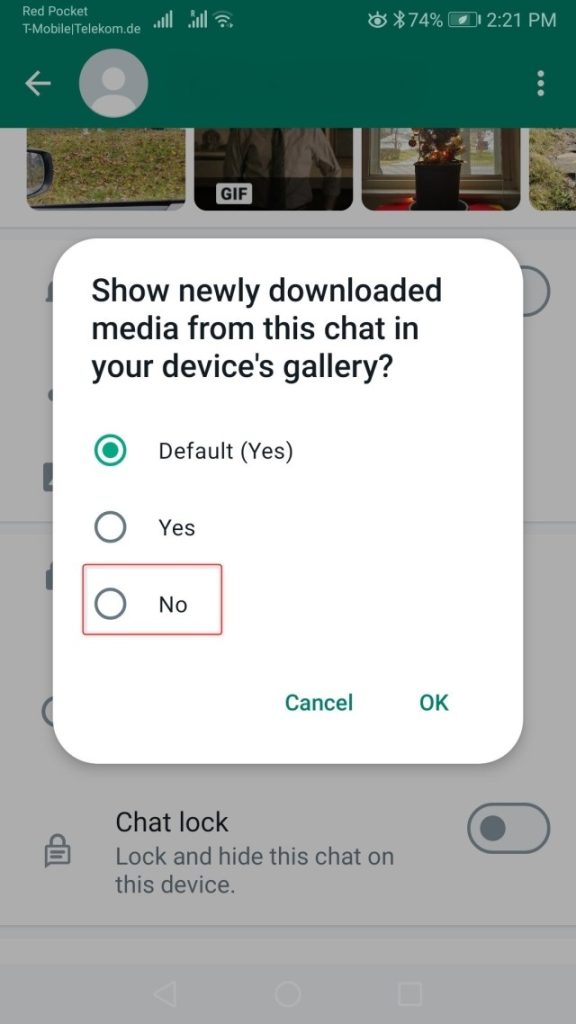
¡Esta es una de las soluciones más simples! En realidad, puedes seleccionar la opción de no guardar archivos multimedia de chats privados o grupales específicos en la galería de tu teléfono.
Simplemente ve al chat respectivo y toca el nombre del chat. Esto causa las aperturas de la página de información, donde verás una de las opciones llamada «visibilidad de archivos multimedia». Debes escoger una de estas opciones y luego seleccionar «no» para no guardar los archivos multimedia de este chat en la galería de tu teléfono.
4. Haz que una imagen desaparezca después de haberla visto una vez (¡oh, vaya!)
Pero la mayoría de los usuarios de WhatsApp probablemente no saben que también hay una forma de que un usuario pueda recrear las famosas imágenes de Snapchat que se eliminan solas en WhatsApp.
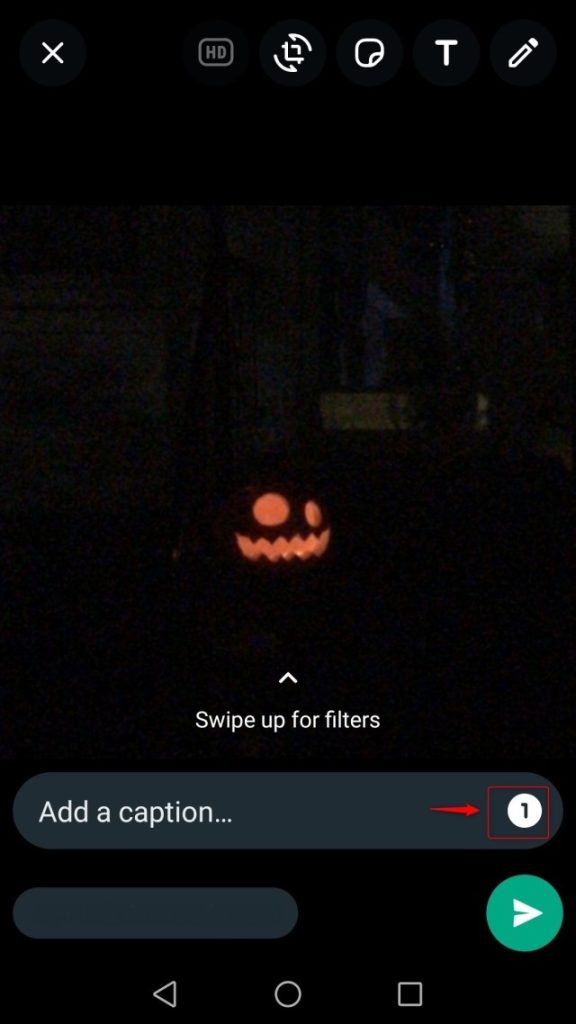
Al seleccionar una de las opciones para ello, el archivo de imagen de los envíos que vas a enviar desaparecerá después de que se haya visto una vez.
Para este efecto, ve a tu galería multimedia y a la imagen que deseas enviar en tus envíos y elige compartirla con un contacto de WhatsApp. Ahora verás que el número «1» aparece junto al campo del pie de foto. Tócalo. Aparece un mensaje entre tus mensajes que explica la función de estas funcionalidades. Presiona «Ok» y esto va a activar el truco de «Ver una vez».
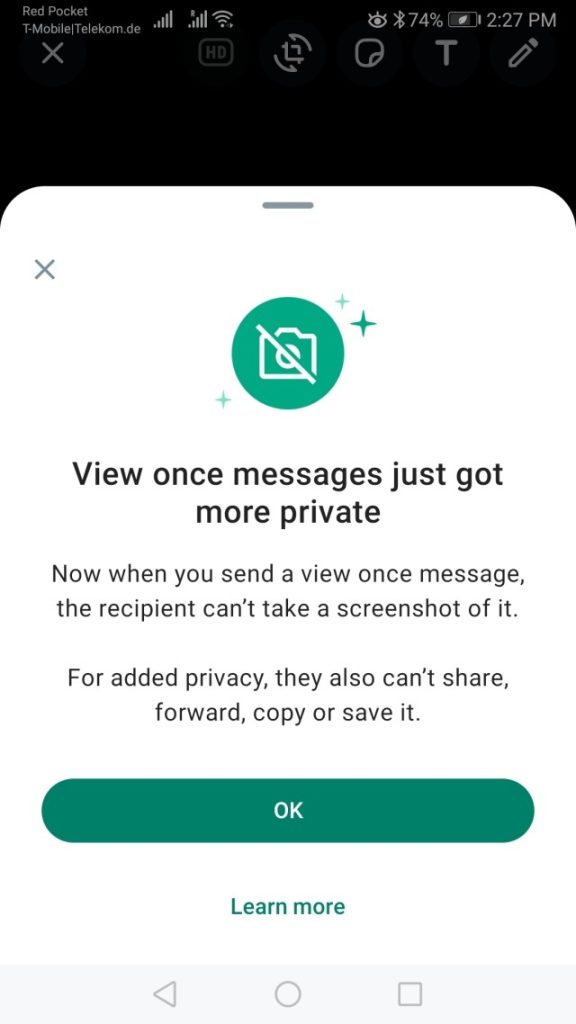
Al usarlo, un destinatario no puede tomar una captura de pantalla de tu mensaje o mensajes, y tampoco puede compartirlo, reenviarlo ni copiarlo.
5. Haz el registro de una historia de voz
¿Sabías que también puedes compartir una historia de voz en WhatsApp? La historia de voz aparece luego como una historia bajo la pestaña de «Actualizaciones», donde ahora también ves los mensajes de estado de otros usuarios.
Si quieres compartir una historia de voz, ve a la pestaña para actualizar, y ahora busca el icono del lápiz en la parte inferior de tu pantalla. Aparece una pantalla en blanco donde puedes escribir tu estado, agregar emojis y efectos. Sin embargo, también verás un icono de micrófono.
¡Tocar el micrófono ahora te permite hacer un registro de una nota de voz que puedes compartir al actualizar tu estado! Ten en cuenta que el clip de voz no puede durar más de 30 segundos.
Este es uno de los divertidos trucos de WhatsApp para destacar más con tu estado de WhatsApp (también genial para influencers y cada empresa en WhatsApp!)
6. Mira a qué hora se han leído tus mensajes
¿Sabías que no solo puedes ver si un usuario entre los usuarios ha visto tu mensaje de los mensajes, sino también a qué hora? Para ver la marca de tiempo de una confirmación de lectura, toca el mensaje de tus mensajes respectivos. Ahora, procede a seleccionar el menú y ve a «información».
Aquí verás la hora exacta en la que se leyó el mensaje entre tus mensajes.
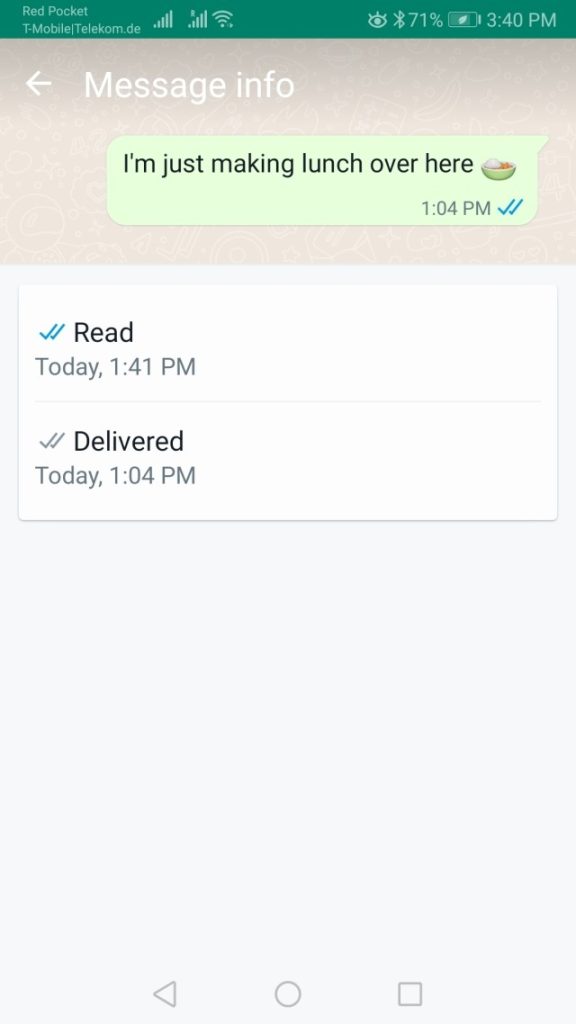
Por supuesto, esto solo funciona si el destinatario tiene la función para activar de «leer mensajes».
7. Dale formato a tu texto
Si quieres ser un poco más expresivo con tus mensajes de WhatsApp, puedes darle formato a tu texto. Tienes tres opciones:
- escribe algo en negrita agregando asteriscos antes y después de la palabra que quieres *resaltar*
- usa cursiva poniendo el guion bajo _delante de las palabras que quieres resaltar_
- tacha una palabra usando la onda ~aproximadamente~
- Truco secreto: También puedes combinar dos estilos, si *_quieres que el texto esté en negrita y cursiva_*
8. Truco extra de WhatsApp: Cambia la fuente
Sí, también puedes cambiar la fuente en WhatsApp para que parezca más estilo máquina de escribir, lo cual es genial. Pero por alguna razón es un truco muy bien escondido.
Escribe el acento grave francés (`) `delante y detrás de la nueva fuente`. Ten cuidado, ¡no es el mismo signo que el apóstrofo (‘)!
En un teléfono Android, lo encontrarás en la segunda página de los símbolos especiales. En un dispositivo iOS, lo encontrarás manteniendo presionado el apóstrofo en los símbolos especiales. Te mostrará varias líneas diferentes. El acento grave es el que está en el extremo izquierdo.
Preguntas frecuentes
Lo son, siempre que solo utilices las funcionalidades y la función integrada con consejos de seguridad. Evita los mods y los atajos sociales para evitar que tu cuenta sea hackeada, comprometida o suspendida.
La verificación en dos pasos, cualquier dispositivo vinculado y las funcionalidades de gestión de chat.
No. No están autorizadas por WhatsApp y pueden exponer tus datos a hackers o hacer que suspendan tu cuenta.
Debes activar la verificación en dos pasos, revisar tu dispositivo vinculado y ajustar tus ajustes de privacidad.
Este artículo fue escrito por Marinela Potor y se procedió a actualizar por Alicia Winokur el 13 de abril de 2026.

Autor: