Insights
Comment bien envoyer des messages groupés sur WhatsApp
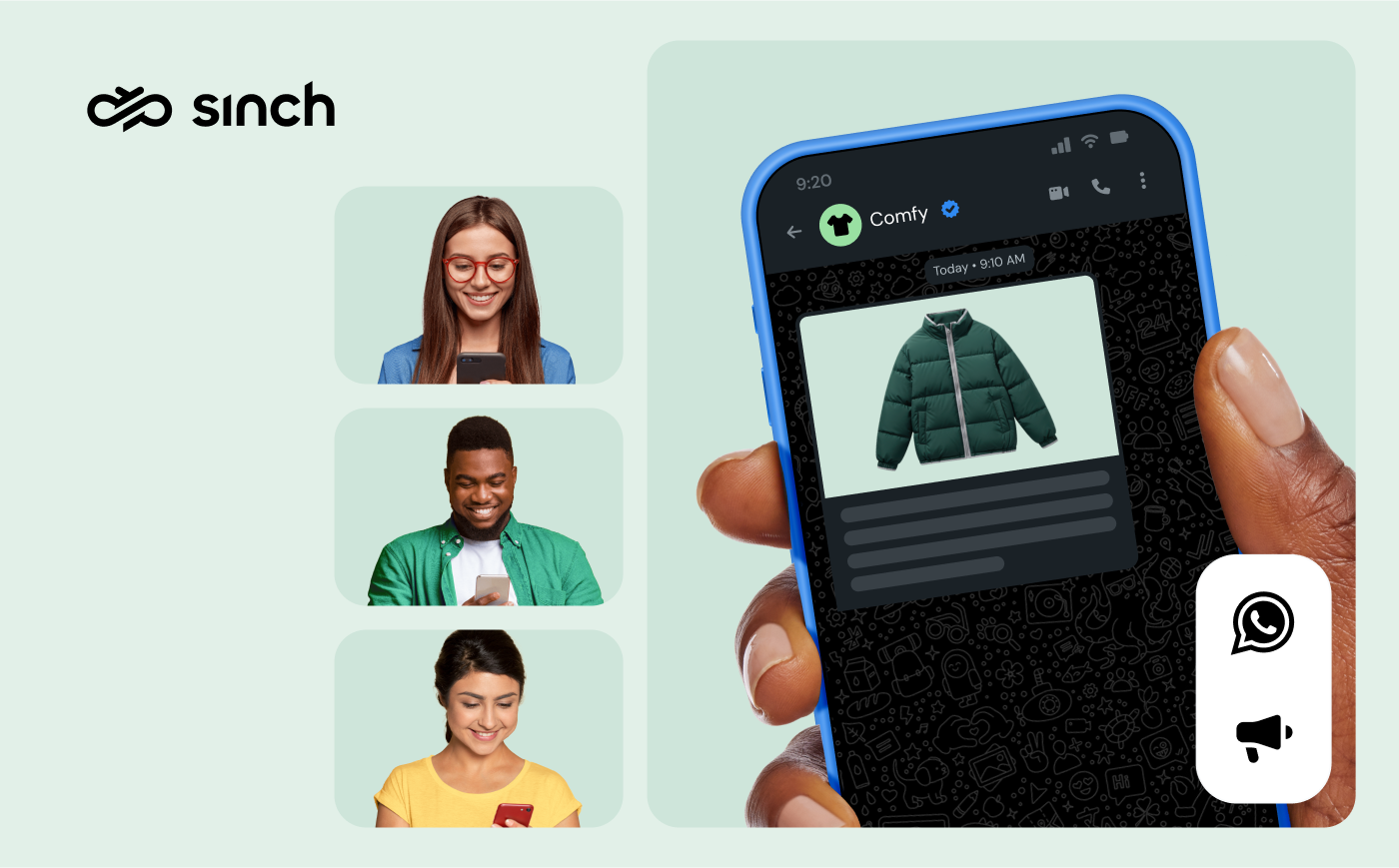
Your customers actually read their WhatsApp messages. With 3.3 billion+ monthly active users and a 98% open rate for business messages, WhatsApp is where a campaign gets seen – not skimmed past in a crowded email inbox.
But try to scale beyond one-to-one chats and you hit walls. The WhatsApp Business app caps broadcasts at 256 contacts. Templates need Meta’s approval. Send too aggressively, and your account gets flagged. If you’ve been wondering whether there’s a legitimate way to reach thousands of customers on WhatsApp, you’re not alone.
The good news? There is – and it doesn’t involve risky workarounds.
In this guide, we’ll break down the two official ways to send bulk messages, how many you can actually send, what it costs, and the step-by-step path to your first compliant campaign.
What are bulk WhatsApp messages?
Bulk WhatsApp messages are messages a business sends to many opted-in recipients at once, either through the WhatsApp Business app’s broadcast lists or – at real scale – through the WhatsApp Business Platform (formerly WhatsApp Business API). One campaign, hundreds or thousands of individual chats.
Because each message lands as a personal one-to-one chat, bulk WhatsApp messaging behaves differently from mass email. Messages can carry images, video, documents, and interactive buttons, and recipients can reply, ask questions, and buy – right in the thread.
One thing bulk messaging is not: spam. WhatsApp requires businesses to collect an opt-in before sending proactive messages, and it actively monitors quality signals like blocks and reports. That discipline is why the channel’s engagement stays so high.
How to send bulk messages on WhatsApp: 2 official options
There are exactly two Meta-approved routes to sending in bulk. Which one fits depends on how many people you need to reach and how much personalization you need.
1. Broadcast lists in the WhatsApp Business app
The free WhatsApp Business app includes a broadcast feature: build a list, write your message, and it goes out to everyone on it as an individual chat.
It’s genuinely useful for very small businesses – and genuinely limited:
- 256 contacts per broadcast list, and you’ll need multiple lists (with manual upkeep) beyond that.
- Recipients must have your number saved in their contacts, or your broadcast never reaches them.
- No personalization, automation, or analytics – you won’t know who read or clicked.
- One phone, one user – built for a single person, not a team.
If your contact list fits comfortably under a few hundred people and you know them personally, start here. If not, the ceiling shows up fast.
2. The WhatsApp Business Platform
The WhatsApp Business Platform is Meta’s enterprise-grade route, accessed through a Business Solution Provider (BSP) like Sinch. It’s built for exactly the job the app can’t do:
- Reach thousands of opted-in customers per campaign – capacity grows as your quality holds up (limits below).
- Personalization at scale – dynamic fields for names, order details, and recommendations, powered by your CRM or e-commerce data.
- Team inboxes, chatbots, and automation for handling the replies a good campaign generates.
- Delivery, read, and click analytics for every send.
The trade-off: proactive messages use pre-approved message templates and per-message pricing – both covered below.
What about unofficial bulk-sender tools?
Search this topic and you’ll find browser extensions and modified apps promising bulk sending with no approval process. They all work the same way: by violating WhatsApp’s terms of service. Meta actively detects them, and the predictable outcome is a banned WhatsApp Business account – along with handing your customers’ phone numbers to an unaccountable third party. In The state of customer communications, 44% of consumers named security and privacy their biggest digital-communication challenge. Lose their trust there and no open rate will win it back.
How many bulk messages can you actually send?
It’s the question sales pages skip. Here are the real numbers.
On the Business Platform, Meta caps how many unique customers you can start conversations with in a rolling 24-hour period. Every verified business starts with a limit and earns higher tiers automatically:
- 1,000 unique customers per 24 hours – the starting tier
- 10,000 per 24 hours
- 100,000 per 24 hours
- Unlimited
Your limit upgrades automatically once you’ve messaged 2,000 unique customers within a period while keeping message quality healthy – Meta now re-evaluates accounts as often as every six hours. Since October 2025, limits apply per business portfolio rather than per phone number, so adding numbers won’t raise the ceiling.
The other half of the equation is your quality rating. Meta scores every sending number based on blocks, reports, and engagement over the trailing seven days. Let quality slide and your limit can drop; keep sending messages people want, and it climbs. Your sending capacity is a direct function of how good your messages are.
Replies are different: once a customer messages you, a 24-hour customer service window opens in which you can respond freely, without templates. Every new inbound message resets it.
Sending bulk messages in the U.S.: know the marketing pause
If your audience includes U.S. phone numbers, there’s a rule you must plan around: since April 1, 2025, Meta has paused marketing template messages to U.S. numbers, and as of August 2026 the pause remains in effect with no announced end date.
What that means in practice for U.S. recipients:
- Paused: proactive marketing templates – promotions, product announcements, win-back campaigns.
- Still available: utility templates (order confirmations, shipping updates), authentication templates like one-time passwords, and free-form replies inside the 24-hour customer service window.
- Still available: Click-to-WhatsApp ads, which open a 72-hour free messaging window when a customer taps through.
Bulk marketing campaigns to opted-in audiences in Latin America, Europe, India, and the rest of the world are unaffected. If the U.S. is your core market, lean on utility and authentication use cases (or a channel like RCS) for now – and re-check the pause before every campaign, because Meta can lift it at any time.
How to send bulk messages on WhatsApp in 6 steps
Here’s the path from zero to your first compliant campaign on the Business Platform.
1. Collect real opt-ins
Before anything else, you need permission. Collect opt-ins wherever customers already interact with you – checkout flows, account signup, a website widget, a QR code on packaging – and be specific about what they’re signing up for. Keep a record of when and how each opt-in was collected, honor opt-outs immediately, and never buy contact lists. Beyond being WhatsApp policy, consent is what separates a welcome message from a blocked number.
2. Set up your WhatsApp Business account through a BSP
To use the Business Platform you’ll work with a BSP like Sinch. You’ll verify your business with Meta, register a dedicated phone number, and create your WhatsApp Business account (WABA). With embedded signup, setup takes minutes – and a verified business profile means customers see who’s messaging them, not a bare number.
3. Create and submit your message templates
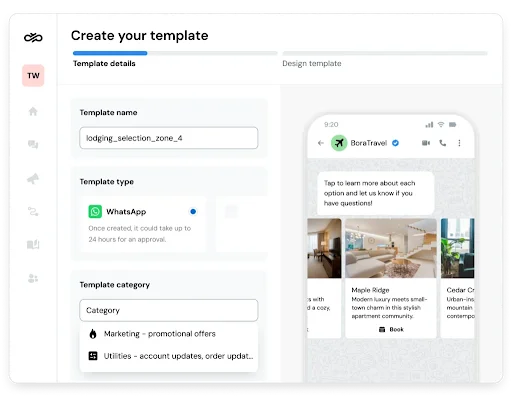
Proactive bulk messages use templates: pre-approved message structures with {{placeholders}} for personalization. Write your message, mark its category (marketing, utility, or authentication), add any media, buttons, or quick replies, and submit – Meta’s review typically takes minutes to a few hours. Once approved, a template can be reused across campaigns indefinitely. Well-structured templates with clear value and an obvious action are also what keep your quality rating healthy.
4. Segment your audience
Don’t send everything to everyone – frequency is the #1 complaint about brand messages, cited by 41% of consumers. Slice your opted-in list by purchase history, engagement, location, or lifecycle stage, and match each segment to a message it will actually welcome.
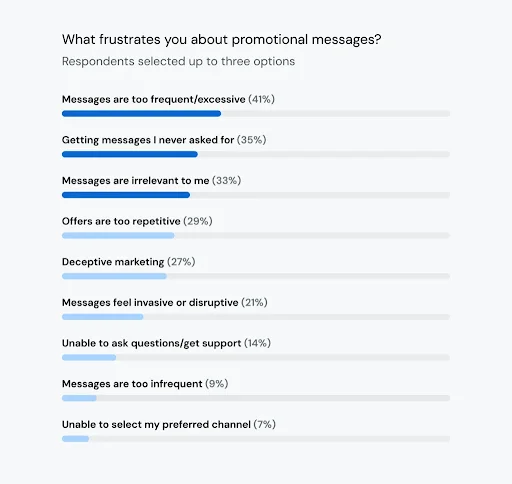
A first-time buyer, a loyal repeat customer, and a lapsed one deserve three different messages – or, sometimes, no message at all.
5. Launch your campaign
Upload or sync your segment, map your personalization fields, pick a send time that matches when your audience is actually on their phones, and send. A no-code platform like Sinch Engage handles this from a dashboard; developer teams can drive the same sends programmatically through Sinch’s Conversation API. Start smaller than your maximum – a well-received first send to your best segment builds the quality signals that raise your limits.
6. Measure, reply, and iterate
Watch delivery rate, read rate, clicks, and – most telling on WhatsApp – replies. Then act on what you see: a template with weak reads needs a better hook; a segment with high blocks needs less frequency or more relevance. And remember that bulk messaging on WhatsApp opens conversations. Have your team or a chatbot ready to answer within the customer service window – replies are the point of this channel, not a side effect.
Brazilian retail rewards platform Familhão shows what that looks like: by moving its subscription renewals into WhatsApp with Sinch, it lifted renewal rates by 23 points.
What does bulk messaging on WhatsApp cost?
Since July 1, 2025, WhatsApp charges per delivered template message rather than per 24-hour conversation. In simple terms:
- Marketing templates are the premium category, priced per delivered message by destination country.
- Utility and authentication templates cost meaningfully less – and utility templates delivered inside an open customer service window are free from Meta’s side today.
- Replies within the 24-hour customer service window are free-form and carry no Meta template fee.
- One dated change to budget for: starting October 1, 2026, Meta begins charging for outbound messages sent during the customer service window – plan for it if your program leans on free service-window replies.
- On top of Meta’s rates, your BSP’s platform or per-message fees apply.
So a 10,000-recipient campaign’s cost depends on template category and destination country – budget from those two variables, not from a flat per-message guess. For current rates and worked examples, see our full WhatsApp pricing guide.
Bulk messaging best practices that protect your account
The mechanics get you sending; these habits keep you sending.
- Lead with value, not volume: Every message should solve a problem, save money, or genuinely inform.
- Personalize past the first name: Use purchase and browsing data to make content feel individually chosen.
- Mind your frequency: A few valuable messages a month beats a weekly drumbeat. Watch block rates as your early-warning signal.
- Use rich media with intent: Images, short videos, and documents lift engagement when they add information, not decoration.
- Test, then scale: Try two template variants on a small segment, and roll the winner out to the rest.
- Keep an exit door open: Make opting out effortless and honor it instantly. A clean list is a high-performing list.
Get started with bulk messages on WhatsApp
Bulk messaging on WhatsApp rewards businesses that do it properly: real opt-ins, approved templates, valuable content, and a plan for the conversations that follow. Get those right and you’re reaching customers on the app they check all day – with engagement email can’t touch.
Sinch is a Meta Premier Partner, and businesses on our platform send WhatsApp campaigns worldwide alongside SMS, RCS, and email – all through one provider.
Ready to send your first bulk WhatsApp campaign? Check out Sinch Engage, our no-code platform for WhatsApp marketing at scale. Or, if you’d rather build with APIs, talk to our team about the Conversation API – we’re excited to help!
Frequently asked questions
Broadcast lists in the WhatsApp Business app are free but capped at 256 saved contacts per list. At platform scale, delivered template messages are paid per message – products promising free bulk sending violate WhatsApp’s terms and put your account and customer data at risk.
That’s a Business Platform capability. App broadcasts only deliver to people who’ve saved your number; platform template messages deliver to any opted-in number. The opt-in is still required – it just doesn’t depend on the customer editing their address book.
Yes, when it’s permission-based. WhatsApp’s business messaging policies require opt-in consent, and depending on where your recipients live, laws like the GDPR or Brazil’s LGPD add their own consent and data-handling requirements. Work with your legal team on how you collect and document consent.
A broadcast list sends individual messages to opted-in contacts; a WhatsApp Channel is a one-way feed people follow, more like a social feed than a campaign tool – see our broadcast vs. Channels comparison for which fits which job.
This article was originally written by Marinela Potor on September 5, 2025, and Drew Wilkinson on September 1, 2026.

Auteur: