Insights
WhatsApp Business API: The ultimate guide for 2026
Thinking about using the WhatsApp Business API to talk to your customers? You’re in the right place. WhatsApp is the world’s most-used messaging app – 3.3 billion+ monthly active users, including 100 million monthly actives in the U.S. – and business messages there see open rates around 98%. When you send something on WhatsApp, it gets seen.
The WhatsApp Business API isn’t an app you download. It’s the connection layer that plugs WhatsApp into the tools you already run – your CRM, help desk, e-commerce platform, or marketing stack – so your team can handle conversations at scale: multi-agent support, automated notifications, bulk campaigns, chatbots, and integrations with channels like SMS and email.
It’s a big topic, so let’s take it step by step. In this guide, we’ll cover what the WhatsApp Business API is, how it differs from the app, how it works under the hood, what it costs, what businesses actually do with it, and how to get access.
What is the WhatsApp Business API?
The WhatsApp Business API – officially named the WhatsApp Business Platform – is Meta’s enterprise-grade messaging solution for companies with high-volume or complex messaging needs. It’s a paid product that lets businesses send and receive WhatsApp messages programmatically: notifications, marketing campaigns, customer support, and secure verification, all from the systems they already use.
To be clear about what we’re not talking about – there are three kinds of WhatsApp:
- Standard WhatsApp is the personal app, for staying in touch with friends and family. WhatsApp prohibits using it commercially.
- The WhatsApp Business app is a free app for small businesses: a business profile, catalog, and manual messaging from a phone.
- The WhatsApp Business API is for businesses that have outgrown the app – it has no app interface of its own, which is exactly why it can live inside your existing tools.
One architectural note that simplifies every older guide you’ll read: since Meta sunset the On-Premises API in October 2025, the Cloud API is the only architecture. The old “Cloud vs. On-Premises” decision is gone – today the real question is simply whether you work with Meta’s Cloud API directly or through a Business Solution Provider (BSP). More on that below.
WhatsApp Business app vs. WhatsApp Business API
The two business options serve very different scales:
| WhatsApp Business app | WhatsApp Business API | |
|---|---|---|
| Price | Free | Paid (per delivered template message) |
| Built for | Small businesses, manual 1:1 chat | Mid-market and enterprise, messaging at scale |
| Users/agents | Up to 5 devices (multi-user is limited) | Unlimited agents, shared team inboxes |
| Message templates (marketing, utility, authentication/OTP) | No | Yes |
| Personalization variables and scheduling | No | Yes |
| CTA and quick-reply buttons | No | Yes |
| Integrations (CRM, contact center, e-commerce) | No | Yes |
| Chatbots and automation | No | Yes |
| WhatsApp Flows | No | Yes |
| Verified badge and display name | Limited | Yes |
| Bulk sending capacity | 256-contact broadcast lists | Tiered, up to unlimited |
Choose the app if you’re a very small team, message volumes are low, and manual replies from a phone are fine.
Choose the API if you need multiple agents working one inbox, automation, campaign scale, or your messaging must connect to the rest of your stack. A useful rule of thumb: the moment WhatsApp becomes part of your operations rather than a phone in a drawer, you’ve outgrown the app. If you’re routinely bumping into the app’s limits – or risking account restrictions by pushing them – the API is the sanctioned path to scale.
How does the WhatsApp Business API work?
Under the hood, the flow is straightforward:
- Your WhatsApp Business Account (WABA) is your business identity in Meta’s system – here’s how accounts work. It holds your phone number(s), display name, and verification status.
- Outbound: your application (or your BSP’s platform) makes an API call using a message template that Meta has approved. The platform validates it, fills in personalization variables, and delivers it.
- Inbound: when a customer messages you, the message hits your configured webhook, so your chatbot, help desk, or agent inbox can respond in real time.
- The 24-hour customer service window: each inbound customer message opens a 24-hour window in which you can reply free-form – no template needed – and every new customer message resets the clock.
Templates come in three categories – marketing, utility, and authentication – and Meta reviews each one before it can be sent (approval typically takes minutes to a few hours). It’s a discipline that keeps the channel valuable: well-built templates get engagement; spammy ones never ship.
Cloud API direct, or through a BSP?
Since the Cloud API is now the only architecture, the choice is about who operates it:
- Direct with Meta’s Cloud API: full control, no intermediary – and all the work. You build and maintain integrations, template workflows, opt-in management, and monitoring yourself. Right for teams with real engineering capacity to spare.
- Through a BSP like Sinch: the BSP runs the infrastructure and gives you the pieces the raw API doesn’t have – a multi-agent inbox, campaign tools, chatbot builders, omnichannel routing, template management, compliance guidance, and support. You focus on the conversations, not the plumbing.
There’s also a middle path many teams miss: BSPs expose their own APIs. Sinch’s Conversation API gives developers one API for WhatsApp plus SMS, RCS, and a dozen other channels – build once, reach everywhere.
How many messages can you send?
API sending capacity is tiered by Meta. Verified businesses start at 1,000 unique customers per rolling 24 hours and are upgraded automatically – through 10,000 and 100,000 up to unlimited – based on volume and message quality, with limits applying per business portfolio since October 2025. Your quality rating (driven by blocks, reports, and engagement) is what moves you up or holds you back.
The practical takeaway: capacity on WhatsApp is earned, not bought. Send messages people want and your ceiling rises; annoy people and it drops. For the full mechanics – tiers, quality ratings, and scaling strategy – see our guide to sending bulk messages on WhatsApp.
Heads up if you message U.S. numbers: the marketing pause
Since April 1, 2025, Meta has paused marketing template messages to U.S. phone numbers, with no announced end date as of August 2026. Utility and authentication templates, free-form replies in the customer service window, and Click-to-WhatsApp ads are unaffected.
What this means in practice: U.S.-focused WhatsApp strategies currently center on customer service, transactional notifications, and OTP verification – all fully available – while proactive promotions to U.S. numbers wait for Meta to lift the pause. Campaigns to the rest of the world are untouched. Re-verify the pause status before planning U.S. sends; Meta can change it at any time.
Why do businesses use the WhatsApp Business API?
Global reach on the app customers prefer
WhatsApp is the most-used messaging app in most countries, with dominant positions across Latin America, Europe, India, Africa, and APAC – and growing fast in the U.S. If your customers are global, WhatsApp is very likely where they already are.

Real two-way conversations
WhatsApp naturally invites dialogue: customers reply, ask questions, and buy inside the thread. That makes it a genuinely conversational channel – businesses don’t talk at customers, they talk with them.
Automation that scales the personal touch
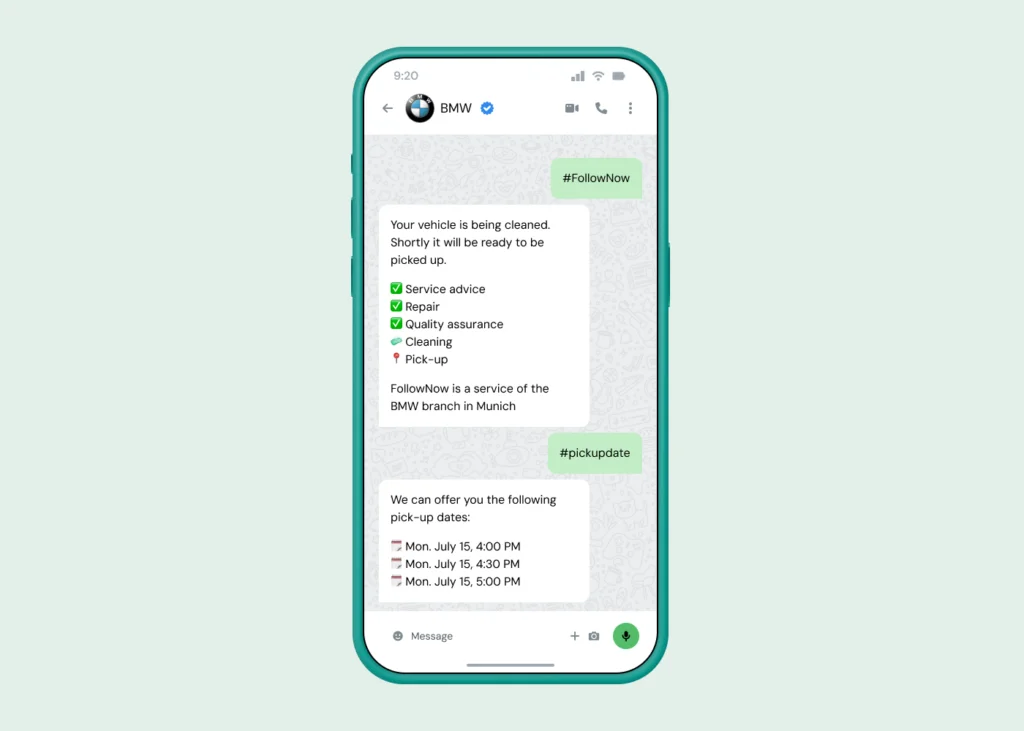
Templates with personalization variables, quick replies, scheduled sends, WhatsApp Flows for app-like in-chat experiences, and chatbots for FAQs, lead qualification, and routing. Automotive giant BMW handles about 80% of incoming customer queries with its WhatsApp bot.
Trust signals built in
API senders can earn the verified badge – the checkmark (now blue, formerly the famous green tick, since Meta unified its verification across apps) – plus a display name and brand profile, so customers see who’s messaging them instead of an unknown number.
Security and data protection
Business messages through the platform are encrypted in transit between you, Sinch, Meta, and the customer. Note the precise claim: end-to-end encryption applies to personal WhatsApp chats, not to BSP-delivered business messaging – a distinction that matters if you operate under strict data-protection requirements. A good BSP helps you build compliant flows: consent capture, data-processing agreements, and regional data handling.
WhatsApp Business API use cases
Here’s what businesses actually run on the API, organized by goal. (For a deeper dive with examples, this section absorbs our full use-cases guide.)
Marketing that gets answered
- Product launches and exclusive offers to opted-in segments – promotional messages with images, carousels, and buy buttons.
- Abandoned-cart reminders that recover revenue with one tap back into checkout.
- Event and webinar invitations with quick-reply RSVPs.
- Broadcast campaigns at a scale the app can’t touch – see broadcasts vs. Channels for choosing the right surface, and the WhatsApp marketing guide for strategy.
Customer service that scales
- Two-way support conversations in a shared multi-agent inbox, with full history and CRM context.
- Chatbot-first triage answering FAQs instantly and handing complex cases to humans.
- Appointment reminders that cut no-shows, and real-time status updates customers don’t have to ask for.
- Post-service feedback collected right in the thread.
Brazilian food-delivery giant iFood automated 94.5% of support tickets with a WhatsApp chatbot; Bangalore’s Orion Mall runs a 24/7 WhatsApp concierge that boosted footfall and sales.
Transactions and security
- Order confirmations, shipping updates, delivery alerts via utility templates.
- One-time passwords and login verification – often dramatically cheaper than SMS OTPs in high-volume markets.
- Payment journeys: rewards platform Familhão moved subscription renewals into WhatsApp and lifted renewal rates by 23 points.
Industry snapshots
- Retail and e-commerce: conversational commerce from discovery to checkout, restock alerts, loyalty updates.
- Financial services: fraud alerts, balance notifications, secure authentication.
- Travel and hospitality: booking confirmations, boarding passes, concierge chat.
- Healthcare: appointment reminders and pre-visit instructions (with data-protection care).
- Education: dismissal notices, event reminders, parent-teacher lines.
“We only invested once in the WhatsApp channel, but could then use it in different departments, which increased our ROI.”

What does the WhatsApp Business API cost?
The API is paid, with two cost layers to understand.
Meta’s fees. Since July 1, 2025, Meta charges per delivered template message (replacing the old per-conversation model). Rates depend on the template category and the recipient’s country:
| Category | What it covers | Example |
|---|---|---|
| Marketing | Promotions and announcements outside the service window | A discount offer to 5,000 opted-in contacts |
| Utility | Transaction-related updates | Order confirmations, shipping alerts |
| Authentication | One-time passcodes | “Your verification code is 123456” |
| Service | Free-form replies inside the 24-hour customer service window | Answering a booking question – no Meta template fee (changes October 1, 2026) |
One dated change to plan for: starting October 1, 2026, Meta begins charging for outbound messages sent during the 24-hour customer service window. Until then, service replies carry no Meta fee.
Provider fees. Your BSP adds platform or per-message fees for the infrastructure, inbox, integrations, and support it provides. At Sinch, pricing is usage-based – you pay for what you send.
To budget a campaign: pick the template category, look up Meta’s rate for each destination country, add provider fees. Our WhatsApp pricing guide walks through worked examples. And because Meta adjusts rates and rules over time, always sanity-check against the official pricing page before you finalize a budget.
How to get access to the WhatsApp Business API
Six steps from zero to sending:
- Create a Meta Business Account – required for business verification and account management.
- Create your WhatsApp Business Account (WABA) – your business identity on WhatsApp. Here’s how it all fits together.
- Register a dedicated phone number – unique to WhatsApp, used as your sender identity (your web and desktop access hang off it too).
- Submit message templates for Meta approval – start with your highest-value utility and marketing messages.
- Connect your stack – via a BSP platform like Sinch Engage (no-code) or the Conversation API (developer-first): inbox, CRM, chatbot, analytics.
- Launch, measure, scale – start with one use case, watch quality ratings, and let your limits climb.
With embedded signup through a BSP, steps 1–3 compress into a guided flow that takes minutes.
How to choose a BSP
Not all providers are equal – and some “providers” aren’t authorized at all, which can get your account banned. Always check Meta’s partner directory. Then compare on:
- Partner status – Sinch is a Meta Premier Partner, the top tier of vetted providers
- Global delivery coverage and reliability
- CRM, help desk, and e-commerce integrations
- Template and opt-in management
- Multi-agent inbox and chatbot tooling
- Compliance support and expert onboarding
- Multichannel breadth – one platform for WhatsApp plus SMS, RCS, email, and voice, so WhatsApp strengthens your stack instead of fragmenting it
Is the WhatsApp Business API worth it?
If any of these sound familiar, the answer is yes:
- A second support agent joined, and conversations are getting lost in one shared phone.
- Customers wait hours for replies, and it shows in your reviews.
- Your campaigns keep hitting the app’s 256-contact broadcast ceiling.
- You’re answering the same five questions manually, all day.
- Your CRM knows things about customers that your messaging can’t use.
The API turns those breaking points into workflows: shared inboxes, automation, integrations, and capacity that scales with quality. Even small teams see the difference – consistent, trackable communication without adding headcount. The result? Businesses like mobilezone invest in the channel once and reuse it across departments.
Get started with the WhatsApp Business API
You now know what the API is, how it works, what it costs, and what it can do. The channel rewards businesses that show up properly: verified identity, approved templates, real opt-ins, and messages worth opening.
As a Meta Premier Partner powering billions of messages a year across WhatsApp, SMS, RCS, and email, Sinch gives you both front doors to the platform: Sinch Engage for no-code campaign and inbox management, and the Conversation API for developers who want one API for every channel.
Ready to put WhatsApp to work? Check out the WhatsApp Business Platform with Sinch. Or, if you’d like help mapping the API to your use case, get in touch with our team – we’re excited to help!
Frequently asked questions
No. Meta charges per delivered template message (rates vary by category and country), and providers add platform fees. Replies inside the 24-hour customer service window carry no Meta template fee, though BSP fees may still apply. See our pricing guide for current numbers.
Create a Meta Business Account and a WhatsApp Business Account (WABA), register a dedicated phone number, submit templates for approval, and connect through Meta’s Cloud API or – far more commonly – a BSP like Sinch. Embedded signup makes it a minutes-long guided flow.
Yes, as long as the number is unique to your WABA and can receive the verification call or SMS. It becomes your WhatsApp sender identity.
If you’re outgrowing the app – multiple agents, automation needs, campaign scale – yes. Multi-agent inboxes, chatbots, and template campaigns aren’t enterprise luxuries; they’re how small teams keep response times down without hiring.
Not strictly – Meta’s Cloud API is available directly. But since the On-Premises sunset, a BSP is how most businesses get the inbox, campaign tools, integrations, and support the raw API doesn’t include.
Yes – authentication templates are built for exactly that, and WhatsApp OTPs are often significantly cheaper than SMS in high-volume markets.
Personal WhatsApp chats are end-to-end encrypted; business messages sent through the platform are encrypted in transit rather than end-to-end. If you handle regulated data, review our data-protection guide and involve your compliance team early.
This article was originally written by Megan Libby/Marinela Potor and was updated by Alicia Winokur on April 17, 2026, and Drew Wilkinson on September 1, 2026.

Author: