Developers
Give an OpenAI GPT-Live voice agent a phone number with Sinch Functions
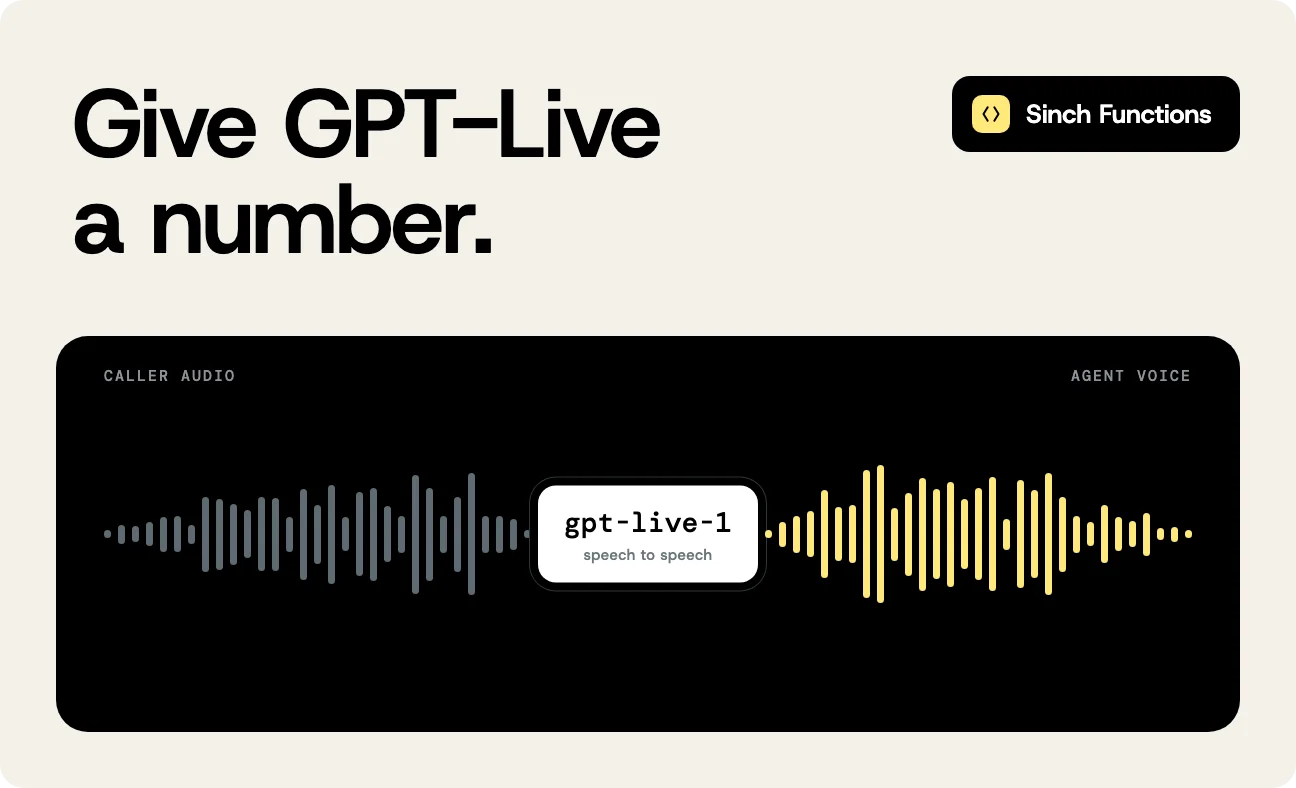
In Connect AI agents to phone calls with Sinch Voice API v2, the agent stayed in text. Using Voice Relay, Sinch turned the caller’s speech into text, the agent answered in text, and Sinch spoke the answer. That’s the right setup when your agent is a text application. Speech-to-speech models work differently: They take the caller’s audio in and speak their answer back, so there’s no text step to wait for. The Realtime Voice: OpenAI template in Sinch Functions connects a phone call to OpenAI’s GPT-Live model that way. You’ll deploy it with the Sinch CLI and call it from your own phone.
The template runs as a Sinch Function, so there’s no server for you to host and no tunnel to keep open. Its demo agent is the host at Bella Vista, a small Italian restaurant, with two tools: Check availability and book a table. I made the test calls for this post against a deployed copy of it.
You’ll need
- A Sinch account with access to Voice API v2
- The Sinch CLI 0.8.2 or later, logged in with
sinch auth login - Node.js 24 or later
- An OpenAI API key from an account with billing set up (GPT-Live isn’t on the API’s free tier, and a ChatGPT subscription doesn’t include API access)
- A phone to call from
The CLI rents a US number for the agent. If you call it from outside the US, it’s an international call for you. Voice API v2 is in public preview, so features and behavior can still change.
Relay or realtime?
Both templates put an AI agent on a Voice API v2 call. They differ in what travels between Sinch and the agent:
| Voice Relay (earlier post) | Realtime (this post) | |
|---|---|---|
| Between Sinch and the agent | Text | Raw call audio |
| Speech recognition and voice | Sinch | The OpenAI model |
| Model | Any text model | A speech-to-speech model |
Pick relay when your agent is a text application you want to keep, or when you want Sinch voices. Realtime is the better fit when you want the model’s own voice and the shortest path from the caller’s words to an answer. Both can run as a Sinch Function. The earlier post hosted its own relay server, and the voice-relay-agent template runs relay inside a function instead. The Sinch Functions template list has realtime templates for OpenAI, Google Gemini Live, xAI Grok, and Deepgram, too. They share the same function structure.
How the template works
When a call comes in, Voice API v2 sends a call.incoming event to the function. The function answers with a call plan in SVAML that bridges the caller to a second leg, a STREAM leg pointing back at the function’s own WebSocket:
                                    {
  "callName": "caller",
  "commands": [
    { "command": "answer" },
    { "command": "bridgeCall", "bridgeName": "bridge" },
    {
      "command": "dial",
      "callName": "stream",
      "to": {
        "type": "STREAM",
        "stream": {
          "endpoint": "wss://YOUR_FUNCTION_HOST/stream",
          "streamOptions": { "version": 1, "codec": "PCM", "sampleRate": 8000 }
        }
      },
      "maxCallDurationSeconds": 1800,
      "events": {
        "onAnswer": [{ "command": "bridgeCall", "bridgeName": "bridge" }]
      }
    }
  ]
}
When the stream leg answers, it joins the same bridge as the caller. That’s the same answer, bridge, and dial shape the relay post used, with STREAM where the relay post had VOICE_RELAY. The full plan also hangs up the caller if the stream leg can’t connect, and hangs up the stream leg when the caller hangs up.
From there, the Sinch Functions runtime does the work:
- Sinch opens the WebSocket and sends the caller’s audio as 8 kHz PCM.
- The runtime opens a session with OpenAI’s GPT-Live (
gpt-live-1), converts the audio to the G.711 format the session uses, and passes it through in both directions. - GPT-Live does the talking. When a turn needs reasoning or a tool call, GPT-Live hands it to a second, text-based model, the backend model, and the runtime runs your tool code inside the function.
- When the call ends, the function saves the transcript, timings, and token usage to function storage.
The runtime also adds two tools of its own: hangup_call, so the agent can end the call after saying goodbye, and transfer_to_human when you set a number to transfer to.
Create the function
sinch functions init scaffolds the function. With --create-voice-service and --rent-number, it also creates a Voice API v2 service, rents a US number, and links the number to the service:
                                    sinch functions init realtime-openai --runtime node --name realtime-openai-phone-agent \
  --create-voice-service --rent-number US --force --non-interactive
Renting a number costs money, which is why the command needs --force. Without the flags, init asks. Creating a new Voice service is the default answer, and the number prompt shows the price before it orders anything. Either way, the output names the service and the number:
                                    Created Voice service e7756e27-4346-422e-b81c-329874b9a1fb
   Rented +12084419139 and linked it to Voice service e7756e27-4346-422e-b81c-329874b9a1fb
The function’s .env file keeps both, as VOICE_SERVICE_ID and VOICE_FROM_NUMBER.
Add your OpenAI key and a dashboard password
The function reads two secrets. OPENAI_API_KEY is your OpenAI key. ADMIN_PASSWORD protects the dashboard and transcript pages, which use the username admin. Run without flags, init asks for both. After a non-interactive init, add them yourself:
                                    cd realtime-openai-phone-agent
sinch secrets add OPENAI_API_KEY YOUR_OPENAI_API_KEY
sinch secrets add ADMIN_PASSWORD YOUR_DASHBOARD_PASSWORD
The CLI stores secrets in your OS keychain and sends them with the deploy. The password only unlocks the two dashboard pages, so you can share it without sharing access to your Sinch project.
What’s in the function
Everything the agent says and does lives in function.ts. The blocks below are excerpts from the file init generated. It deploys as it is once the secrets are set, and you customize it by editing these parts in place. The core is one realtimeAgent call:
                                    const agent = realtimeAgent({
  provider: 'openai',
  prompt: `You are the host at Bella Vista, a small Italian restaurant. Keep replies short and conversational, the way a person would speak on the phone. Callers may ask about hours, the menu, or want to check availability and book a table — use the tools for that. If a caller wants to speak with a person, offer to transfer them. Speak in plain sentences only — no markdown, asterisks, or other symbols, since your words are read aloud. Reply in English unless the caller clearly speaks another language for more than a word or two. Confirm the reservation name with the caller before booking. After booking, read back the date, time, party size, and confirmation number, then say goodbye — only end the call after that.`,
  greeting: 'Thanks for calling Bella Vista, how can I help?',
  transferTo: process.env.TRANSFER_TO,
  tools: restaurantTools(),
  onEnd: async (ctx) => {
    // ... saves the transcript, timings, and usage to function storage
  },
});
The greeting is spoken by GPT-Live, in the model’s voice, as soon as the stream connects. The tools are plain functions with a JSON Schema for their arguments. This is the booking tool:
                                    const book_table = tool<{
  date: string;
  time: string;
  party_size: number;
  customer_name: string;
  notes?: string;
}>({
  name: 'book_table',
  description: 'Book a table reservation.',
  parameters: {
    type: 'object',
    properties: {
      date: { type: 'string', description: 'Date in YYYY-MM-DD' },
      time: { type: 'string', description: 'Time in HH:MM 24h' },
      party_size: { type: 'number', description: 'Number of guests' },
      customer_name: { type: 'string', description: 'Name for the reservation' },
      notes: { type: 'string', description: 'Special requests' },
    },
    required: ['date', 'time', 'party_size', 'customer_name'],
  },
  handler: async ({ date, time, party_size, customer_name, notes }, ctx) => {
    const confirmationId = `BK-${Date.now().toString(36).toUpperCase()}`;
    await ctx.storage.write(
      `bookings/${confirmationId}.json`,
      JSON.stringify({ date, time, party_size, customer_name, notes })
    );
    return {
      success: true,
      confirmation_id: confirmationId,
      message: `Booking confirmed for ${customer_name} on ${date} at ${time} (${party_size} guests). Confirmation: ${confirmationId}.`,
    };
  },
});
The handler runs inside the function, so it can reach anything the function can: Function storage here, your booking system in a real deployment. The demo’s availability check says yes to everything, so swap in your own before you put a real number on it.
Deploy and call
Deploy the function to the public namespace, so Sinch can reach both the webhook and the WebSocket:
sinch functions deploy --public --no-docs
--no-docs skips the step that regenerates README.md. The template’s transfer number, TRANSFER_TO, is empty by default, so the deploy warns about it before it starts:/
                                    ⚠ Validation passed with warnings
⚠️  TRANSFER_TO is empty and not found in credentials or keychain — it will not be available in production
   💡 Set a value in .env or add a secret: sinch secrets add TRANSFER_TO <value>
? Deploy anyway? (Y/n)
Answer Y to deploy without transfers. To enable them, set TRANSFER_TO=+15551234567 in the function’s .env file with the number to transfer to, and deploy again.
When it finishes, the deploy has built the function, started it, and pointed the Voice API v2 service at it:
                                    ✔ ✅ Function deployed successfully

ℹ 🎉 Deployment Complete!
ℹ    Function: realtime-openai-phone-agent
ℹ    Status: ✅ Running
ℹ    URL: https://firm-beacon.fn.sinch.io

ℹ 📞 Voice Integration:
ℹ    Voice service e7756e27-4346-422e-b81c-329874b9a1fb webhook set by the Functions API to: https://firm-beacon.fn.sinch.io/webhook/voice
The URL in the output is your function’s address. Follow the logs in a second terminal with sinch functions logs --follow, then call the number.
This is one of my test calls, booking a table for three. It ran with the backend model set to gpt-6-luna, covered in Make it yours:
                                    Agent:  Thanks for calling Bella Vista. How can I help?
Caller: Can I book a table for three people for Saturday at 4 p.m.?
        [check_availability]
Agent:  Okay, let me check if we have a table open then. Yeah, that time is
        available. What name should I put the reservation under?
Caller: It's under Riley.
Agent:  Riley. Okay, just to confirm, that's under the name Riley?
Caller: Yes.
        [book_table, BK-MVTOZNRS]
Agent:  Great, one moment. You're all set for three this Saturday at 4 p.m.,
        under Riley. Your confirmation number is B K dash M V T O Z N R S.
        Thanks for calling Bella Vista. Goodbye.
Caller: Thanks, bye.
Agent:  Take care, bye.
        [hangup_call]
In this call, the agent started speaking 0.2 to 0.8 seconds after the caller stopped, including the turns that called a tool. Those numbers come from the runtime’s own timestamps for when the caller’s speech ended and the agent’s audio started, so they don’t include the phone network’s delay. The call lasted 56 seconds.
Read the dashboard
The template adds two pages to the function. /conversations returns the last 20 saved calls as JSON, and /dashboard shows them with timing per turn. Open /dashboard on your function’s URL from the deploy output, for example https://firm-beacon.fn.sinch.io/dashboard, and log in with admin and your password.
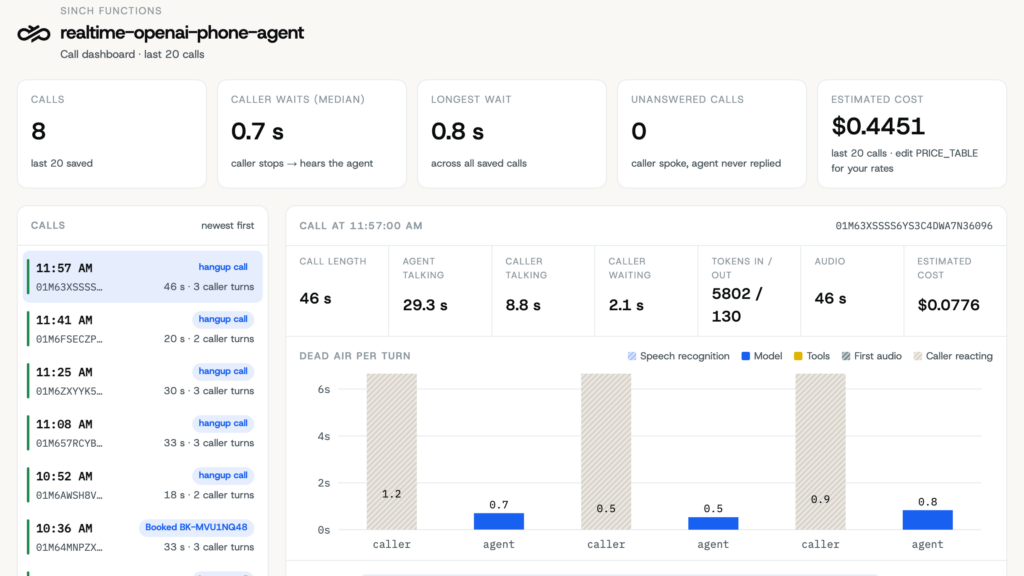
The number to watch is caller waits: The time from when the caller stops talking until they hear the agent. The bars labeled agent in the chart show that wait for each reply. The yellow part is time spent in your tools, and the blue part is the rest of the wait. Striped segments are estimates the dashboard uses when a call is missing a timestamp. The estimated cost is a rough figure from token and session counts. The rates it uses are in PRICE_TABLE in assets/dashboard.html, so set them to GPT-Live’s per-minute price and your backend model’s token prices.
Make it yours
Most of the changes you’ll want are in the realtimeAgent options:
promptandgreetingset who the agent is. Put the facts it should know in the prompt, such as opening hours and a short menu, or the model fills the gaps on its own.toolsis where your business logic goes. Each tool’sdescriptionandparameterstell the model when to call it.voicepicks one of OpenAI’s voices. Without it, OpenAI uses its default.transferToenables thetransfer_to_humantool.providerOptions.openaipasses OpenAI-specific settings through. The backend model that handles tools and reasoning is one of them. Add it to the existingrealtimeAgentcall:
                                    const agent = realtimeAgent({
  provider: 'openai',
  // ... prompt, greeting, tools
  providerOptions: { openai: { backendModel: 'gpt-6-luna' } },
});
The template’s default backend model is gpt-5.6-luna. The test call above ran with gpt-6-luna, the model OpenAI’s delegation guide uses in its examples.
The template also exists for C#, with the agent as a class and each tool as a method marked [AgentTool]. The flow on the call is the same.
Before you take real calls
Cost
At the time of writing, GPT-Live costs $0.05 per minute of session time, and the backend model’s tokens are billed on top. Sinch voice minutes and the number are billed separately. The test call above used 44 seconds of GPT-Live session time, about $0.04, and about 9,600 backend input tokens. Check OpenAI’s model page for current rates and for the limit on concurrent sessions at your usage tier.
Ending calls
The agent ends a call by calling hangup_call, so the model decides when the conversation is over. The runtime adds instructions for that to your prompt, and your own prompt shapes it too, so test the endings your callers will actually use. The stream leg also has a maximum duration of 30 minutes, which caps any call that stays open.
Bookings
Treat the result of book_table as the record of a booking, and check bookings in your own system. The confirmation the agent reads out is the model repeating that result to the caller, so use the tool results, which the transcript also stores, for anything that depends on the booking, like a reminder message.
Who can see the transcripts
Transcripts include everything the caller said, and the function logs include the caller’s number. Keep ADMIN_PASSWORD strong, and treat function storage as a place that holds customer data.
Troubleshooting
- The call doesn’t reach the function. Check that the service points at the function with
sinch voice services get YOUR_SERVICE_ID, usingVOICE_SERVICE_IDfrom.env. The webhook should be your function’s URL followed by/webhook/voice. If it isn’t, deploy again, and wait for the deploy to finish before you call. - The call connects and ends right away. The function couldn’t open the OpenAI session, so it ends the call instead of leaving the caller in silence. The logs show the
call.incomingand, a second later, acall.hangupwithMANAGER_HANGUP. Check the stored key withsinch secrets get OPENAI_API_KEY --show, make sure it belongs to a paid OpenAI tier, and deploy again after you change it. - The dashboard returns 401. Log in with the username
adminand theADMIN_PASSWORDyou set. If you’ve lost the password, set a new one withsinch secrets add ADMIN_PASSWORDand deploy again.
Clean up
Delete the function when you’re done:
sinch functions delete YOUR_FUNCTION_ID
The function ID is in .env as FUNCTION_ID, and in the output of sinch functions list. Deleting the function also deletes the Voice API v2 service that init created. Release the number separately, so you stop paying for it:
sinch numbers active release YOUR_PHONE_NUMBER
The number is VOICE_FROM_NUMBER in .env. A released number stays in sinch numbers active list until the end of its billing period. If you added the secrets with sinch secrets add, remove them with sinch secrets delete OPENAI_API_KEY and sinch secrets delete ADMIN_PASSWORD.
Next steps
Start by pointing check_availability and book_table at your real booking system, then call it with the questions your customers actually ask. To compare voices and latency, the Gemini Live, Grok, and Deepgram templates take the same realtimeAgent options, with that vendor’s API key as the secret.
Additional resources
- Build an AI voice agent with Sinch Functions
- Stream call audio with Voice API v2
- Sinch CLI changelog
- OpenAI GPT-Live guide
- Connect AI agents to phone calls with Sinch Voice API v2
- Build a voice IVR with Sinch Functions

Author: