SINCH AGENT TOOLS · MCP

Sinch MCP Server: Connect your AI agents to live APIs

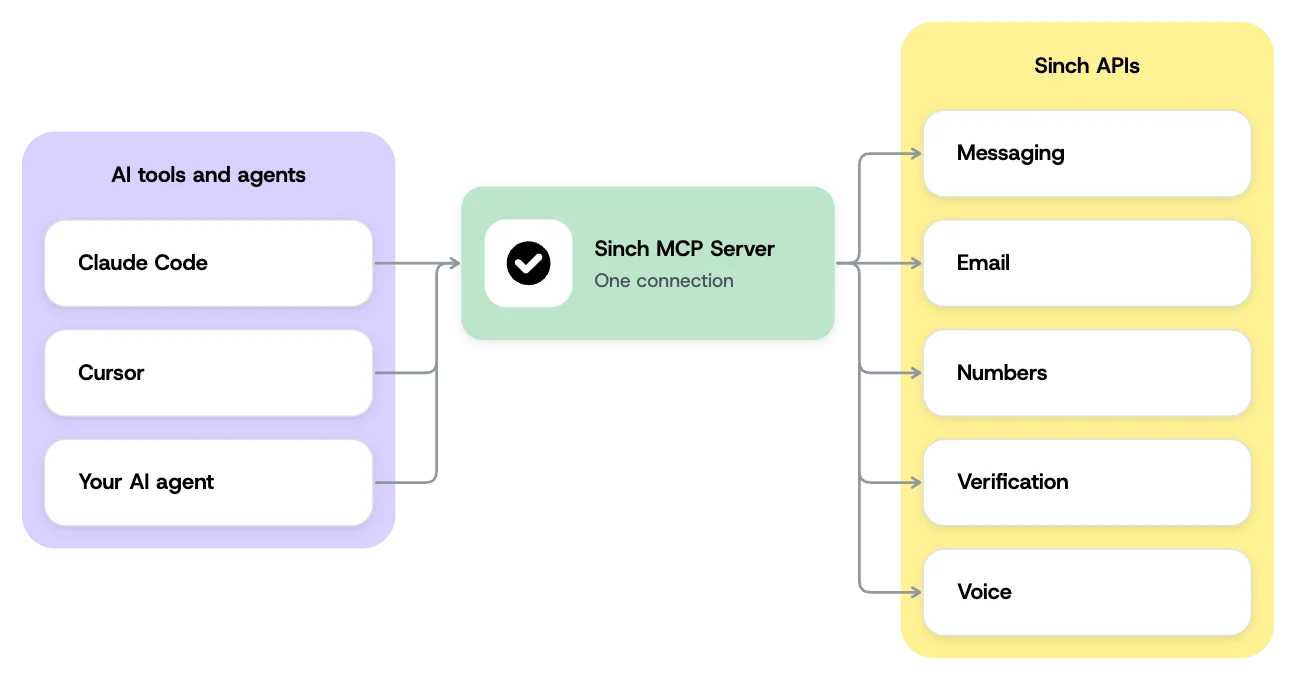
The Sinch MCP Server connects AI agents and coding tools directly to Sinch’s communications APIs – Messaging, Email, Numbers, Verification, and Voice – through the Model Context Protocol. Your agent takes real, clearly labeled actions instead of guessing from documentation.

Live API calls need a Sinch account. The Docs MCP Server needs none.

Image for Sinch MCP Server: Connect your AI agents to live APIs
Join over 200,000 businesses, including 8 of the 10 largest tech companies in the world

WHY INTEGRATIONS BREAK

Real actions, not just documentation

Most integrations make an AI agent guess how to talk to an API, then hope the generated call works. MCP removes the guesswork, connecting your agent directly to Sinch APIs with clearly labeled actions like send a message or verify a number. Connect once, and reach Messaging, Email, Numbers, Verification, and Voice through the same protocol.

Image for Real actions, not just documentation

THE MCP TOOLSET

Purpose-built tools your agent can trust

Think of the Sinch MCP Server as a direct line between an AI assistant and Sinch APIs. It ships clearly named tools for each task – send a message, verify a number, place a call, rent a number – rather than a generic wrapper that leaves an agent to improvise arbitrary calls. Fewer, sharper tools make agent behavior more predictable.

  • Configuration: Set up and manage the products an agent will use

  • Design: Shape messages, flows, and calls before they run

  • Execution: Send messages, place calls, and verify numbers in real time

  • Analytics: Read back what happened for reporting and follow-up


                                # Add the Sinch MCP Server to Claude, Cursor, or your AI tool of choice

npx -y @sinch/mcp


MCP DEPLOYMENT MODELS

Four ways to run the Sinch MCP Server

Which version of that line you use depends on how much control over data and infrastructure you need. Pick the one that fits your stack, your compliance requirements, and how your agents run. Three are available today, MCP on Demand is coming soon, and all four share the same underlying codebase.

A Sinch-hosted cloud endpoint that takes real actions, with no local setup. It’s the fastest path for third-party AI platforms and agents that live in chat interfaces. It also opens the door to native-connector listings in tools like Google Agent Space, Microsoft Copilot Studio, Lovable, and OpenAI Assistants.

A locally run server that takes those same actions inside your own environment, on developer workstations or private infrastructure. Built for regulated industries that need data sovereignty, and for IDE-native workflows in Cursor, Claude Code, and VS Code. Install directly with npx -y @sinch/mcp, or get it bundled with Sinch Skills through the Cursor Marketplace.

A read-only reference layer, built and maintained by Redocly, that gives AI tools real-time access to Sinch’s API reference and code patterns. It handles discovery and code generation, not execution. Add developers.sinch.com/mcp as an endpoint in any MCP-compatible AI tool, with no account or API key needed. Paired with Skills, it keeps generated code accurate while Skills guide the approach.

A secure, multi-tenant model with isolated MCP instances for customers, departments, or individual agents. It auto-scales to absorb variable agent demand.

Image for Four ways to run the Sinch MCP Server

MCP USE CASES

Where teams use the Sinch MCP Server

Each deployment model fits a different situation. Three are in production today, and MCP on Demand is coming soon.

Cloud-hosted customer service

An enterprise agent platform connects to the Remote MCP Server with no local install, then calls tools like send a message or verify a number mid-conversation instead of handing off to a human.

Regulated, data-sovereign builds

A developer at a bank, hospital system, or government agency runs the server locally with npx -y @sinch/mcp, so credentials and customer context never leave their environment.

Code before you have an account

Point any MCP-compatible tool at developers.sinch.com/mcp to pull the current API schema, then pair it with the matching Sinch Skill for the guidance a schema alone doesn’t cover.

Isolated instances for every customer (coming soon)

A platform serving many enterprise customers or internal teams gives each one its own isolated MCP instance with MCP on Demand. No customer’s agent context or credentials touch another’s, and no one has to stand up separate infrastructure per tenant.

MCP AND THE REST OF AGENT TOOLS

Part of the Agent Tools suite

MCP is one of six Agent Tools components, handling execution and discovery. Skills add the operational patterns your agent needs to use each API correctly. The CLI, SDKs, and Functions then carry that code to a deployed workflow. Each works on its own, and they work better together.

Frequently asked questions about the Sinch MCP Server

Quick answers on what the Sinch MCP Server does, which deployment model fits your build, and where to start.

A server that connects AI agents and coding tools directly to Sinch’s communications APIs through the Model Context Protocol, so an agent can take real actions like sending a message or verifying a number.

Messaging, Email, Numbers, Verification, and Voice, through a single connection.

Both execute real actions. Remote is Sinch-hosted with no local setup. Self-hosted runs inside your own environment, so credentials and data never leave it.

A read-only reference layer at developers.sinch.com/mcp that gives AI tools current API schemas and code patterns. No account or API key is needed – it’s for discovery and code generation, not for executing actions.

Yes. The Remote MCP Server is the execution backbone behind the Sinch Messaging Agent in Google Gemini Enterprise.

A multi-tenant model with isolated instances per customer, department, or agent. It’s coming soon – the Remote, Self-hosted, and Docs MCP Servers are available today.

It’s one component of Sinch Agent Tools, the developer layer for building on Sinch APIs. Agent Tools sits inside a broader set of AI capabilities spanning messaging, voice, email, and verification.

Install from GitHub, get the Cursor Marketplace listing, or add the Docs MCP endpoint to your AI tool.