Resources
SMS integrations: I’ve supported apps and APIs – here’s how to choose
So you’re looking to integrate SMS with something. There are two main ways to do this:
- Integrate SMS via an API
- Integrate SMS via a software (and maybe a software with an API – read on to let me explain)
I’m here to help you choose your own adventure for SMS integrations, and I hope my experience will shine through this article to truly help you find the right path for your business.
I spent the better part of a year supporting Sinch SimpleTexting, a small business texting service that is perfect for sending SMS for events, promotions, internal comms, customer service, and more. Then Sinch reorganized its teams, and now I’ve been supporting messaging APIs for a few years – where SMS is less of a marketing tool and more of a piece of infrastructure for mid-market businesses and enterprises.
Coming from both the app and API worlds, I can tell you the most important thing upfront: There are really only two ways to integrate SMS with your existing tech stack, and which one is right for you comes down to a few pretty simple questions.
So let’s figure out which SMS integration path is truly best for your use case and tech stack complexity, shall we?
Which SMS integration is right for you?
Let me give you my honest TL;DR before we get deep into the weeds.
Pick the description below that sounds most like you, and you’ll generally know the right SMS integration path for your business.
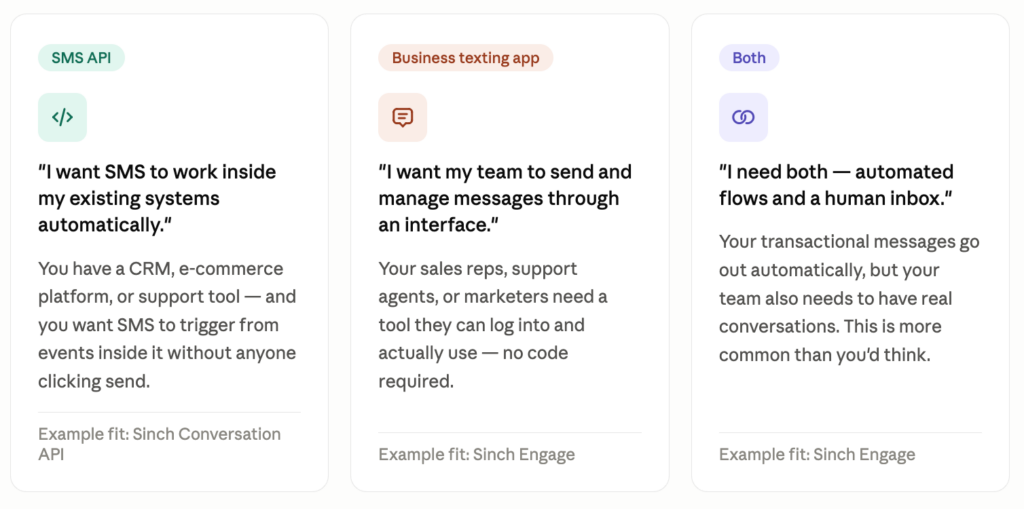
“I want SMS to work behind the scenes inside my own product or systems.”
This is the SMS API path. You need SMS embedded in your stack in a way that’s connected to your own logic, your own data, and systems that no pre-built integration covers.
You don’t need an interface a layperson is expecting to use to send SMS messages.
This means you probably already have a mature CRM and developers who can connect the dots between systems.
“I want my team to send and manage messages without involving a developer.”
This is the business texting app path. Your sales reps, support agents, or marketers need something they can log into and an interface they can use.
Or these folks already use a platform like HubSpot and want SMS to fit into how these folks already operate with an out-of-the-box SMS integration between your existing tool and an SMS service.
Speed to launch and ease of use for a non-technical user are more important than deep customization here.
“I need both – automated flows and a human inbox.”
This is more common than you’d think. Your transactional messages go out automatically, and your team handles the conversations that need a real person behind them.
This is the path toward an SMS application that offers API as a core feature.
Let’s look at these SMS integration options in a bit more detail.
SMS API
A messaging API like Sinch Conversation API is infrastructure. There’s no interface to log into (well, other than the Sinch Build dashboard to quickly get started): SMS works behind the scenes, embedded in your product or systems, invisible to whoever is on the receiving end.
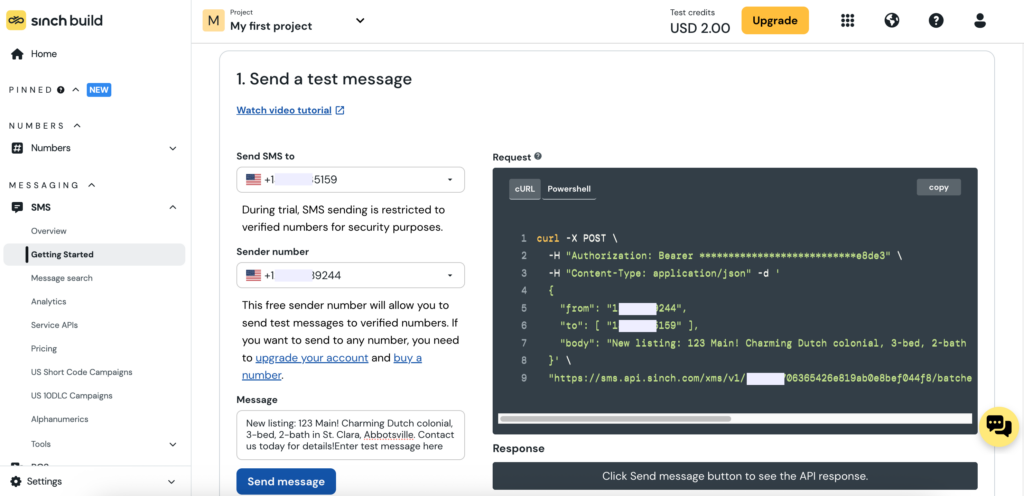
That’s what makes it powerful. You’re not limited to pre-built integrations or the workflows or the interfaces someone else designed. You can connect the SMS API to proprietary systems, pull from your own data, and build logic that’s specific to how your business actually works.
You’ll need developers to make this happen – either someone who can integrate it directly into your codebase, or an existing native connector to a platform you already use like Salesforce or SAP. That’s the real entry requirement here, not volume or company size.
But here’s the thing about the technical bar with APIs in 2026: It’s not always as high as it sounds.
A marketer friend of mine vibe coded an SMS integration using Sinch Conversation API and Claude that texts him his marathon training plan from Strava every morning. He’s not a developer. He’s just technically curious and willing to play around.
If that sounds like you, an SMS API might be more accessible than you think.
Business texting app
A texting service like Sinch Engage is built for a normal person to actually use. There’s an interface. You can see what you’re building – it even has previews so you can see what your SMS will look like when it hits your contact’s inbox.
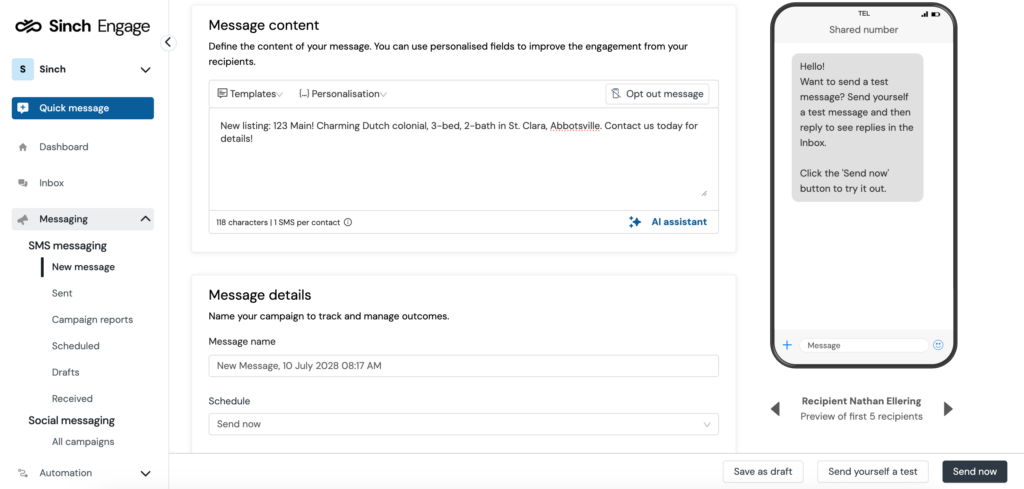
Texting services like Sinch Engage are great for marketing blasts, event messages, and two-way conversations with customers.
You can set up triggered messages, too.
And if you’re using a platform like HubSpot, Sinch Engage’s native integration means you can build workflow-driven texts directly inside HubSpot with its workflows. When a contact reaches a certain lifecycle stage or does a specific action, you can send a text automatically. No developer required.
You’ll still need to connect the SMS service to your CRM or e-commerce platform. But if your team is non-technical and you want something a sales rep or marketer can own day to day, this is probably the right call.
Both
A lot of mid-sized businesses end up here.
The API handles the automated and transactional stuff like onboarding, verification, receipt, and reminder SMS messages. The app gives your team a place to have actual conversations and send blast and targeted messages to groups of contacts.
Your API and application don’t have to be from the same provider, but it can keep things simple for your developers and the team members who’ll use the interface.
If you’re in this camp, you’re likely looking for a business texting service with a strong API as a core feature. For example, Sinch Engage fits this description.
Four things to figure out before you pick your SMS integration platform
The cards/statements above are a good starting point for decision-making.
But if you’re still not sure between API, app, or both – or you want to pressure-test your choice – here are the four questions I’d want to answer before committing to anything.
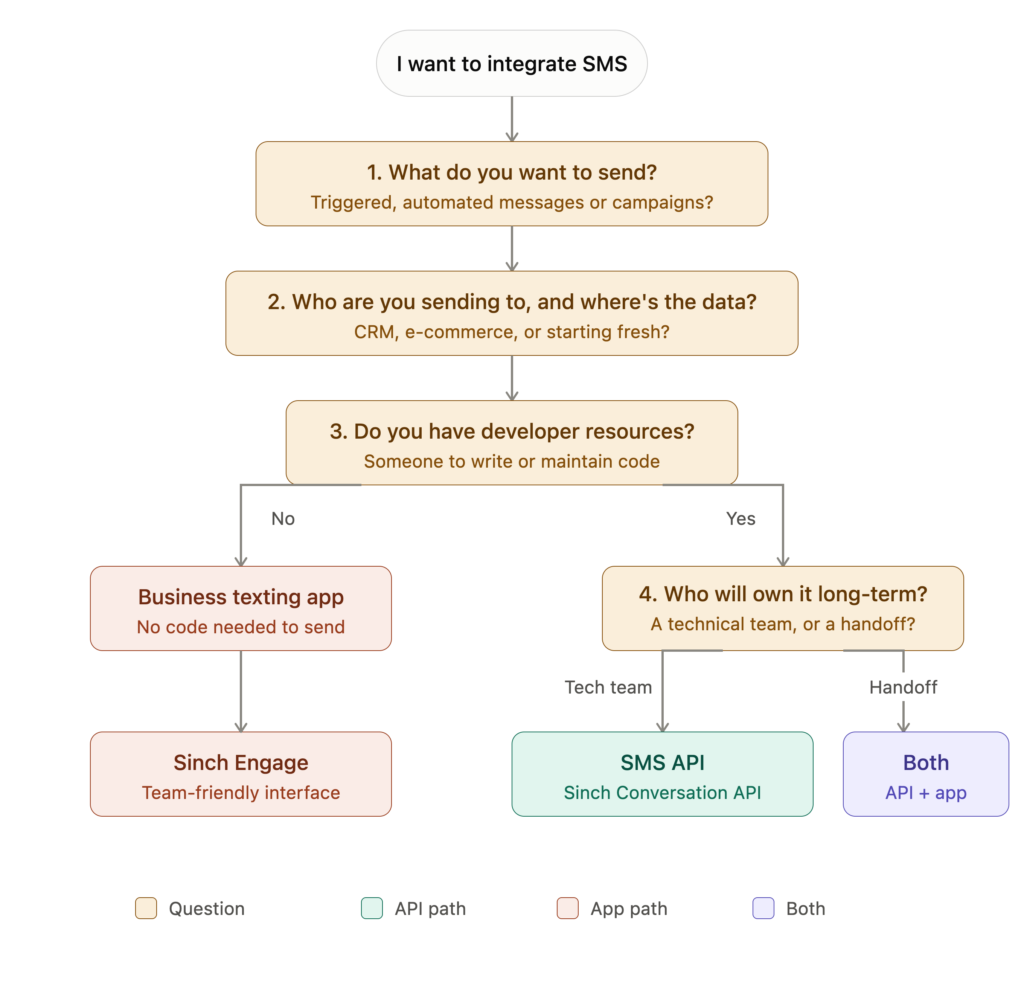
1. What do you actually want to send?
Use case drives everything here. Some common triggered messages from SMS APIs include:
- Order confirmations and receipts
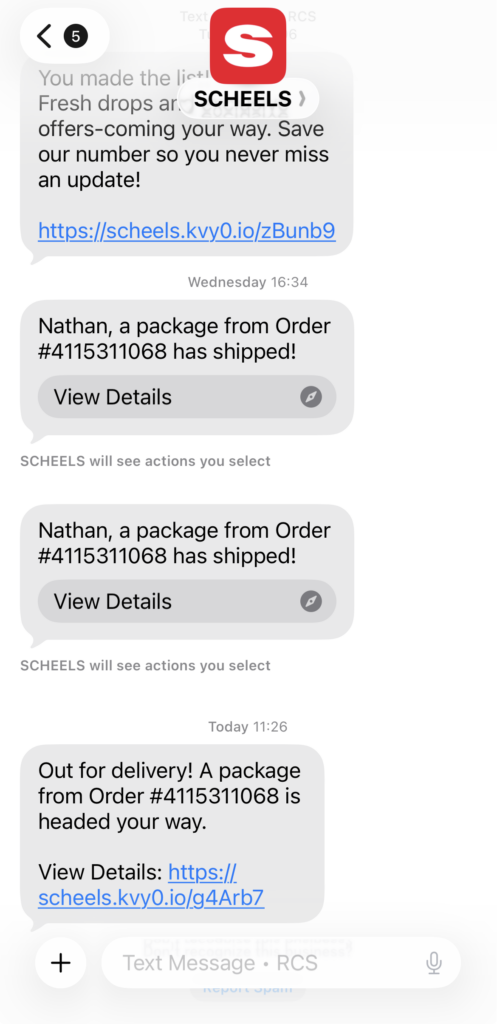
- Shipping and delivery updates
- One-time passwords and authentication codes
- Appointment reminders
- Abandoned cart recovery
Anything triggered by a contact’s action – something they did in your system that automatically fires a message – is generally an API play.
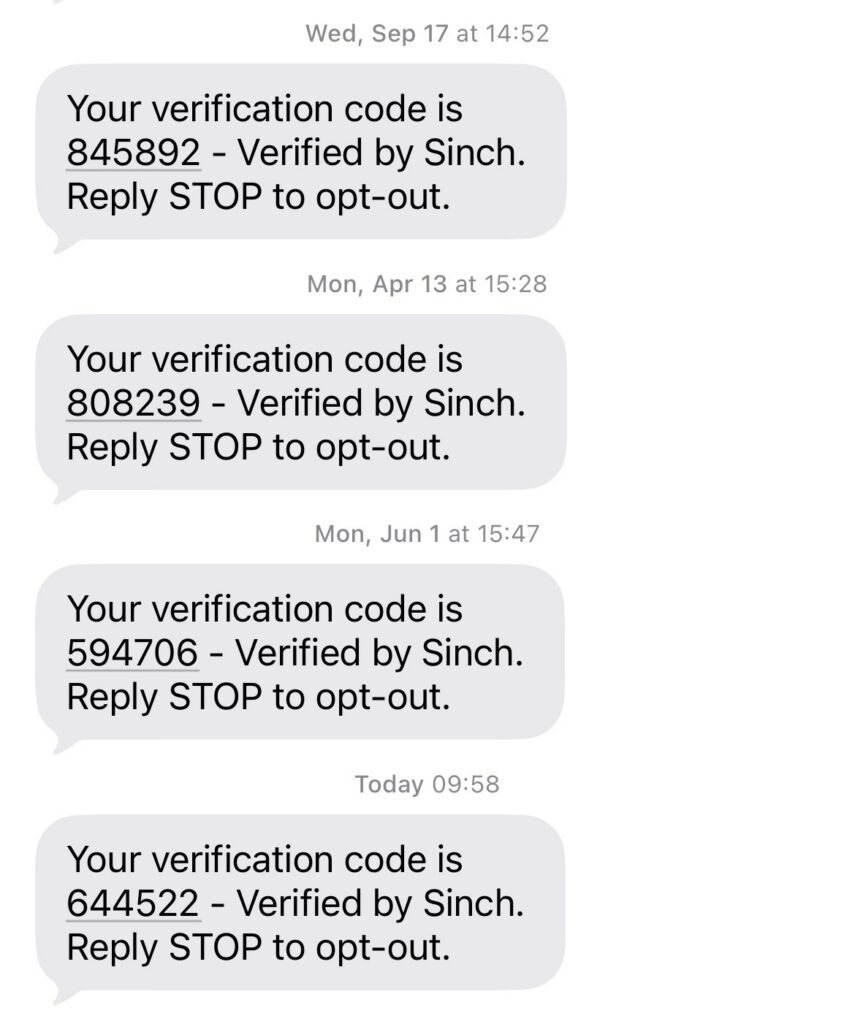
An SMS API gives you the most control and flexibility, especially at scale.
But if you’re already in a platform like HubSpot, a business texting app with a deep native integration can handle triggered workflows without a developer touching anything. Knowing your use cases (and existing tech stack) upfront helps you figure out which path is best for your business.
If the following are the only things you’re sending, a business texting app could be a perfect fit:
- Marketing campaigns and promotional blasts
- Event reminders and announcements
- Two-way customer support conversations
- Sales outreach and follow-up
- Employee comms
If you only want to send SMS messages to groups or segments of people without a lot of need for fancy triggers, a business texting app may be the right fit for your use case.
2. Who are you sending to, and where does that contact information live?
This question has a few layers to it.
If you don’t have contacts yet, you actually have more freedom than you think. You can choose your SMS provider first and build your list compliantly from the start.
In that case, starting with a business texting app is often the easier path because you can get moving without a lot of technical setup, and most services have easy ways to start building your SMS list.
If you already have contacts somewhere – your CRM, your email service provider, your e-commerce platform – that existing tool should influence which SMS provider you choose. Pick one that has a native integration with what you already use. It saves you a lot of duct tape (and future headaches of a brittle system that may break).
Most (if not all) CRMs have APIs, which means Sinch Conversation API can connect to them. And if you’re going the app route, Sinch Engage has native integrations with a lot of the platforms you’re probably already using. More on that in the next section.
And if you have an existing SMS list, one important thing to sort out early: Do you have explicit SMS consent for those contacts? Email opt-in does not equal SMS opt-in. It’s worth getting across the line on compliance before you start sending.
3. How technical are you? Or is there someone who can help?
Be honest here. An SMS API requires either a developer/technical person who can integrate it directly into your codebase, or an existing connector to a platform you already use – think Salesforce or SAP. Neither is a small lift.
If neither of those describes your situation, that’s completely fine. That’s exactly what a business texting app is built for.
4. Who else will need to own this once it’s set up?
This one gets overlooked. You might be technical enough to set something up, but if you’re handing it off to a team that isn’t, that matters.
A developer-built API integration needs a developer to maintain it. If that resource goes away, so does your SMS program.
An app with a clean interface is a lot easier to hand off to someone who may not be as techy.
Types of SMS integrations
The right SMS integrations depend on which path you chose above. Here’s what each Sinch product actually connects to, and more importantly, what you can do once it’s connected.
If you went with an SMS API: Sinch Conversation API integrations
Sinch Conversation API has native connectors that are built for the kind of enterprise platforms where SMS needs to live deep inside complex systems.
If your platform isn’t on this list, that’s fine too. If it has an API, Conversation API can connect to it. That’s kind of the whole point.
Salesforce Sales and Service Cloud
Trigger SMS directly from customer records and service cases, so a support update or an appointment reminder goes out automatically as a case moves through your pipeline.
Salesforce Marketing Cloud – Journey Builder
Add SMS as a step inside the customer journeys your team is already building, letting text fire at exactly the right moment alongside email and other channels.
SAP S/4 Hana and SAP Service Cloud
Connect SMS to your core business operations – order status, logistics, service notifications – so messages are driven by the same system running the rest of your company.
Emarsys
Layer SMS into your existing Emarsys campaigns and automations without leaving the platform your marketing team already knows.
If you went with a business texting app: Sinch Engage integrations
Sinch Engage has native integrations with a lot of the tool categories you’re probably already using, and you may not need a developer to connect them.
(And don’t forget! Sinch Engage has a robust Messages API feature that gives you the power of an interface coupled with API flexibility.)
Here’s what a few of Sinch Engage’s SMS integrations unlock.
CRM and sales
Connect Salesforce, HubSpot, Zoho, or Microsoft Dynamics 365 to trigger texts based on where a contact is in your pipeline.
When someone hits a certain lifecycle stage in HubSpot, for example, a text goes out automatically – all configured inside the tools your team already uses.
Watch this short video for an example of how to integrate an RCS message into your HubSpot workflow via the Sinch Engage integration:

E-commerce
Connect Shopify, WooCommerce, or BigCommerce to send order confirmations, shipping updates, and abandoned cart reminders driven by real purchase behavior.
Marketing and email
Connect Mailchimp, Klaviyo, ActiveCampaign, Mailjet, or Adobe Campaign to coordinate SMS with your email program, so the two channels work together instead of stepping on each other.
Operations and automation
Connect Zapier, Workato, NetSuite, or Aircall to wire SMS into just about any workflow. If a tool you use isn’t on the list, Zapier and Workato can usually bridge the gap.
Healthcare and HR
Sinch Engage also connects to platforms like Epic and Zoho Recruit for industry-specific messaging needs.
A note on email and SMS
You’ll notice email platforms show up on these integrations lists. That’s intentional. Email and SMS aren’t competing channels – they work best together.
Email handles long-form content. SMS handles short, time-sensitive nudges. A simple example is verification use case: Email and SMS complement each other well, and integrating these into the same flows creates a cohesive user experience.
Running integrated marketing campaigns through integrated platforms keeps your contact lists, consent status, and engagement data in sync, so you’re not accidentally emailing or messaging people twice or sending to folks who opted out.
Frequently asked questions
SMS integration is the process of connecting a text messaging service and/or API to the other tools and systems your business already uses. That connection is what lets your CRM trigger an automated message, your e-commerce platform send an order confirmation, or your support team manage customer conversations via SMS messages.
Honestly, it depends on what “beginner” means for you. If you’re a developer who’s new to SMS but comfortable with APIs, Sinch Conversation API is a strong messaging API contender. The documentation is solid and it supports SMS alongside other channels like WhatsApp and RCS from day one.
If you’re not technical at all, a business texting app like Sinch Engage is probably a better fit than any API. The learning curve is a lot friendlier, and you don’t need to write a single line of code to get started.
No. SMS is not getting phased out.
SMS is still the most universally supported messaging channel on the planet. It works on every mobile device natively.
That said, the channel is evolving. RCS is growing fast, and a lot of businesses are starting to think about omnichannel messaging rather than SMS alone. That’s actually one of the reasons Sinch Conversation API is built to handle multiple channels from one place, so you’re not locked into SMS only as the landscape shifts.
No, you do not need a developer to integrate SMS.
A business texting app like Sinch Engage does not require a developer. You can connect it to your existing tools, set up workflows, and start sending without writing any code.
An SMS API integration requires either a developer who can work it into your codebase, or an existing native connector between the API and your platform. Neither is a small lift.
Yes, you need SMS consent for your existing contacts.
SMS consent is separate from email consent. Just because someone is on your email list does not mean you can legally text them.
The rules vary depending on where your contacts are located and what type of messages you’re sending, but the general principle is the same everywhere: You need explicit permission to send SMS. If you’re not sure where you stand, it’s worth talking to your SMS provider about compliance before you start sending.
SMS stands for Short Message Service, which is the technical protocol behind standard text messaging. SMS messages are plain text messages of 160 characters or fewer. Text messages, however, include a wider range of message types, including MMS or Multimedia Message Service and RCS or Rich Communication Services.
Ready to integrate SMS?
By now, I hope you probably have a pretty good sense of which path is yours.
If you need SMS working behind the scenes inside your own product or systems, Sinch Conversation API is worth exploring.
If you want a tool your team can start using without a developer, take a look at Sinch Engage.
And if you need a bit of API and a bit of application, Sinch Engage is a solid choice.

Author: