Insights, Products
RCS message types: A guide to RCS for Business messages

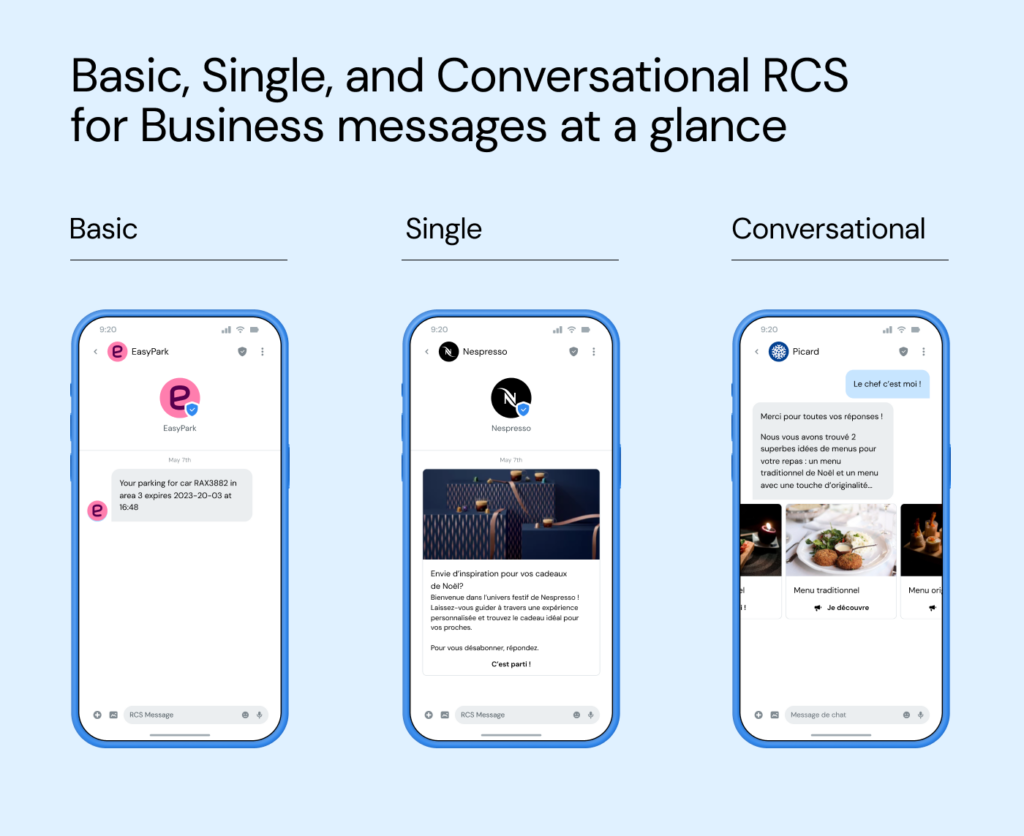
RCS message types are the formats businesses use to send branded messages through Rich Communication Services (RCS) – and they fall into three functional groups: Basic messages, Single messages, and conversational (session-based) messages. Each one lands in the same place: your customer’s native texting inbox, under your verified brand name and logo rather than an anonymous number.
The naming can get confusing, because carriers label these types differently by region – “Rich” and “Rich Media” in the U.S., “Basic” and “Single” almost everywhere else. Underneath the labels, the choice is simple: how rich does this message need to be, and do you want a one-way notification or a two-way conversation? And here’s the good news – if you already send SMS, you’re most of the way there, because RCS reaches the same native inbox and falls back to SMS automatically.
In this guide, we’ll break down what RCS message types are, walk through all three, compare them side by side, unpack the interactive building blocks, and show you how to choose – with real examples from brands already doing it.
What are RCS message types?
Rich Communication Services (RCS) is the messaging standard created by the GSM Association (GSMA) under its Universal Profile to modernize SMS and MMS. Google is its biggest implementer – Google Messages is the default RCS app on Android – but the standard itself belongs to the mobile industry, not to any single company.
RCS for Business (previously called “RCS Business Messaging” or “RBM”) is the application-to-person (A2P) side of that standard: the branded, verified messages a company sends to its customers. Because RCS supports everything from a plain text alert to a swipeable product carousel, carriers and platforms group those messages into types – each with its own capabilities, character limits, and billing model.
Think of the types as a ladder. At the bottom is a simple, verified text message that looks a lot like SMS; at the top is a full two-way conversation with rich media, interactive buttons, and AI-driven replies. What stays constant at every rung is that the message arrives from a verified sender profile – brand name, logo, and badge – in the native messaging app, no download required. RCS now reaches roughly 1.5 billion users globally, including 250 million in the U.S., where more than a billion RCS messages are sent every day.
The three types of RCS for Business messages
Most carriers and platforms organize RCS for Business messages into three functional types. The labels shift by region, but the capabilities line up cleanly.
Basic messages: your SMS, upgraded
A Basic message is the entry point – text only, up to 160 characters, sent from a verified, branded sender, with URL previews that show recipients where a link leads. U.S. carriers usually call this a “Rich” message.
Basic messages are perfect for one-off notifications that don’t need a reply: one-time passwords (OTPs), delivery updates, appointment confirmations, and limited-time offers. The upgrade over SMS is trust, not flash – the same alert, now clearly from you, with a branded profile instead of a mystery number. Because they map so closely to SMS, they’re also the easiest first step: if your backend already handles text, you can start here with almost no new integration.
Single messages: rich, interactive, one-way
A Single message is where RCS starts to feel like an app. It carries text beyond 160 characters plus rich media – images, GIFs, videos, rich cards, and carousels – along with suggested replies and suggested actions like opening a link, dialing a number, or dropping a pin on a map. U.S. carriers call this a “Rich Media” message.
A craft note on carousels, learned the hard way by teams migrating from MMS: don’t treat the format as one big image with everything crammed in. The campaigns that perform pace the story across cards – the first card earns the swipe like a teaser, and each card that follows advances one chapter of the offer until the last one carries the call to action. Carousels also update in minutes when an offer changes, which is exactly where video assets – slow to re-edit – tend to fall behind the business.
Single messages are still one-way: you send, the customer sees a visually engaging message, and they can tap a button to act. That makes them a natural fit for marketing campaigns, product showcases, and promotions where visuals do the selling – RCS marketing campaigns deliver 3 to 7 times higher click-through rates than rich SMS, and interactive campaigns can lift average order value by nearly 10%.
Conversational (session) messages: two-way at scale
The third type is the one the ladder is built toward: conversational messages. Here the message opens a genuine two-way thread. The customer replies, and your brand – or an AI agent – responds inside the same inbox, handling everything from product questions to returns to support triage.
This matters more than it sounds: in Sinch research, 28% of consumers say one-way messages frustrate them when they can’t interact or ask a question. Conversational RCS answers that directly. It’s also where billing changes – when a customer replies and your brand responds, a 24-hour session opens, and pricing typically shifts from per-message to per-session. Whether a message is conversational is defined by the agent type you register – non-conversational for one-way sends, conversational for two-way sessions – rather than by the format itself.
RCS message types compared
Here’s how the three types stack up on capabilities, billing, and best-fit use cases.
| Message type | Content | Interactivity | Billing model | Best for |
| Basic (US: “Rich”) | Text only, up to 160 characters, URL previews | Verified sender; limited suggested replies and actions | Typically per message (non-conversational agent), similar to SMS | OTPs, alerts, delivery updates, short offers |
| Single (US: “Rich Media”) | Text over 160 characters, images, GIFs, video, rich cards, carousels | Full suggested replies and actions, webview | Typically per message (non-conversational agent) | Marketing campaigns, product showcases, promotions |
| Conversational (session) | All Single-message media, plus ongoing two-way exchange | Full interactivity, plus AI-driven or agent-led replies | Per 24-hour session (conversational agent) | Support, conversational commerce, returns, booking |
A quick word on pricing: billing follows the RCS Agent you register – a non-conversational agent bills messages individually, much like SMS, while a conversational agent bills per 24-hour session, so an active conversation isn’t charged per back-and-forth.
The building blocks of RCS messages
What makes Single and conversational messages feel app-like isn’t the “type” – it’s the interactive components inside them. These are the pieces you’ll actually design.
- Rich cards: a standalone card combining an image, title, description, and tappable buttons – ideal for a single featured product or offer.
- Carousels: a swipeable set of rich cards, supporting up to 10 cards with up to 4 buttons each, so customers can browse a lookbook or product range without leaving the thread.
- Suggested replies: tappable chips that let a customer respond with pre-defined text in one tap – “Track my order,” “Start a return,” “Yes, it was me.” Display text is capped at 25 characters to prevent truncation, and each tap returns a structured payload your system can act on. Removing typing friction this way can drive up to 2.3 times higher click-through rates than traditional SMS, and 3.7 times higher purchase intent.
- Suggested actions: buttons that trigger a native device action – dial a number, open a URL, view a location on a map, or compose a text message.
- Webview: load a full web experience – a payment page or booking form – directly inside the conversation, so customers never leave the messaging app.
The one component that appears in every type, from Basic to conversational, is the verified sender profile – which is worth its own section.
RCS branded messages and verified senders
Every RCS for Business message, regardless of type, is a branded message – that’s built into the protocol. Before you can send anything, your brand’s verified sender profile is vetted and approved by Google and mobile network operators; once it’s live, recipients see your official name, logo, brand color, and a verification badge at the top of the conversation.
Why does that matter so much? Because trust in mobile messaging is fragile. Our State of customer communications research shows that 53% of consumers have received a legitimate brand message in the past year that they initially found suspicious. Verified RCS profiles close that gap: nearly 80% of consumers say visual indicators like a logo or checkmark make them more likely to trust a sender, and 59% of industry leaders familiar with RCS say it will be game-changing for customer communications.

“RCS is a fantastic channel for branded messaging, but it’s also important to remember that channels like WhatsApp offer similar capabilities. For a truly omnichannel approach, businesses should consider how they can leverage the unique strengths of each channel to create a cohesive, engaging customer experience.”

Walk, run, fly: building up your branded messaging
You don’t have to launch every message type at once. The brands that get RCS right tend to grow into it in three phases:
- Walk – start with the basics. Upgrade one or two high-impact SMS campaigns to Basic RCS messages. Your existing texts still work: RCS-enabled customers get a branded message; everyone else falls back to SMS automatically.
- Run – add richness. Layer in Single messages with rich cards, carousels, images, and suggested actions, turning standard campaigns into interactive experiences.
- Fly – embrace conversation. Move into conversational messages, where AI support and thoughtful design make the exchange feel like a natural back-and-forth.
Pro tip: Keep your branding, tone, and imagery consistent across every channel – RCS, WhatsApp, email – so your identity is recognizable wherever your customer opens a message.
RCS message types in action
So what does this look like in the real world? Two brands show the range – one at the Basic end of the ladder, one further up.
Basic messages: EasyPark builds a secure driver experience
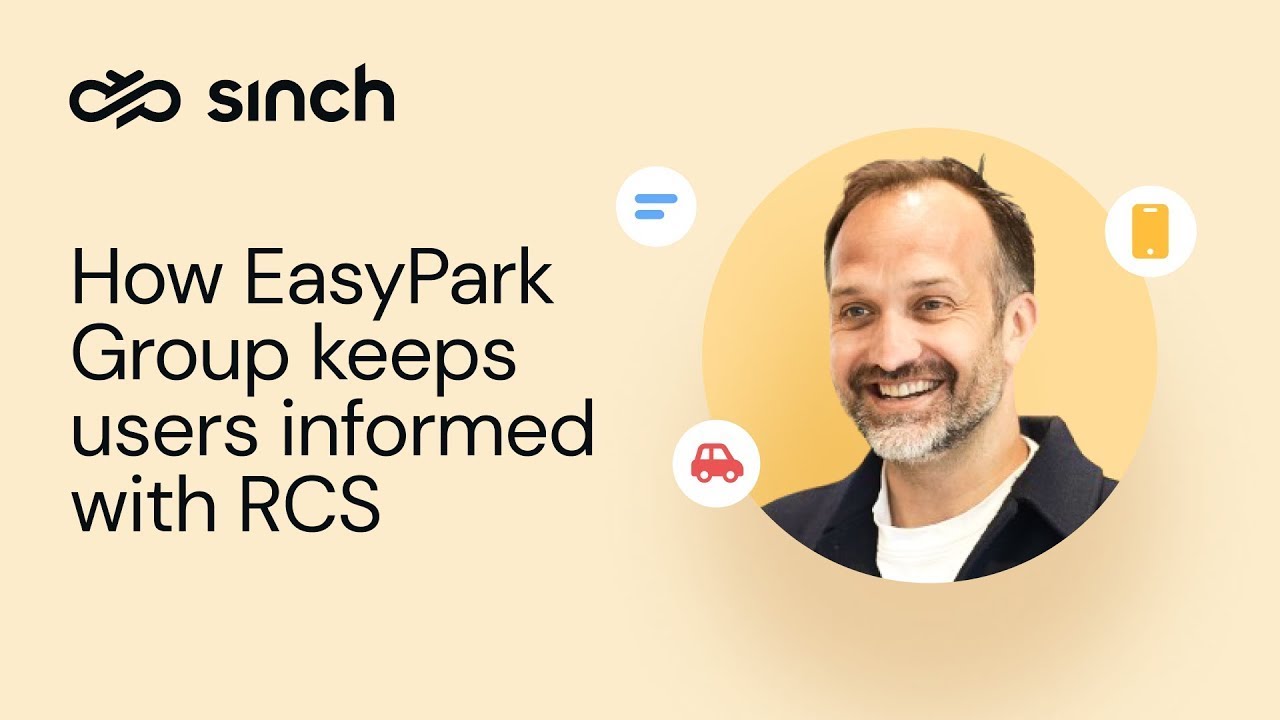
EasyPark Group, a leading digital parking app, relied on multiple vendors to send SMS parking reminders across dozens of markets. After consolidating with Sinch, the team upgraded those SMS reminders to RCS Basic messages for RCS-capable devices.
The payoff was trust. Drivers on Android now see the verified EasyPark brand as the sender and know the reminders are genuine – no small thing when 75% of organizations report SMS phishing attacks (Proofpoint’s 2024 State of the Phish). For drivers without RCS, nothing changed: they still receive SMS reminders, so every driver stays informed thanks to automatic fallback.
From Single message to conversation: Nespresso inspires with rich, interactive content
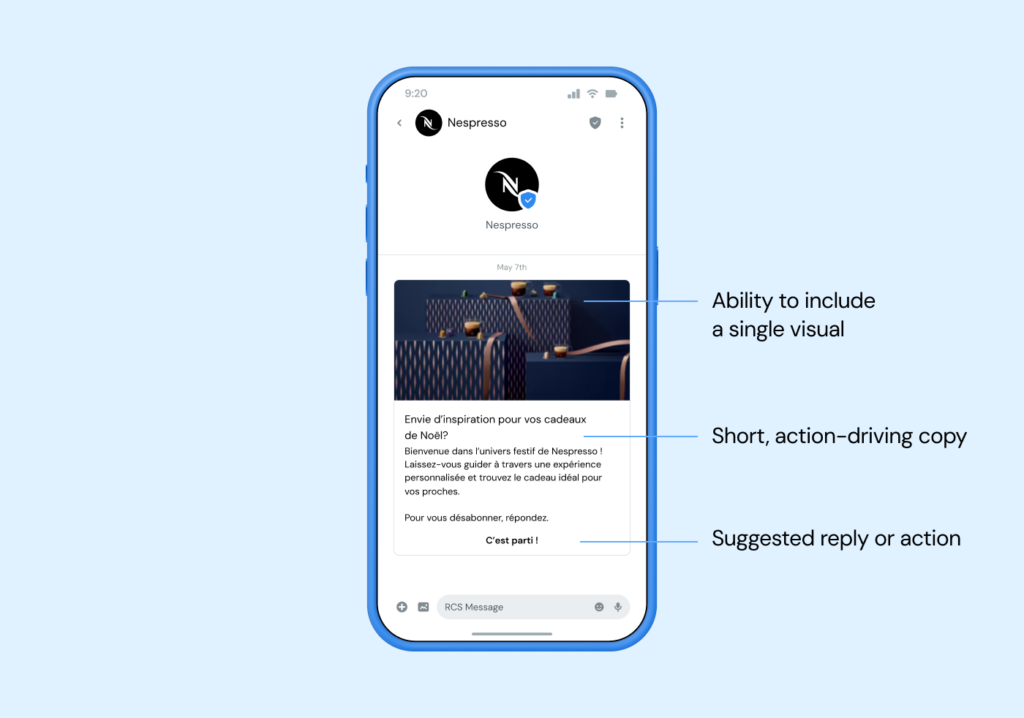
Nespresso, the premium coffee brand, wanted to guide French customers toward its subscription program. It led with a Single message – a striking visual and concise copy – whose suggested replies opened into a guided, chatbot-led conversation.
The result? That conversational experience earned a 15% click-through rate and a 36% completion rate – and generated 2.3 times more completions than the Rich SMS fallback. The visuals and interactive buttons did the heavy lifting, and every reply became an opening for deeper engagement.
How to choose the right RCS message type
Weighing the types for your own program? Keep these factors in mind.
- Your message: A transactional alert like a one-time password fits a Basic message; a sales-focused message with a product carousel calls for Single; anything two-way needs conversational.
- Cost: Non-conversational agents bill per message, similar to SMS; conversational agents bill per 24-hour session. If you expect back-and-forth, session billing usually works in your favor.
- Content rules: RCS limits what you can send – categories like adult, political, tobacco, and dangerous or misleading content are prohibited, while alcohol and gambling are allowed only under certain conditions. Check Google’s Acceptable Use Policy before you build.
- Security and compliance: RCS for Business (A2P) messages are encrypted in transit, not end to end, though RBM carries strong compliance credentials (ISO 27001, SOC 2, SOC 3, GDPR, and PSD2). For confidential data governed by HIPAA or PCI, weigh each channel’s encryption model with your compliance team – see how RCS compares with the WhatsApp Business Platform. (Separately, end-to-end encryption for person-to-person RCS chats between iPhone and Android is rolling out in beta following iOS 26.5 – but it does not extend to brand-to-consumer messaging.)
- Your audience: RCS for Business is broadly available on Android and, since iOS 18, is rolling out on iPhone in key markets. Where a customer isn’t RCS-enabled, SMS fallback keeps the message flowing.
Frequently asked questions about RCS message types
RCS for Business messages fall into three functional types: Basic messages (text only, up to 160 characters, from a verified sender), Single messages (rich media like images, cards, and carousels, still one-way), and conversational messages (two-way threads billed per session). U.S. carriers often label the first two “Rich” and “Rich Media.”
A Basic message is text only, capped at 160 characters, with URL previews and a verified sender – ideal for alerts and OTPs. A Single message adds rich media (images, video, rich cards, carousels) and interactive buttons, and carries text beyond 160 characters – ideal for marketing. Both are one-way; the jump to two-way is the conversational type.
It depends on the RCS Agent you register: a non-conversational agent bills messages individually, similar to SMS, while a conversational agent bills per 24-hour session. See our RCS pricing guide for details.
RCS for Business (A2P) messages are encrypted in transit, not end to end, so they aren’t the right fit for confidential data governed by HIPAA or PCI. They do carry compliance credentials including ISO 27001, SOC 2, SOC 3, GDPR, and PSD2. For sensitive use cases, keep confidential details behind an authenticated login rather than in the message body.
Yes. Apple added RCS support in iOS 18, and RCS for Business is rolling out on iPhone in key markets, dependent on Apple and carriers. Where RCS isn’t available, messages fall back to SMS automatically.
Get started with RCS for Business
The message-type question comes down to one thing: matching the format to the job. Basic messages upgrade your alerts with trust and branding. Single messages bring the visuals and interactivity that drive campaigns. Conversational messages turn a broadcast into a relationship. And a verified sender profile makes every one of them unmistakably yours.
The brands seeing the strongest results didn’t wait for the perfect strategy – they upgraded one SMS campaign, learned, and scaled. With RCS reaching more inboxes every month across a market projected to grow from around $3 billion in 2025 to roughly $9 billion by 2030, there’s real upside in starting now.
Want to go deeper first? Explore these resources:
- What is RCS messaging? The complete guide
- RCS vs SMS: How are they different?
- 10+ RCS use cases and messaging examples
- How RCS verified senders build customer trust
- An enterprise guide to sending RCS messages via API
Ready to choose your first RCS message type? Check out RCS for Business through Sinch Conversation API. Or, if you’d rather talk it through, reach out to our team – we’re here to help you build messaging experiences your customers will trust.
Last updated by Drew Wilkinson on the 4th of August 2026

Author:

Co-author: