Insights
What is RCS messaging? Definition, features, and how it works

RCS (Rich Communication Services) is the messaging standard that upgrades SMS with verified sender identities, high-resolution media, read receipts, and tappable replies – all inside the native messaging app your phone already uses. It was created by the GSM Association (GSMA), the body behind global mobile standards, and it works on both Android and iPhone. When a device can’t receive RCS, the message simply falls back to SMS, so it still arrives.
That much you can find on any explainer. The part most of them skip is what RCS does for trust. For the first time, a text from a business can show you a verified name, logo, and checkmark instead of an unknown five-digit number. Richer media is what people notice first. Knowing who actually sent the message is what changes how they respond.
With around 1.5 billion users globally – including 250 million in the U.S., where more than a billion RCS messages are sent every day – RCS has quietly become one of the biggest messaging channels on the planet. In this guide, we’ll break down what RCS means on your phone, how it works on iPhone and Android, how it compares to SMS, MMS, and WhatsApp, how secure it really is, and what RCS for Business changes for companies messaging customers at scale.
What is RCS messaging?
RCS messaging is texting, rebuilt for the smartphone era. Rich Communication Services is an open standard maintained by the GSMA under a specification called the Universal Profile, which keeps the experience consistent across devices, carriers, and countries. Google has been its biggest implementer – Google Messages is the default RCS app on Android, and Google’s Jibe platform powers much of the network – but the standard belongs to the mobile industry, not to any single company.
Where an SMS is limited to 160 characters of plain text, an RCS message supports:
- High-resolution photos and videos, not the compressed versions MMS sends.
- Read receipts and typing indicators, so conversations feel live.
- Group chats that stay in one thread instead of splitting apart.
- Suggested replies and tappable buttons built into the message itself.
- Verified business senders that show a name, logo, and checkmark instead of a random number.
There’s no app to download and no account to create. RCS runs inside the default messaging app – which is exactly what separates it from over-the-top (OTT) apps like WhatsApp.
The idea has been around longer than you’d think: operators started work on RCS back in 2007, and our brief history of RCS traces the long road from there. What matters now is the momentum: the global RCS market was worth around $3 billion in 2025 and is projected to reach roughly $9 billion by 2030.

What does RCS mean on your phone?
When your texting app says a message was sent over RCS, it means the message traveled over the internet through the RCS standard instead of the older cellular SMS network. You get features plain texting never had, without changing anything about how you text.
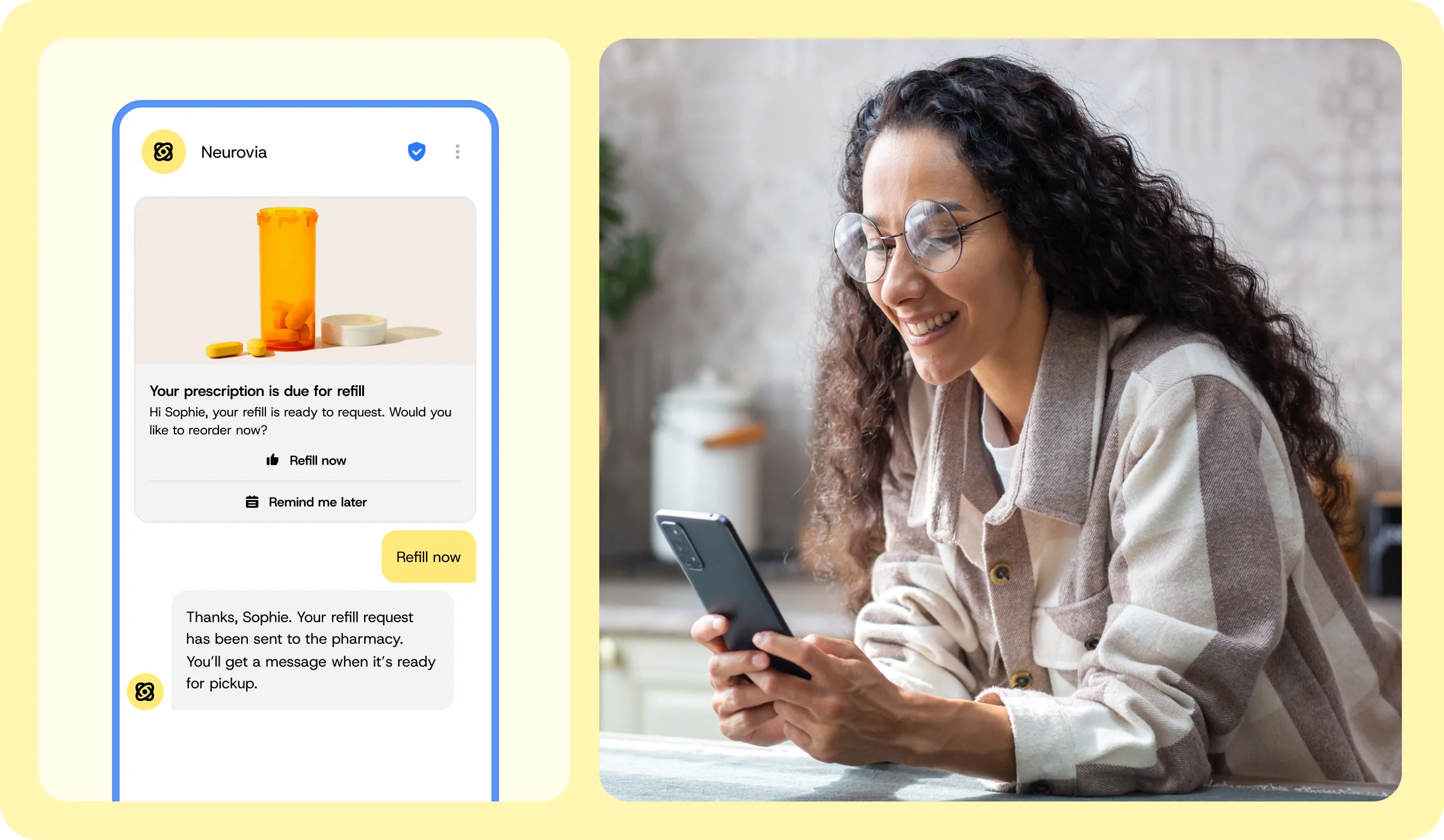
An RCS message also looks different. At the top of a business thread you may see a verified sender name, logo, and checkmark instead of a phone number. Inside the message you might get a swipeable carousel, tappable reply chips, or buttons that open a link, start a call, or pull up directions.
What is RCS chat?
“RCS chat” is the consumer name for the same thing. On Android, Google Messages labels the upgraded experience “RCS chats” (formerly “chat features”), so people often call the messages they send RCS chats. It’s not a separate app or account – just standard texting with the richer layer turned on.
So an RCS chat is simply a normal text conversation that supports reactions, typing indicators, high-quality media, and verified business senders. When support drops on either side, the same conversation quietly continues as SMS.
How does RCS messaging work?
Three things have to line up for a message to travel over RCS:
- A messaging app that supports it, such as Google Messages or the iPhone Messages app.
- A carrier or RCS service that supports it, since the standard runs through mobile operators and platforms like Google Jibe.
- A data connection, because RCS sends over the internet (Wi-Fi or mobile data) rather than the cellular text channel.
When any of those is missing, the message falls back to MMS or SMS automatically. That fallback is why RCS can add rich features without ever cutting off reach – and why it’s safe for a business to adopt before every customer’s device supports it.
Behind the scenes, an RCS message travels from the sender’s app through their provider’s RCS infrastructure to the recipient’s carrier and device, with a capability check along the way to confirm the receiving phone can handle RCS. For the full technical journey – Universal Profile, capability checks, and how fallback decisions get made – see our deep dive on how RCS works.
Businesses use a specific version of the standard with its own verification layer – more on that below.
RCS on iPhone and Android
For years, RCS was an Android story. That changed when Apple added RCS support to the iPhone with iOS 18 in September 2024 – and Apple has kept building on it since.
RCS on Android
On Android, RCS runs through Google Messages, the default texting app on most devices, where it’s usually on by default. And because Android holds more than 70% of the global mobile operating system market, most Android-to-Android texting already runs over RCS without anyone choosing it.
RCS on iPhone
On iPhone, RCS is separate from iMessage. iMessage still handles blue-bubble chats between Apple devices; RCS is what upgrades the green-bubble conversations with Android users – and, increasingly, with businesses. iPhone users get typing indicators, read receipts, high-quality media, and verified senders in those threads too. Availability depends on your carrier, and the bubbles stay green. Our comparison of RCS vs iMessage covers exactly how the two relate.
The big 2026 development is encryption. With iOS 26.5 (May 2026), end-to-end encryption began rolling out in beta for person-to-person RCS chats between iPhone and Android, built on the GSMA’s Universal Profile 3.0. On the business side, RCS for Business support is rolling out on iOS in several key markets, dependent on Apple and each carrier. In short: RCS is no longer an Android-only channel.
RCS vs SMS, MMS, and other messaging channels
SMS, MMS, and RCS are three generations of the same idea. SMS is the universal baseline: it works on every phone, needs no data connection, and remains the most dependable channel in mobile – which is exactly why RCS uses it as a fallback rather than a rival. MMS added basic media. RCS keeps the universal reach through fallback and adds verified senders, rich media, and interactivity.
| SMS | MMS | RCS | |
|---|---|---|---|
| Message length | 160 characters | Longer text plus media | Long-form, rich layout (up to 3,072 characters of text) |
| Media | None | Images and video, compressed | High-resolution images, video, carousels, files up to 100MB |
| Sender identity | Phone number | Phone number | Verified name, logo, and checkmark |
| Interactivity | None | None | Suggested replies, buttons, carousels |
| Read receipts and typing indicators | No | No | Yes |
| Network | Cellular, near-universal | Cellular | Internet (Wi-Fi or data), falls back to SMS |
| Best for | Alerts, one-time passwords, universal reach | Basic picture messaging | Branded, interactive conversations |
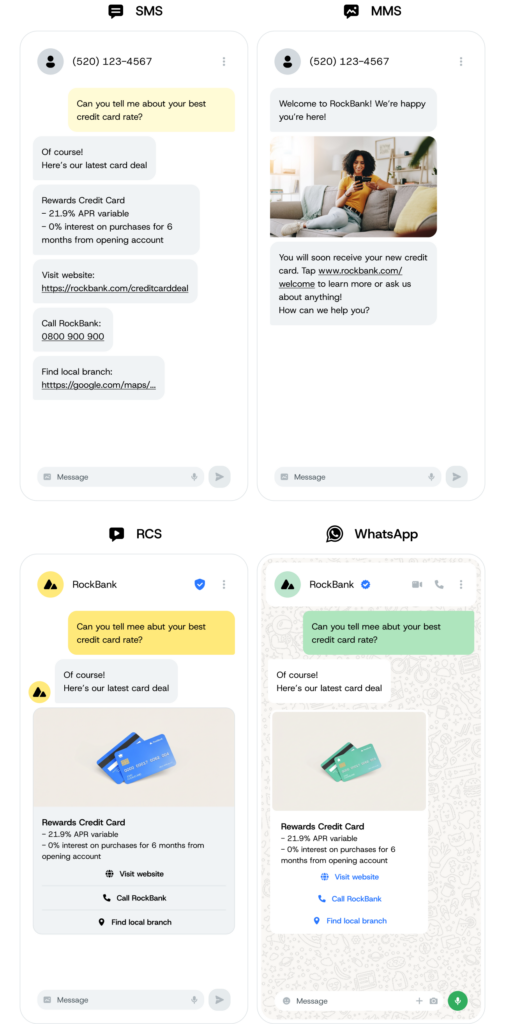
The practical difference is trust. An SMS or MMS asks you to believe an unknown number. An RCS message can show the brand’s verified name and logo before you read a word. For the feature-by-feature breakdown, see RCS vs SMS.
Two adjacent comparisons come up constantly:
- RCS vs iMessage: iMessage is Apple’s proprietary service, end-to-end encrypted but exclusive to Apple devices, with no native business messaging channel. RCS is the open, cross-platform standard that works between iPhone and Android.
- RCS vs WhatsApp: WhatsApp is Meta’s app, with over 3.3 billion monthly active users and deep commerce features – but it requires an app download, while RCS lands in the native inbox. They don’t interoperate, and most global brands end up using both. See RCS vs WhatsApp.
Is RCS messaging secure?
RCS security has one honest answer: it depends on who is messaging whom. There are three distinct states, and getting them straight matters – especially if you’re a business deciding what to send over the channel.
| Scenario | Encryption | Status |
|---|---|---|
| Personal chats, Android ↔ Android (Google Messages) | End-to-end encrypted | Live for years – on by default |
| Personal chats, iPhone ↔ Android | End-to-end encrypted via Universal Profile 3.0 / MLS | Rolling out in beta following iOS 26.5 (May 2026), carrier dependent |
| RCS for Business (A2P) – branded messages from a company | Encrypted in transit (TLS), not end to end | Standard today – the E2EE rollout does not extend to business messaging |
For business messaging, be precise: RCS for Business messages are encrypted in transit between hops, but they are not end-to-end encrypted, and Google and aggregators can access message content. The channel does carry strong compliance credentials – ISO 27001, SOC 2, SOC 3, GDPR, and PSD2 – and verified sender profiles make brand impersonation far harder than over SMS, where an unverified sender ID can be spoofed or imitated. That combination makes RCS for Business well suited to marketing, alerts, and notifications, but not to sending confidential data in the message body.
For regulated conversations, the pattern that works is the authenticated handoff: the RCS message carries the branded, verified prompt and a secure link, and the sensitive details stay behind a login inside your own authenticated property. And for use cases where end-to-end encryption of the message itself is a hard requirement – think HIPAA- or PCI-grade data – a channel like WhatsApp Business Platform, which uses the Signal protocol for E2EE, is the better fit. We go deeper on all of this in our guide to RCS security.
What is RCS for Business?
RCS for Business (previously called “RCS Business Messaging” or “RBM”) is the application-to-person (A2P) version of RCS – the channel businesses use to message customers at scale. It’s the reason your bank’s fraud alert can arrive with a logo and checkmark, and your favorite retailer’s promotion can arrive as a swipeable product carousel instead of a text with a link.
Getting on the channel isn’t as simple as buying a phone number, and that’s by design. A business registers an RCS Agent – its official, branded identity – and gets verified and approved by Google and carriers before it can send a single message. Customers must opt in. That vetting is what makes the verified checkmark mean something.
Once verified, a business can send far more than text. RCS for Business message types include rich cards, carousels, suggested replies, and interactive buttons – and the best campaigns use them with intent. Think of a carousel paced like a movie trailer: the first card exists to hook, and every card after it is a chapter that moves the story toward one clear action.

“One of the cool things about RCS is that you can do so much with it. A lot of businesses start with fairly simple messages, by converting their existing SMS over. That works well for improving security with the sender verifications, the branding, and the delivery receipts. And once you start seeing it working, you start to move on to more advanced use cases.”

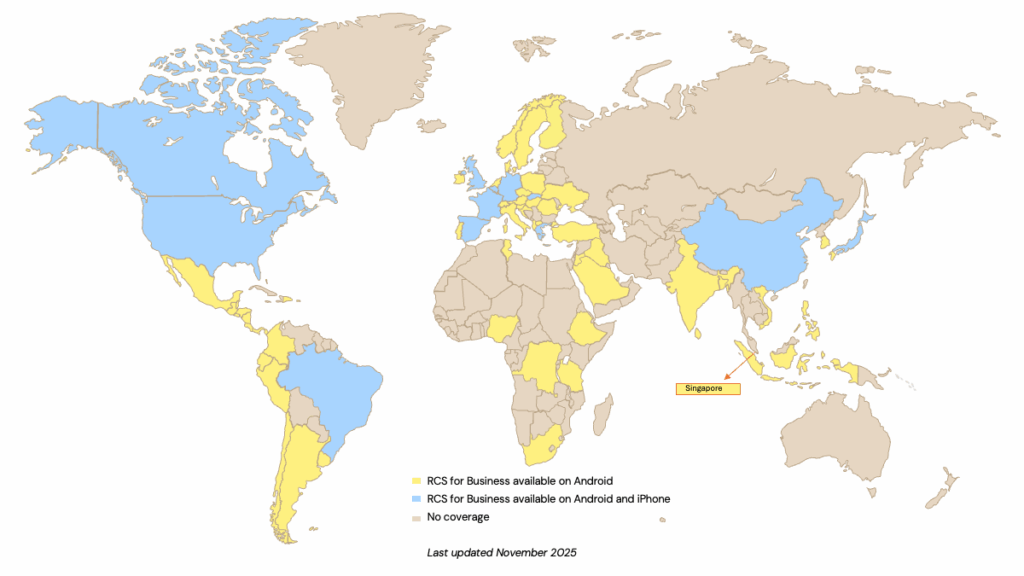
Coverage keeps expanding: RCS for Business has operator support in a growing list of countries on Android, and it’s rolling out on iOS in key markets, dependent on Apple and each carrier.
Why RCS matters for your business: 5 key benefits
In our 2025 State of customer communications survey of 1,600 business leaders, nearly 87% were already familiar with RCS – and the reasons cluster around five benefits:
- Verified identity and trust: Nearly 80% of consumers say visual indicators like logos and checkmarks increase their trust in a sender’s identity. That’s why 59% of consumers prefer RCS over SMS or MMS for verification messages like one-time passwords (OTPs).
- Engagement that shows up in the numbers: During the 2024 holiday season, RCS usage grew 111% year over year, with brands seeing 53% open rates – and RCS marketing campaigns deliver 3–7x higher click-through rates than rich SMS.
- Two-way conversations, not broadcasts: This is the real shift. SMS trained businesses to broadcast; RCS turns the thread into a two-way brand experience where customers reply with a tap, browse a carousel, or hand a question to an AI-powered chatbot – all without leaving the inbox. One-way messages actively frustrate 28% of consumers who can’t respond or ask questions.
- Analytics beyond the delivery receipt: Read receipts and engagement metrics tell you what happened after delivery, which makes RCS campaigns measurably easier to optimize than SMS ever was.
- Reach without risk: Automatic fallback to MMS or SMS means an RCS-first strategy never sacrifices deliverability. You upgrade the experience where devices support it and lose nothing where they don’t.
RCS messaging examples: What brands are achieving
Numbers from real programs beat feature lists. Here’s what three brands did with RCS – all documented in full in our customer stories.
EasyPark: Verified parking alerts at scale
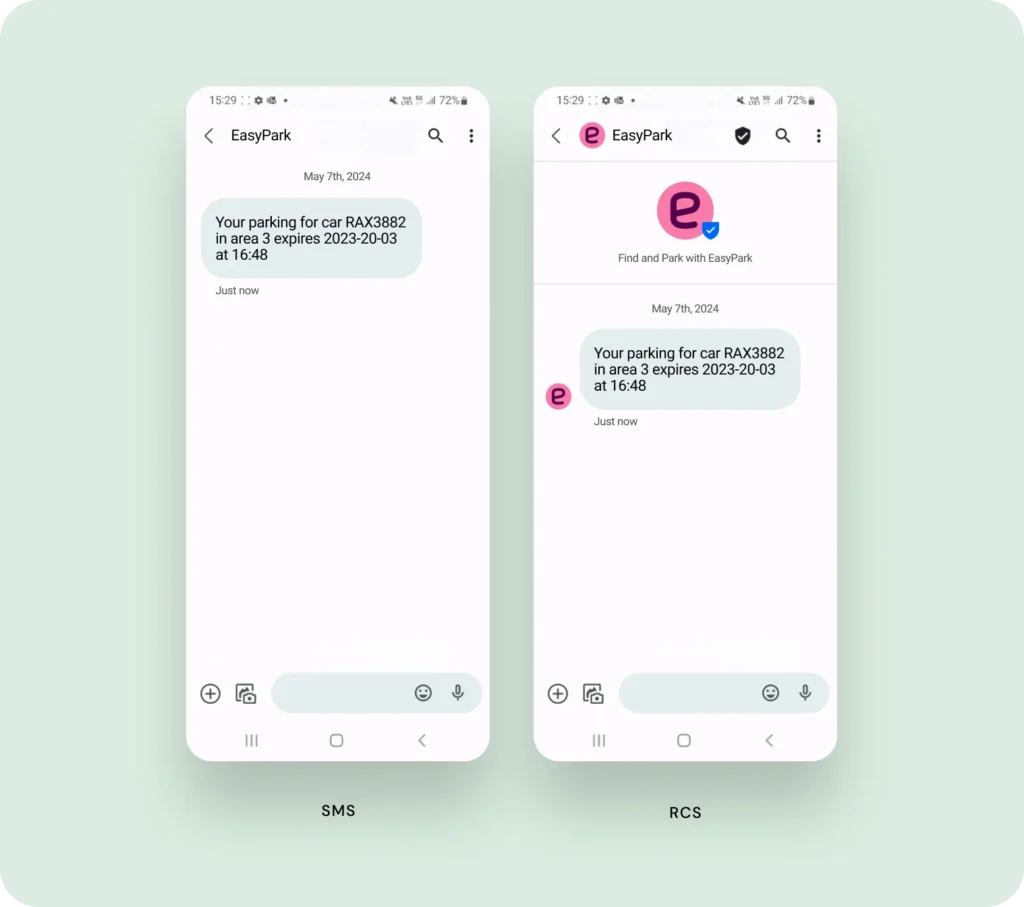
EasyPark Group, the world leader in digital parking, sends real-time parking reminders and alerts over RCS, complete with its logo and verified checkmark, falling back to SMS when a device doesn’t support it. The result? Delivery rates in Germany rose to 97.4%, with 40% of messages arriving over RCS.
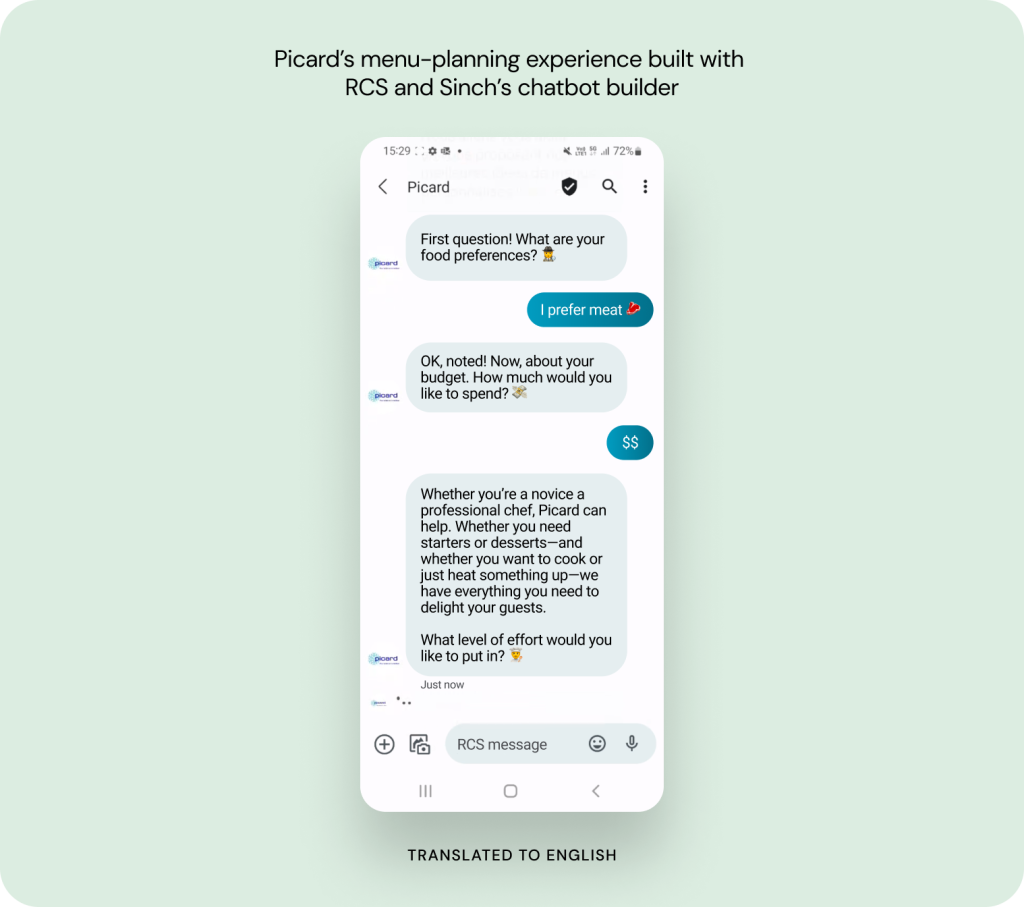
French frozen-food retailer Picard built a conversational RCS experience that helped customers plan holiday menus around their dietary preferences, budget, and appetite for cooking – entirely inside the native messaging app. Customer engagement increased 42%.
BUT: Promotions that tripled last year’s results
BUT, a leading French home furnishing retailer, moved promotional campaigns to RCS and reached a 13.5% click-through rate, generating €61,000 in additional turnover – tripling the previous year’s results.
For a wider tour of what’s working, from fraud alerts to interactive lookbooks, see our roundup of RCS use cases and examples.
Where RCS fits by industry
The same verified, interactive thread does a different job in every vertical:
- Banking and financial services: branded fraud alerts with one-tap “Freeze card” buttons, verified OTPs, and loan-application updates customers can actually trust. In financial services, 49% of organizations already use RCS. More in our guide to RCS in banking.
- Healthcare: rich appointment reminders with confirm-and-reschedule buttons, wellness campaigns, and secure patient-portal logins – 36% of healthcare organizations use RCS today and 45% plan to invest. See RCS in healthcare.
- Technology and SaaS: interactive onboarding, feature-release carousels, and verified two-factor authentication (2FA) for platform logins. See RCS for SaaS companies.
- Retail and e-commerce: product carousels customers browse and buy from, visual order tracking, and conversational returns – 76% of consumers are open to handling returns directly in a messaging app.
- Travel and hospitality: rich boarding passes, real-time gate changes, and one-tap room upgrades delivered as scannable cards.
How much does RCS messaging cost?
For consumers, RCS is free to use – it sends over Wi-Fi or mobile data rather than consuming SMS credits.
For businesses, there’s no single price for an RCS message. Pricing is set by mobile operators, varies by market and message type, and is billed either per message or per 24-hour session. Basic RCS messages are typically priced comparably to SMS, while rich, conversational messages cost more – and tend to earn it back in conversion. The full breakdown, including billing models and how RCS compares to SMS and WhatsApp on cost, is in our guide to RCS pricing.
How to turn on RCS messaging
RCS is on by default for most people, but here’s how to check – and what to do when it misbehaves.
On Android
- Open Google Messages and tap your profile picture in the top right.
- Select Messages settings, then RCS chats.
- Toggle RCS chats on. You may need to verify your phone number, and the app confirms with a “Connected” status once active.
On iPhone
- Go to Settings > Apps > Messages (or Settings > Messages on some versions).
- Tap RCS messaging and toggle it on. Your carrier has to support RCS for the toggle to appear and take effect.
Why RCS isn’t working (and how to fix it)
When RCS stops working, the message almost always still arrives as a plain SMS – the conversation just drops to the older standard. The common causes are easy to check:
- No data connection. RCS needs Wi-Fi or mobile data; without it, your phone falls back to SMS.
- The other person can’t receive RCS. Their device or carrier may not support it, or they’ve turned it off. Both sides need it.
- RCS is still connecting. After you first turn it on, it can take a few minutes – or a restart – to show “Connected.”
- A recent number or device change. Moving your number to a new phone can require re-registering RCS in settings.
How to get started with RCS for Business
Ready to put the channel to work? Here’s the path we see succeed.
- Register and verify your brand. Submit your brand name, logo, and details for verification by Google and carriers – this creates your RCS Agent, your official identity on the channel. Our enterprise guide to the RCS API walks through the process.
- Start by upgrading what you already send. Converting existing SMS traffic – alerts, reminders, OTPs – gets you verified branding and delivery insight with almost no creative lift, and fallback to SMS is built in whether you send through an API or a no-code campaign tool.
- Prove it with a clean test. Don’t take the channel’s word for it – run an A/B test with real channel isolation: RCS with fallback against the same content as pure SMS, with device eligibility checked in the control group so you’re comparing like with like. That’s the test that turns “RCS looks nice” into a business case your CFO signs off on.
- Then get conversational. Once the basics perform, layer in carousels, suggested replies, and two-way flows – the territory where RCS pulls furthest ahead of SMS. Our RCS marketing guide is the playbook for this stage.
Pro tip: If you’re a mobile operator rather than a brand, the opportunity runs the other direction – monetizing RCS traffic on your network. See RCS for mobile operators.
Frequently asked questions about RCS messaging
RCS stands for Rich Communication Services. It’s the open messaging standard, maintained by the GSMA, that upgrades SMS with verified senders, high-resolution media, read receipts, and interactive replies – all inside your phone’s default messaging app.
RCS chat is the consumer name for messages sent over RCS in apps like Google Messages. It’s standard texting with richer media, reactions, typing indicators, and interactivity turned on – not a separate app or account.
No. RCS is a GSMA standard that belongs to the mobile industry. Google is its biggest implementer – Google Messages is the default RCS app on Android, and Google’s Jibe platform carries much of the traffic – but Apple, carriers, and messaging providers all implement the same standard.
Yes. Apple has supported RCS since iOS 18 (September 2024), and end-to-end encryption for personal iPhone-to-Android chats is rolling out in beta following iOS 26.5. RCS for Business support on iOS is rolling out in key markets, dependent on Apple and carriers.
No. iMessage is Apple’s own service for chats between Apple devices. RCS is the open, cross-platform standard that upgrades green-bubble conversations between iPhone and Android and powers verified business messaging.
It depends on the conversation. Personal Android-to-Android chats in Google Messages are end-to-end encrypted by default, and cross-platform end-to-end encryption between iPhone and Android is rolling out in beta following iOS 26.5. Business messages sent through RCS for Business are encrypted in transit but not end to end.
For consumers, yes – RCS sends over Wi-Fi or mobile data rather than SMS credits. For businesses, RCS is a paid channel priced by operators per message or per 24-hour session.
Yes. RCS requires an active data connection – Wi-Fi or mobile data. If you lose internet access, the conversation falls back to SMS or MMS, depending on your device and carrier.
Messages fall back to SMS when RCS isn’t available – usually a lost data connection, an unsupported device or carrier on either end, or a recipient who has RCS turned off. The message still arrives as a standard text.
RCS for Business (previously called “RCS Business Messaging” or “RBM”) is the application-to-person version of RCS. Businesses register a verified sender profile, approved by Google and carriers, and can then send branded, interactive messages – rich cards, carousels, suggested replies – to opted-in customers, with automatic SMS fallback.
Register and verify your brand as an RCS Agent, then send through a provider like Sinch – programmatically via the Conversation API, or through no-code campaigns in Sinch Engage. Messages fall back to SMS when RCS isn’t available.
Get started with RCS messaging
RCS is what texting was always supposed to become: rich, interactive, and – for the first time – verifiable. For your business, it means the channel your customers already check dozens of times a day can now carry your brand, your buttons, and your proof of identity.
Sinch has been building on RCS since 2017 – earlier than most – and today runs more than 900 billion interactions a year for over 200,000 businesses across a direct network of 600+ carriers. That’s the infrastructure behind verified RCS with dependable SMS fallback. Explore everything Sinch does with RCS to see the full picture.
Want to keep reading first? These are the deep dives:
- RCS statistics: 24 key numbers to know for 2026
- RCS message types: A guide to RCS for Business messages
- RCS verified sender: How brand verification works
- An enterprise guide to sending RCS messages via API
Ready to send messages your customers can trust at a glance? Check out RCS via the Conversation API and start building. Or, if you’d rather talk it through first, reach out to our team – we’re excited to help you build messaging experiences your customers will love!
Last updated by Drew Wilkinson on the 17th of July 2026

Author:

Co-author: