Engage Product Updates
Let your HubSpot Breeze Agents text for you
Sinch's Send SMS action lets any Breeze Agent research a contact, draft a personalized text, and send it over SMS — with your approval, and without
leaving HubSpot. MMS, RCS, and WhatsApp are coming soon.
Breeze agents already research accounts, qualify leads, and draft outreach inside HubSpot. What they couldn’t do was reach the channel your customers answer fastest.
Now they can. Sinch Engage is named an Essential App for HubSpot, and it sits at the forefront of HubSpot’s AI messaging ecosystem — one of the first partners to make its channels available to Breeze Agents. Sinch Engage is now an action in HubSpot’s Agent Builder, so any Breeze Agent you build can read the CRM record and send an SMS as its next step — no rep, no export, no separate tool.
For sales, marketing, and service teams running high message volumes, that means:
- Autonomous prospecting outreach. Give an agent a company name and it pulls every linked HubSpot contact, checks who has a valid phone number on file, and drafts an individual, CRM-personalized messaging for each one.
- Your rep stays in control. By default nothing sends without an explicit approval step, so you see the exact message before it goes out. Reps can also turn manual approval off and let the agent send automatically.
- Compliance built in. The agent checks each contact’s SMS opt-out status and blocks the send if they’ve opted out, rather than sending anyway.
- Works two ways. As a Breeze Agent tool inside Agent Hub, and as a standard HubSpot workflow action — so teams don’t need to adopt Agent Hub to use it.
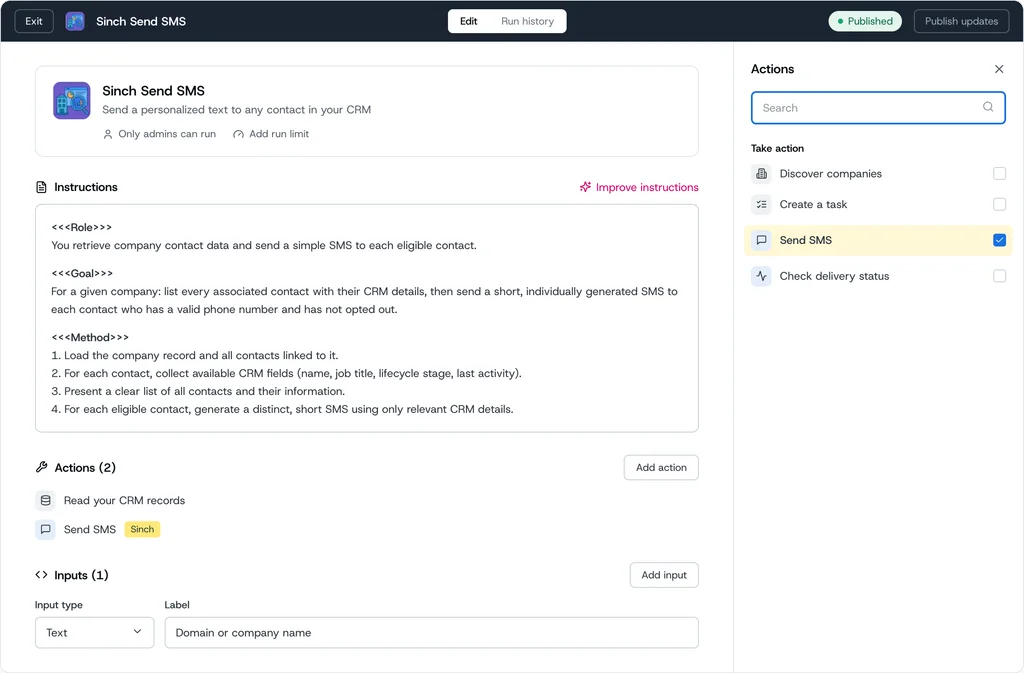
What the Send SMS action does
Give the agent a job and it gets it done. Each run returns an execution ID, a delivery status, and a failure reason if something goes wrong, so the agent can check its own work and retry or escalate. Opt-out status is checked before every send.
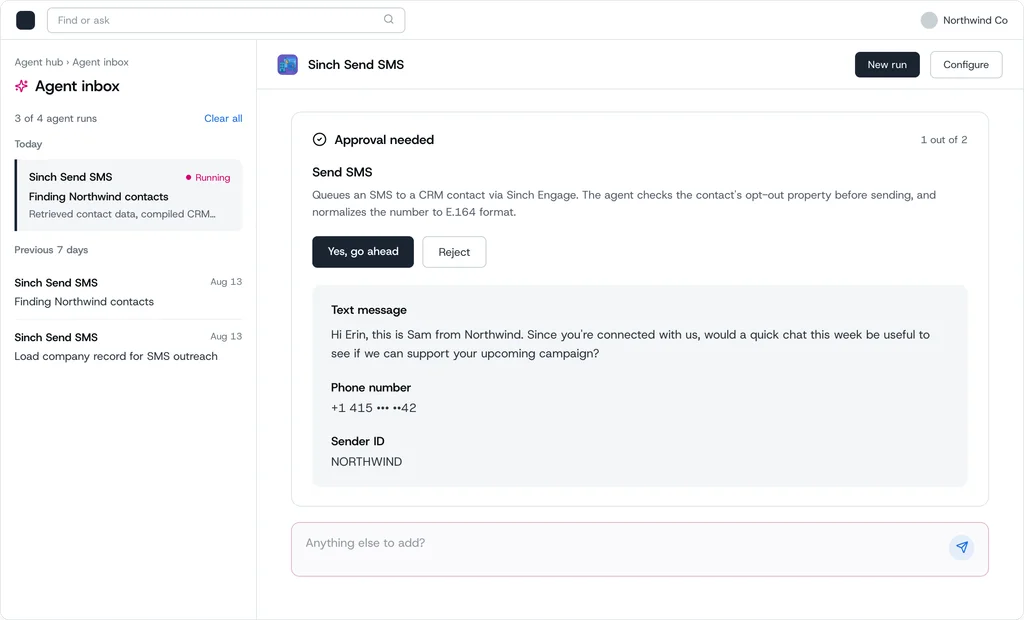
The approval request shows the exact text message, phone number, and sender ID before anything sends.
How Breeze Agents with the Sinch Send SMS action make your team more efficient
If a moment in HubSpot calls for a text, an agent can handle it. These are the patterns teams are setting up first.
Sales: catch a lead while the interest is still warm
A rep identifies a high-intent lead and asks the agent for the best next step. The agent pulls recent engagement and drafts a short follow-up. The rep reads it, approves it, and it goes out.
“For this lead, check recent mobile engagement and recommend the best outreach channel. If SMS is best, draft a short follow-up and send it.”
Marketing: get more people to show up, and keep the conversation going
Point the agent at a list — webinar registrants who chose mobile reminders, campaign responders, a target account’s contacts — and ask it to draft. It produces copy per contact using their own CRM details; you review, approve, and send — or turn approval off and let the agent send on its own once you trust the pattern. Afterwards the agent can check delivery and summarize outcomes.
“Draft a 1-hour webinar reminder for mobile. Keep it short and include the join link.”
“Find campaign responders who’d benefit from an SMS follow-up, draft short copy, and send it for my approval.”
Prospecting: reach high-value accounts on a channel they actually see
Outbound often fails because email alone is easy to ignore. For high-value accounts, a short and well-timed text creates a faster path to engagement.
Build an agent that reads CRM context about the contact, company, and recent activity, decides when an SMS follow-up is appropriate, sends it through Sinch, and hands off to the owning rep when the prospect engages. Good triggers: a high-intent form with no meeting booked, prior outreach opened but not answered, a missed meeting, or a stalled conversation the rep wants to restart.
Say a senior contact at a target account engages lightly but never replies. The agent reviews the account and sends:
“Hi Sarah — reaching out because many teams are reworking how they handle customer messaging across SMS, voice, and email. If helpful, I can share a few ideas tailored to your setup. Open to a quick intro next week?”
If they respond, the rep takes over. Keep it to high-intent contacts, cap frequency, one clear ask per message, and stop after a reply or opt-out.
Not every motion needs an agent, either. Because Send SMS is also a standard workflow action, a demo request or a lead score change can trigger the message on its own — set the trigger once and it runs for every contact who meets it. As MMS, RCS, and WhatsApp become available, the same agents will be able to pick a richer channel for the moments that need one.
How to set it up
- Connect Sinch Engage to HubSpot. Install the integration and authenticate your Sinch Engage account.
- Create an agent in Agent Builder. Give it a role, a goal, and a method — for example: load the company record and its contacts, collect the CRM fields you want to personalize with, then send one short SMS per contact with a valid mobile number.
- Add the Sinch Send SMS action. In the actions panel, search for Send SMS under “Take action”, add it, then map the phone number, message, sender ID, and contact ID.
- Run it, or automate it. Publish the agent and run it from Agent Hub, or skip Agent Hub and use Send SMS as a standard workflow action, triggered by something like a demo request or a lead score change.
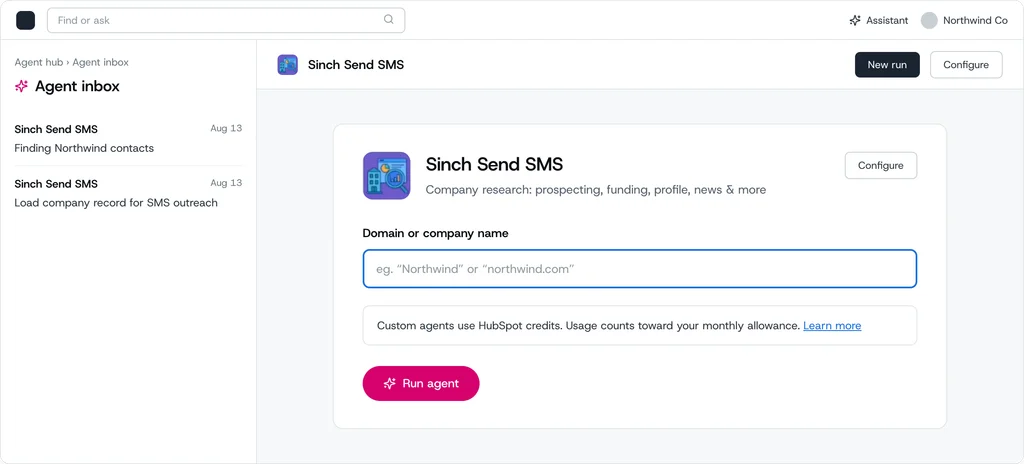
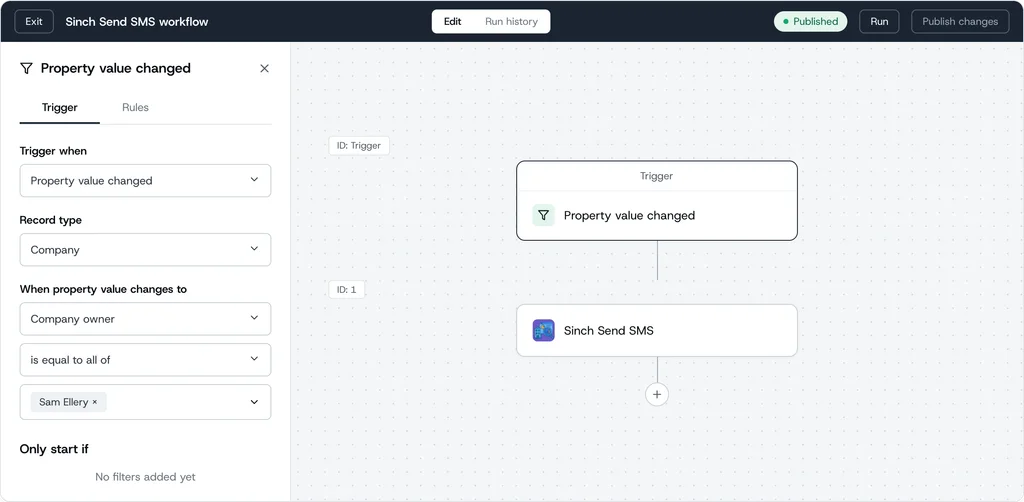
Consent, logging, and traceability stay intact throughout: the agent checks opt-out status before every send, nothing goes out without approval, every message is written back to the contact in HubSpot, and delivery and reply data is available in Sinch Engage reporting.
Ready to get started?
- Find step-by-step setup guidance in the Sinch help center.
- Not a Sinch Engage customer yet? Talk to our team to learn how you can start automating your support and improving your customer communications.
- Browse more HubSpot text messaging resources.