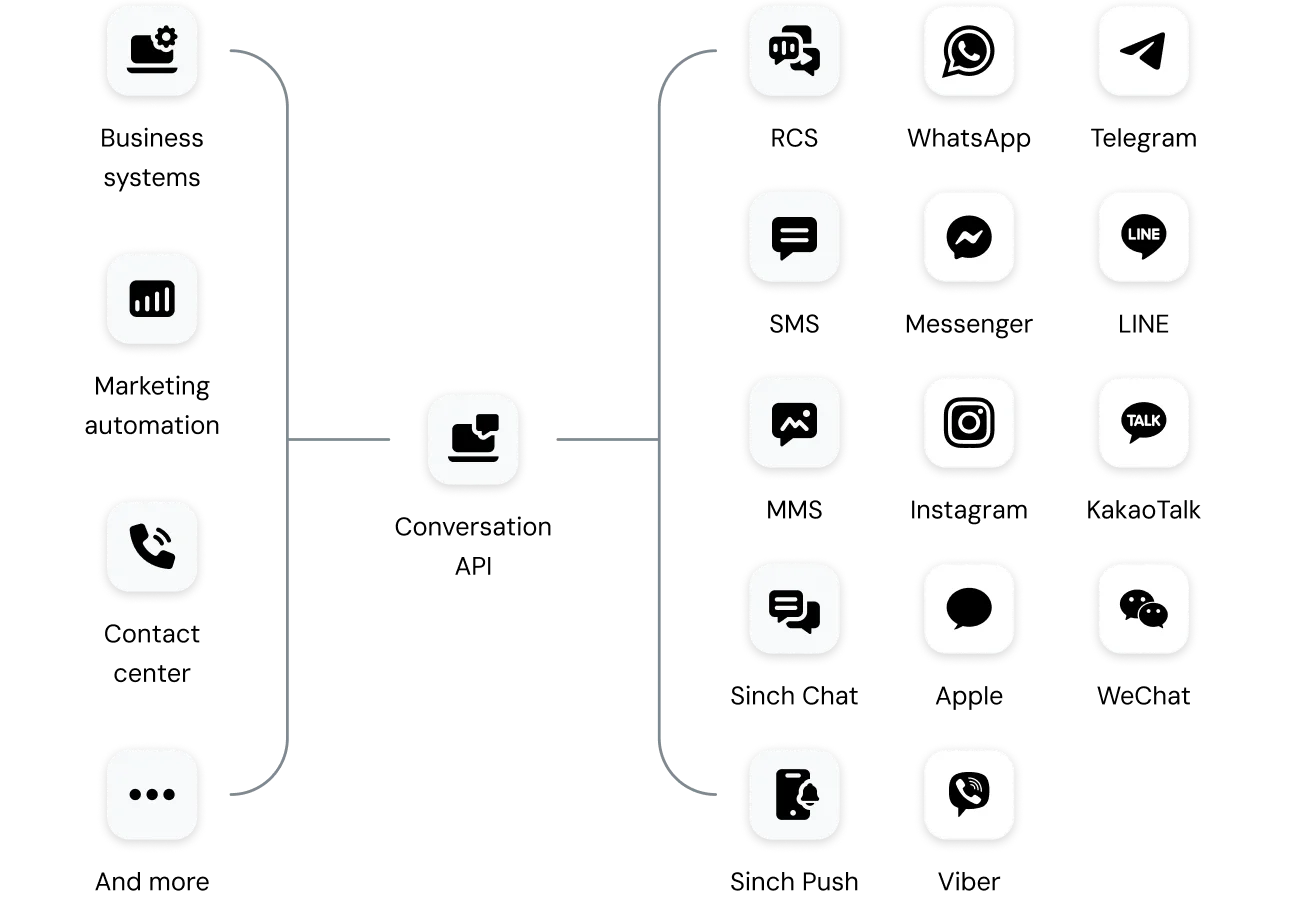
GET YOUR MESSAGES READ

Reliable delivery with smart channel routing

Automatically route your messages with Channel Priority Fallback (available through the Sinch Conversation API). Set the order of channels you prefer, and the API will try them in that order—falling back to the next option if a higher-priority channel can’t deliver. 
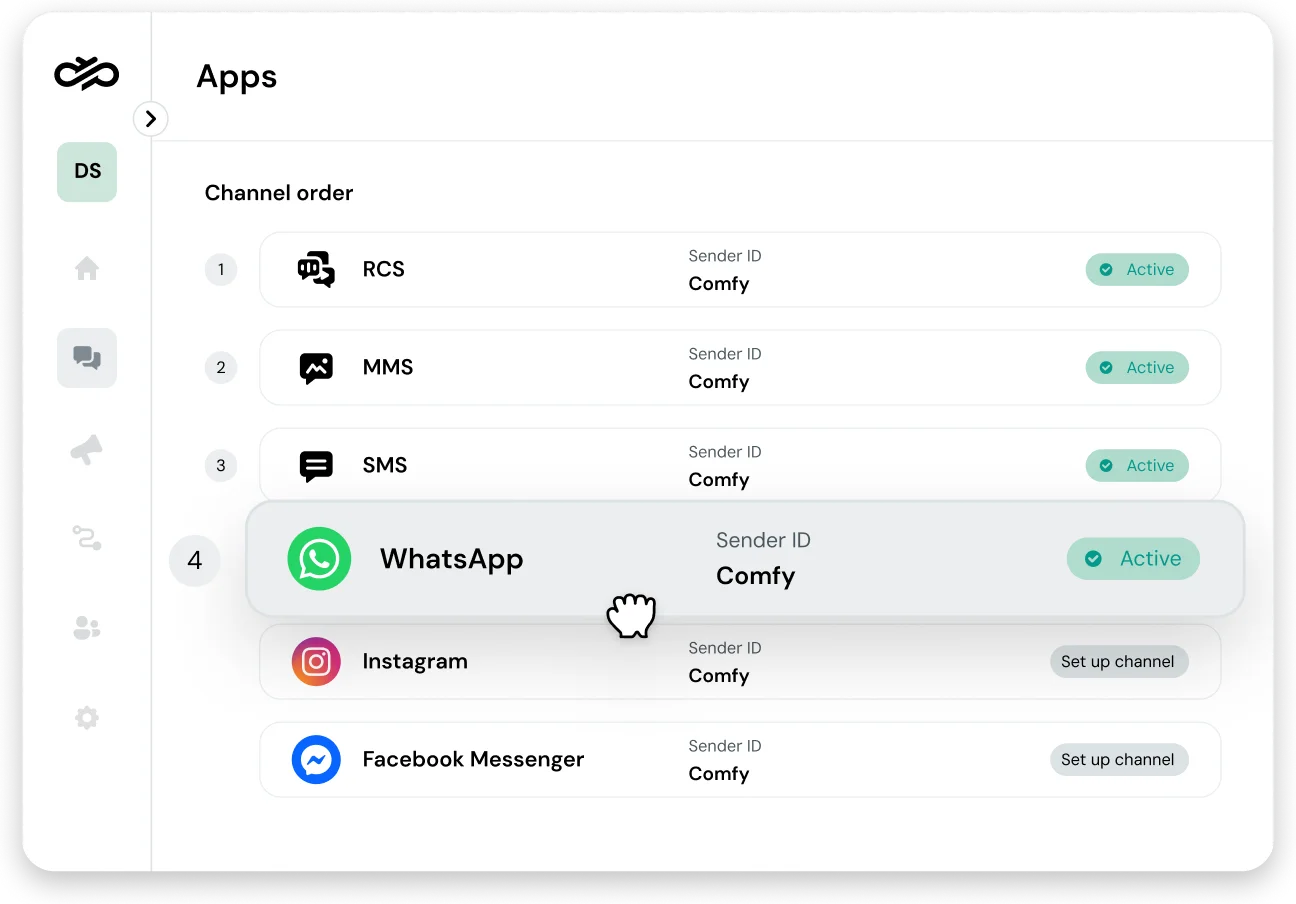
Image for Reliable delivery with smart channel routing

WHAT MAKES IT GREAT

Why teams love Conversation API’s channel priority and fallback

No more worrying about failed notifications, ballooning costs, or messy “if-then” code. With channel priority in the Conversation API, you get dependable delivery, smarter spending, and the reliability of a Tier-1 global network.

Reach user reliably

Smart routing checks where your users can be reached and automatic switches channels when needed—no manual steps or monitoring.

Flexible channel choices

Put low-cost channels first and keep SMS fallback as a safety net. You only pay once for the delivered message and nothing for fallback attempts.

Simpler, cleaner code

Replace complex branching with a single array in your API call and let Sinch handle the delivery strategy, timing, and ordering for dependable delivery.

REACH USERS WHEN IT MATTERS 

Don’t rely on one channel for mission-critical message

Channel priority automatically delivers your message on the best available channel, and seamlessly falls back when one can’t get through. Whether a customer switches devices, loses connectivity, or moves between networks, your message still arrives.

  • Keep delivery rates high

  • Remove manual monitoring and resends

  • Protect customer trust during time-sensitive events

Image for Don’t rely on one channel for mission-critical message

COST-AWARE MESSAGING 

Cut messaging costs with customizable routing 

Put low-cost channels first and use more expensive fallback channels only when needed. You’re billed once for the successful delivery, so you scale affordably without sacrificing reach. 

  • Keep reliability high while minimizing cost 

  • Lower your per-message cost by defaulting to efficient channels 

  • Deliver consistently across markets, devices, and network conditions 

Image for Cut messaging costs with customizable routing 

DEVELOPER PRODUCTIVITY 

Ship faster without complex channel logic

A single array encodes your delivery strategy while the API handles timing and retries behind the scenes. Your team ships faster and spends less time on maintenance.

  • One-line declarative delivery strategy

  • Configure fallback timing from the dashboard

  • Free developers up to focus on high-value work

Image for Ship faster without complex channel logic

REAL-WORLD SCENARIOS

Where channel priority and fallback shines

Cost-effective critical alerts

Automatically try WhatsApp first for service alerts, then fall back to SMS so important messages never get missed—at the lowest possible cost.

Engaging marketing campaigns

Send rich RCS promos for an immersive brand experience and switch to SMS for customers on unsupported devices.

User onboarding and engagement

Welcome new users on their favorite chat app or get instant SMS fallback to secure immediate engagement if the app isn’t installed.

Critical customer updates

Share order confirmations, shipping alerts, or appointment reminders with dependable reach through smart, multi-channel routing.

FEATURE DETAILS 

What’s inside channel priority and fallback

Customizable priority order

Choose the exact order of channels for each message to match your business needs.

Automatic fallback logic

If one channel can’t deliver, the API automatically tries the next one. 


Contact-aware sending

Uses contact ID reachability data to avoid unnecessary attempts and speed up delivery.

Configurable fallback timing

Choose custom delays between attempts or use smart defaults from the dashboard.

Override priorities

Force a specific channel when business needs call for a different path. 


Works with all channels

Combine any channels supported by the Conversation API for true omnichannel reach.

Complete API-level control

Manage delivery strategy directly in the API—no complex UI setups required.


Cost-aware logic

Built-in intelligence helps you stay within budget at a global scale. 


Frequently asked questions about channel priority and fallback

Channel priority lets you set the order of channels in your API request. If the first channel can’t deliver, the API automatically tries the next—often SMS—to make sure the message gets through. All Conversation API features follow global compliance standards, including GDPR. 

Omnichannel Templates define how a message looks on each channel. Channel priority controls where the message gets sent first. You can use them together for rich, reliable messaging. 

Include a channel_priority_order array in your SendMessage call (for example, [“RCS”, “WHATSAPP”, “SMS”]). The API checks reachability, sends on the first channel, waits for your configured delay if needed, then tries the next channel until delivery succeeds.

The API only sends the message on the single channel you provide. It doesn’t use fallback unless a network-level failover (like RCS to SMS) exists.

No. You’re charged for the message that delivers successfully; all fallback attempts are free.

Any channel supported by the Conversation API like SMS, WhatsApp, RCS, and more, can be combined in any order that fits your strategy.

Yes. Set a custom fallback delay in the Sinch Dashboard or use the default timing to balance speed and user experience.

You need an active Sinch account and access to the Conversation API within your project.

Talk to an expert about Channel priority and fallback

Learn how you can get reliable message delivery with channel priority and SMS fallback in the Sinch Conversation API—all on 14 of the world’s most popular messaging apps.