Resources
How to register your SMS sender ID with ACMA

The SMS Sender ID Register is now live in Australia. Since July 1, 2026, any branded text sent from an unregistered sender ID shows up as “Unverified” – grouped in the same thread as suspected scams.
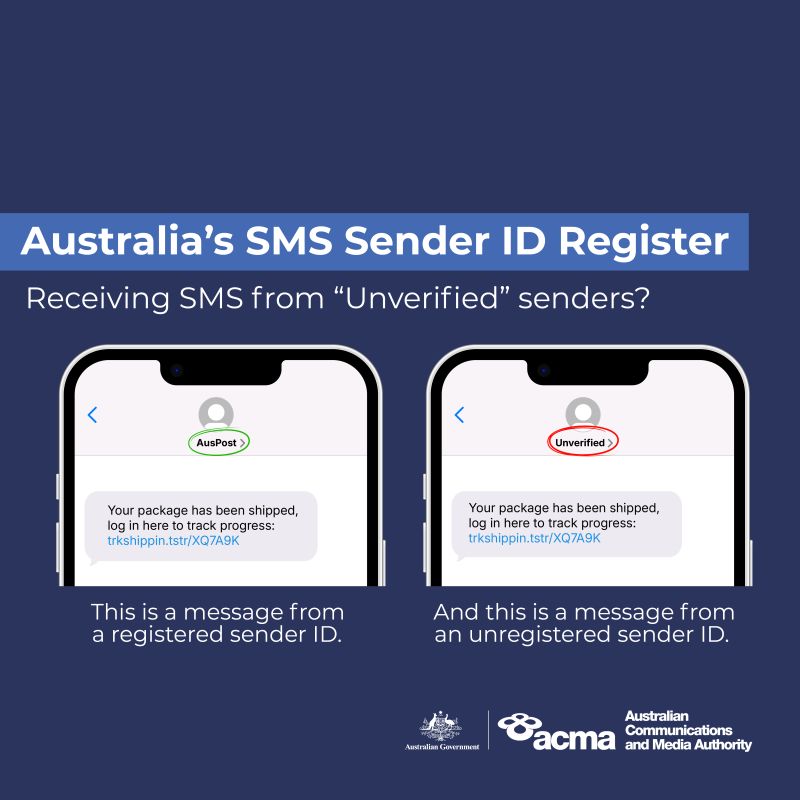
I work on messaging applications and APIs at Sinch, and I’ve been helping our team communicate this ACMA sender ID rollout across our Australian customers since applications opened. Most of what’s written about the register just restates the regulation. What I want to do here is translate it into what you actually have to do to get your ACMA sender ID registered – and, since you’ve landed here after July 1 and your texts may already be showing as “Unverified,” how to fix that fast.
Here’s the short version before we get into it:
- You register through an approved telco or message provider – not directly with ACMA.
- Your sender ID must be 2 to 11 characters and clearly match your organisation.
- Unregistered branded texts now display as “Unverified” to the people you message.
What the ACMA SMS Sender ID Register is
The SMS Sender ID Register is a system that verifies the branded names businesses use to send text messages. A sender ID is the name at the top of a text, like “ATO,” “AusPost,” or “myGov,” that tells you who a message is from. The Australian Communications and Media Authority (ACMA) runs the register so that only verified organisations can send texts under a given brand name.
The goal is to make it harder for scammers to impersonate trusted brands. Australians lost more than $13.8 million to text message scams in the first nine months of 2025, according to the ACMA. Most of those scams copied the sender IDs of well-known organisations to slip into genuine message threads.
How the register came about
Australia didn’t stand up the register overnight. The ACMA consulted on the draft rules from March 2025, opened applications on November 30, 2025, and switched on enforcement – the point where unregistered sender IDs start showing as “Unverified” – on July 1, 2026. It sits inside the government’s wider Fighting Scams initiative, which also requires telcos to trace and block scam calls and texts.
Sender IDs used to be easy to spoof, which is exactly what scammers exploited to drop fake messages into a real brand’s thread. The register closes that gap by tying each branded name to a verified organisation.
What “Unverified” means for your texts now
Since July 1, 2026, texts sent from a sender ID that isn’t registered no longer show your brand name. The name is replaced with the word “Unverified,” and those messages are grouped into a single thread alongside other unverified and potential scam texts. Most people treat that thread with suspicion.
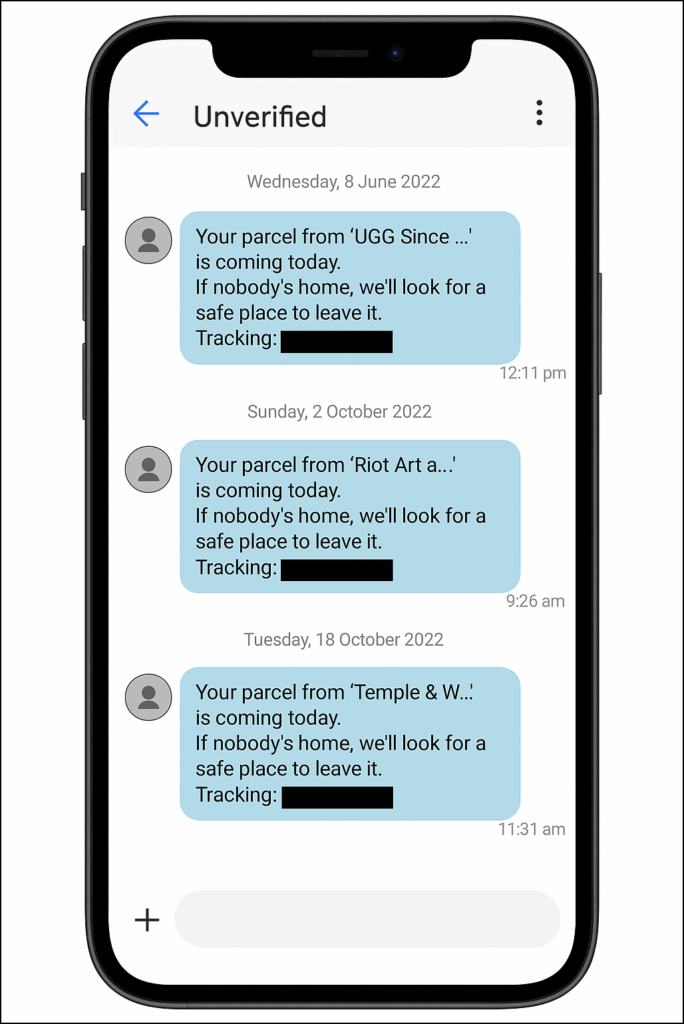
For a business, that’s a real deliverability and trust problem. If your sender ID isn’t registered yet, your customers are seeing “Unverified” instead of your name today – so the fix is to register it as soon as you can. Registration is still open, and the steps below walk through it.
You’ve really got three options for an unregistered sender ID:
- Register it and get your business name back,
- Keep sending as “Unverified” as a short-term stop-gap, or
- Stop using it and switch to a dedicated number.
If you send through Sinch Engage, formerly MessageMedia, your options for an unverified sender ID are laid out in more detail, including where the reminders show up in the platform.
Who needs to register
The register applies to any business or organisation that sends branded texts to Australian mobile numbers. How you register depends on your situation.
Businesses and organisations with an ABN
If you have an Australian Business Number and send branded texts, you need to register your sender ID. This covers companies, sole traders, government entities, not-for-profits, and agencies sending on their own behalf.
Your sender ID has to match your registered business name, company name, trademark, or domain name.
Groups and organisations without an ABN
You can still register without an ABN – for example, a community group, school, or overseas body. Your sender ID must match your trademark or a name on an official register in the country where you’re based.
The identity checks are a little different, and most senders in this group register through a certified provider. If you send through Sinch Engage, there’s a specific flow for registering without an ABN.
Organisations sending texts into Australia from overseas
The register applies wherever the message lands, not where it’s sent from. If you send branded texts to Australian mobile numbers from outside the country, you need a registered sender ID, too.
Register through a participating provider like Sinch Engage so your messages aren’t relabelled as “Unverified.”
Rules your sender ID has to meet
Before you register, check that your sender ID fits ACMA’s criteria. A sender ID that breaks these rules will be rejected, so it’s worth confirming before you apply.
- Length and characters: Between 2 and 11 characters, using standard letters, numbers, and symbols. It can’t be numbers only.
- Linked to you: The name must match your business name, company name, trademark, or domain – or a shortened version or acronym of it.
- Restricted words: It can’t contain “Unverified,” restricted terms, or anything offensive, deceptive, or misleading.
- Formatting details: No leading or trailing spaces or underscores. Sender IDs aren’t case sensitive, so “ABC” and “abc” are treated as the same.
How to register your sender ID
You don’t register with ACMA directly. You register through a telco or message provider that participates in the register, and they submit your sender ID to ACMA on your behalf.
The process comes down to three steps.
If you send through Sinch Engage, the step-by-step registration guides cover each situation in detail.
1. Contact your provider. Reach out to each telco or message provider you use to send branded texts, and check they’re on ACMA’s approved list. You have to register through every provider you send with – registering with one doesn’t cover the others.
2. Provide your sender IDs. Give your provider the sender IDs you want to register and show a valid use case for each one. That means proving the sender ID matches your identity and is clearly linked to your organisation. Make sure your details on the Australian Business Register are current first.
3. Confirm and verify. You’ll pass checks that verify your organisation, your identity, and your authority to act for it – usually using myID. Once ACMA reviews the application, your provider notifies you by email. Review times vary, but a straightforward registration usually takes a few business days – often around three to five – from submission to your business name being restored.
Here’s the one thing we’ve learned at Sinch Engage that we’d do differently from the official instructions.
ACMA’s own guidance has your authorised representative set up ACMA Assist – the government portal that confirms who can act for your business – after the application is submitted, by clicking a link in an email.
In practice, that email is the single most common reason registrations stall: it goes to the contact on the application, who often isn’t the person authorised to approve it.
Set up ACMA Assist first.
Your authorised representative needs the myID app at Standard identity strength, your ABN, and the email listed for your business on the Australian Business Register.
Sender ID registration is one piece of ACMA compliance
Registering your sender ID sits alongside the rules that already applied to business texting in Australia under the Spam Act 2003. Those rules haven’t gone away, and the register doesn’t replace them.
To send commercial SMS legally, you still need three things in every message:
- Consent: Collect explicit opt-in and keep a record of when and how each contact agreed.
- Identification: Send from a registered sender ID so recipients can see it’s really you.
- Opt-out: Include a clear option like “Reply STOP to opt out” and action it immediately.
A registered sender ID handles the identification part and makes it obvious – but consent and opt-out are still on you.
This is not legal advice. It’s general information only – check with your own compliance or legal advisers for your situation.
Registering your sender ID with Sinch Conversation API, Sinch Verification API, or Sinch Engage
Both Sinch and Sinch Engage, formerly MessageMedia, are on ACMA’s approved list of telcos and message providers. That means you can register your sender ID directly through the platform you already send with, rather than piecing the process together yourself.
Inside Sinch Engage, the registration flow pulls your business details from the Australian Business Register, checks your sender ID against your registered details, and walks you through naming an authorised representative.
It turns ACMA registration into a guided flow rather than a manual task. Our compliance team reviews the application before it goes to ACMA, and you can track its status through to approval.
In practice, that means:
- Prefilled details: Your business information is retrieved from the ABR automatically.
- Built-in validation: The platform confirms your sender ID matches your registered business.
- Tracked submission: Our team reviews and submits to ACMA, and you follow the status in-app.
If your branded texts are showing as “Unverified” right now, registering your sender ID is the fix – and it’s the thing worth doing today rather than next week.
Frequently asked questions
The SMS Sender ID Register is an Australian register, run by the ACMA, that verifies the branded names businesses use to send text messages. Once a sender ID is registered, only the verified organisation behind it can send texts under that name.
Any business or organisation that sends texts using a branded name (rather than a phone number) to Australian mobiles must register an SMS sender ID. This applies to Australian and international senders, and to groups with or without an ABN.
Since July 1, 2026, branded texts from unregistered sender IDs have their name replaced with “Unverified” and are grouped with suspected scam messages. That damages customer trust, so the fix is to register as soon as possible.
Contact each telco or message provider you send with, give them the sender IDs you want to register, and show a valid use case for each. Make sure your details on the Australian Business Register are current, then verify your identity using myID.
You can still register through a certified provider. Instead of an ABN, your sender ID needs to match your trademark or a name on an official register in the country where your organisation is based. A registration fee may apply for non-ABN sender IDs, so check with your provider.
It varies with the complexity of the application. A straightforward registration usually takes a few business days – often around three to five – from submission to approval. Setting up ACMA Assist before you submit is the best way to avoid delays.
Yes. A sender ID can be registered and used by multiple organisations, as long as each one can prove its own valid use case for it.
No. You register through a telco or message provider like Sinch Engage, formerly MessageMedia, that participates in the register, and they submit your sender ID to ACMA for you. You need to register through every provider you send with.

Author: