SEND MESSAGES EASILY 

Batch and schedule messages with one API request
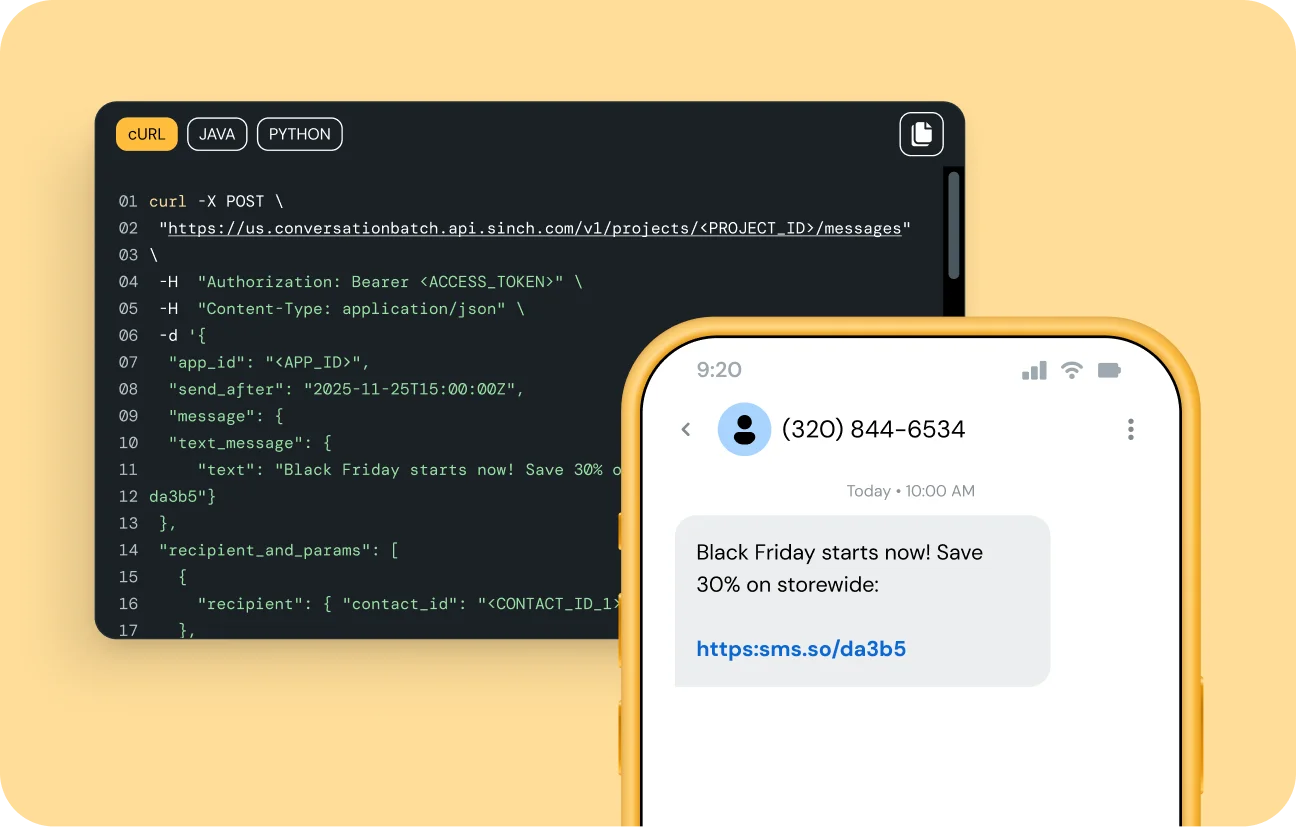
Use the Sinch Conversation API to batch and schedule personalized messages and choose whether they go out now or later. Reach up to 1,000 recipients in one call with no extra code or added fees.

Image for Batch and schedule messages with one API request

WHY IT MATTERS

Get efficiency, timing, and reach without extra engineering

Message batching and scheduling removes the heavy lifting of high-volume sends and complex schedulers. With one endpoint, you can batch and schedule messages, cut thousands of calls, get read at the ideal moment, and reach customers on any Conversation API channel. 

Scale without the strain

Send one request to more recipients and avoid the time, cost, and risk of looping individual API calls.

Perfect timing, zero effort

Messages get delivered exactly when you choose. Just set the time and you’re done.

Better developer experience

We provide the complex scheduling and high-volume sending infrastructure, so your team can build faster with less upkeep.
Image for Cut large sends down to a single, stress-free request

ELIMINATE COMPLEXITY 

Cut large sends down to a single, stress-free request

Stop wrestling with rate limits and endless loops. Use one POST to batch and schedule messages and let Sinch handle delivery, retries, and monitoring behind the scenes. 

  • Reach up to 1,000 recipients per call

  • No custom sending logic to write

  • Real-time batch status tracking

Image for Schedule campaigns and reminders in minutes, not months

AUTOMATE TIMING 

Schedule campaigns and reminders in minutes, not months

Move beyond one-time bulk sends to well-timed conversations. With a single parameter, you can batch and schedule messages up to a week ahead of time, freeing developers from extra work.

  • Works with just one parameter

  • Schedule once, reuse anytime

  • Cancel or adjust before send time

Image for Run omnichannel campaigns from the same trusted endpoint 

SCALE EVERY CHANNEL

Run omnichannel campaigns from the same trusted endpoint 

Other tools limit bulk sending to SMS, while our feature is native to the Conversation API. It lets you batch and schedule messages across any channel, from simple SMS to interactive RCS. Launch rich, interactive campaigns without duplicating code or integrations.

  • Same code for SMS, RCS, and WhatsApp

  • Works with any supported message type

  • Future channels automatically included

FEATURES THAT JUST WORK 

Everything you need to batch, schedule, and control messages

Up to 1,000 recipients

Reach a large audience with a single request instead of thousands of individual calls.

Future send parameter

Choose the exact delivery time and let Sinch handle the rest.

Cancel scheduled batches  

Stop or update any batch before it starts sending for total control.

Real-time status checks

Track delivery progress and performance with a simple query.

Single POST endpoint

Integrate quickly using one unified /v1/batches call.

Batch ID tracking

Easily manage, audit, and troubleshoot each batch with a unique identifier.

Works on every channel

Use SMS, RCS, WhatsApp, and all Conversation API channels with the same workflow.

No added fees

You only pay the standard per-message rate on the channels you use. 

WHERE IT WORKS

From flash sales to critical alerts

Promotional marketing campaigns

Schedule a flash sale announcement to reach your entire subscriber list on Friday at 9 AM, hitting inboxes when engagement is highest. 

Appointment reminders  

Automatically queue reminders for next week’s patients 24 hours before their appointments to help reduce no-shows.


Time-sensitive alerts

Set maintenance or service notifications ahead of time, so customers know what to expect.


Recurring notifications

Configure daily or weekly messages, like appointment reminders or news digests, to send automatically when your audience expects. 

Frequently asked questions 

Send a single POST to /v1/batches with your recipient list. To schedule delivery, include the send_after parameter with your desired date and time. 

Batching sends the same message to many recipients at once. Scheduling sends a message at a chosen future time. You can combine both in one request.

Yes. Use the batch ID to cancel or modify any scheduled batch as long as it hasn’t started sending. 

No. Message batching and scheduling is free to use. You’re only billed for the normal per-message price once messages are sent. 

All Conversation API channels, including SMS, RCS, WhatsApp, and more.

You need an active Sinch account and access to the Conversation API to get started.


                                $client = new Clx\Xms\Client("{spid}", "{token}");
                    $batchParams = new \Clx\Xms\Api\MtBatchTextSmsCreate();
                    $batchParams->setSender("12345");
                    $batchParams->setRecipients(["46123123123"]);
                    $batchParams->setBody("Hello, World!");
                    try {
                        $result = $client->createTextBatch($batchParams);
                        echo("Successfully sent batch " . $result->getBatchId());
                    } catch (\Clx\Xms\ApiException $ex) {
                        echo("Failed to communicate with XMS: " . $ex->getMessage() . "\n");
                    }


                                const targetPosition =
                    element.getBoundingClientRect().top + window.pageYOffset + offset
                    const startPosition = window.pageYOffset
                    const distance = targetPosition - startPosition
                    // Initialize a start time for the animation
                    let startTime = null


                                echo "test";


View our documentation

See how to batch, schedule, and automate messaging at scale with Conversation API.

Talk to an expert about message batching and sending

Learn how you can send campaigns to thousands of recipients immediately or schedule them for later with one easy API call.