Engage Product Updates
Redesigned Campaign Metrics Dashboard: Measure your total messaging performance
Analyzing campaign reports one by one is slow and makes it difficult to see the bigger picture. You can’t spot trends or measure your total impact when you’re stuck in the details of individual sends.
Our new Campaign Metrics Dashboard changes that.
We’ve overhauled our reporting experience to give you a centralized, aggregated view of all your campaign activity, giving you the insights you need to understand your overall performance at a glance.
What’s new with the Campaign Metrics Dashboard
1. See the big picture with a unified dashboard
With the redesigned dashboard, you gain an aggregated view of all your campaigns over a specific time period.
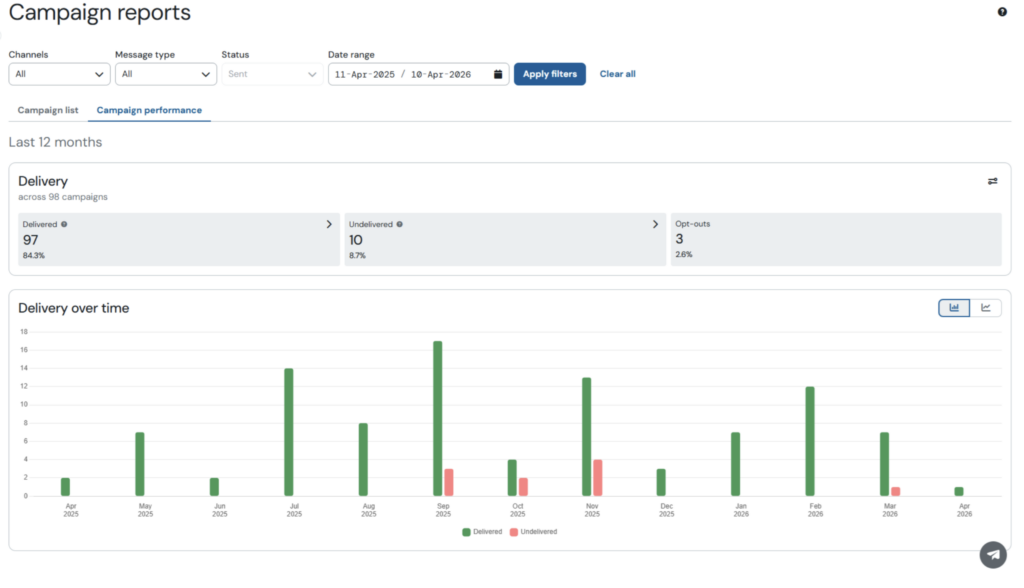
Instead of analyzing reports one by one, you can now track key metrics like delivery and engagement across all your messaging efforts from a single, unified view.
2. Customize your reports
Your dashboard should work for you. We’ve added the ability to customize the metrics and columns that are displayed in your reports.
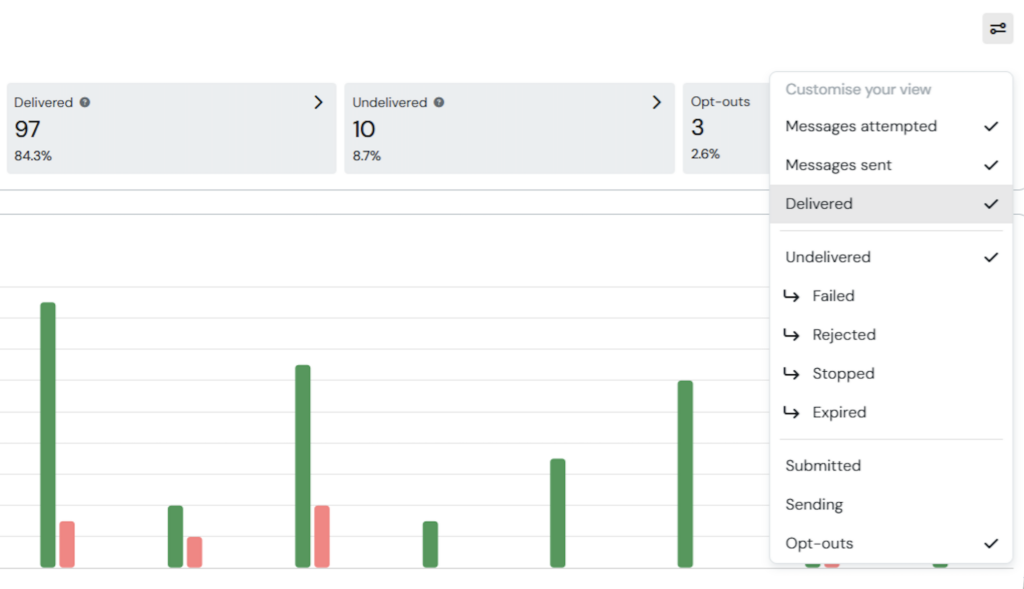
This helps you focus on the data that matters most to your business and hide the rest. Your preferences are saved, so your dashboard is always set up just the way you like it.
3. Navigate to the right data faster
We’ve also refreshed the design to make your data easier to read and understand. The new layout highlights key information, helping you spot trends and evaluate performance more effectively.
The new Campaign Metrics Dashboard is now available for all Sinch Engage customers. Log in to your account to explore the new features.
How to use the new dashboard
You can start using the new Campaign Metrics Dashboard today.
- Navigate to Campaign Reports: From your Sinch Engage account, go to “Campaign Reports” under the “Messaging” section in the main menu.
- Switch to Campaign Performance: You will land on the Campaign list table which shows individual details of all your campaigns. Click on the “Campaign Performance” tab to view the new metrics dashboard.
- View the data that matters to you: Use the filters and date picker to view the performance of all your campaigns, or just the details of those that matter most.
Ready to get started?
Log in to your Sinch Engage account to explore the new dashboard today.
- Find step-by-step guidance in our Campaign Reporting support docs.
- Not a Sinch Engage customer yet? Talk to our team to learn how you can improve your customer communications.