Engage Product Updates
HubSpot Custom Objects Integration: Automate messaging using your unique business data
Managing customer communications with generic data fields can be limiting. You know how it goes: your business runs on unique data like event registrations, property listings, or product subscriptions, but your messaging workflows are stuck with standard Contact and Deal properties. This creates data silos and missed opportunities for timely, relevant communication.
Our expanded integration with HubSpot Custom Objects changes that.
Now, using our HubSpot texting integration, you can connect Sinch Engage directly to the custom objects that power your business. This allows you to automate messaging based on the data that matters most to you, turning your unique business processes into powerful communication workflows.
This update deepens our partnership with HubSpot and adds significant value to our existing integration, helping busy teams:
- Automate highly targeted campaigns based on unique data points, from pet care appointments to vehicle service reminders.
- Free up your team’s time by triggering workflows that automatically send the right message at the right time.
- Improve customer engagement with personalized, data-driven messages that align perfectly with their journey.
What’s new with HubSpot Custom Objects + Sinch Engage
1. Trigger workflows from any custom object
Your business isn’t one-size-fits-all, and your data shouldn’t be either. This integration lets you build workflows that start when a record in a custom object is created or updated.
Whether it’s a “Pledge” object for a non-profit, a “Listings” object for a real estate agency, or a “Show” object for a production company, you can now automate SMS and MMS messages based on that specific data. This finally connects your core business operations directly to your communication strategy.
2. Send 1:1 messages from a custom object record
Communication is a two-way street. In addition to automated workflows, you can now send direct 1:1 messages (like SMS and MMS) from within the custom object record view itself.
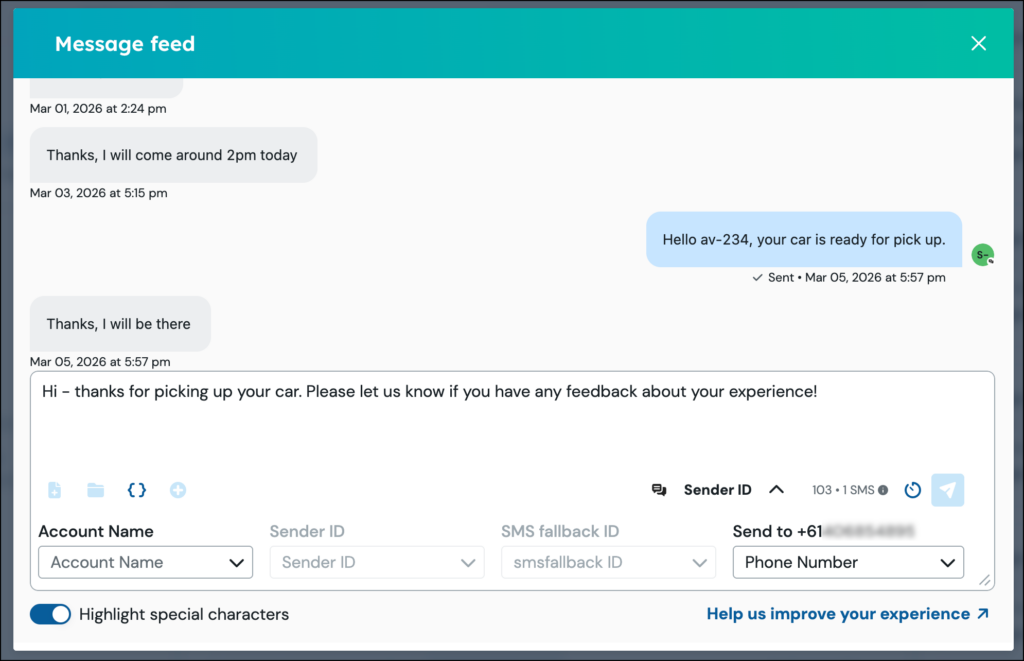
This allows your sales, support, and marketing teams to have contextual, one-on-one conversations without leaving HubSpot. All inbound and outbound messages are mapped to the custom object record, ensuring every interaction is tracked and available for your team to see.
How it works: Get started with custom objects
You can start leveraging custom objects in your messaging workflows today.
- Build Your Custom Object: In HubSpot, define and create your custom object to model your unique business data. Ensure it includes a field with a phone number data type.
- Create a Workflow: In the HubSpot Workflow builder, select your custom object as the trigger criteria. You can start a workflow when a record is created or a specific property is updated.
- Add the Sinch Engage Action: Drag the Sinch Engage “Send SMS” action into your workflow and configure your message. Once activated, your automated messaging is live.
The value of using Sinch’s integration with HubSpot Custom objects
For teams that rely on HubSpot to manage complex business processes, this update is a powerful new way to improve your operations. It connects Sinch Engage’s robust messaging capabilities directly to your most critical data, giving you a powerful set of capabilities to:
- Create truly personalized messaging: Customers receive messages based on the specific data you track about them, leading to more relevant and effective communication.
- Unify your data and communications: All messaging activities, whether automated or 1:1, are recorded directly on the custom object timeline, creating a single source of truth for every interaction.
- Scale your unique business processes: Automate communications for any workflow, no matter how specific, allowing your team to focus on high-value tasks instead of manual messaging.
Ready to get started?
Get the most out of this new release with these helpful resources:
- Find step-by-step guidance on our support docs for how to send messages from a HubSpot custom object.
- Not a Sinch Engage customer yet? Talk to our team to learn how you can start automating your customer communications.
- Discover more HubSpot text messaging resources.