Resources
A complete guide to SMS in NetSuite: Automate texts for reminders, field service, and more

NetSuite powers over 43,000 organizations worldwide as the backbone of financials, CRM, inventory, and ecommerce operations. As online commerce continues to accelerate, customer interactions must happen in real time – and that’s where SMS comes in.
Text messaging from within NetSuite allows businesses to engage customers instantly on the device most of them are on constantly: their phone. With over 90% of text messages read within 3 minutes of delivery, SMS offers unmatched immediacy, visibility, and engagement.
This guide outlines best practices for implementing SMS and MMS communication in NetSuite. You’ll also get 15 ready-to-use NetSuite SMS templates for everything from order confirmations to promotions (no coding required).
When to use SMS in NetSuite
Text messaging is most effective when your message is:
- Time-sensitive or urgent, such as appointment reminders, deliveries, or order updates.
- Targeted to on-the-go recipients like field staff, delivery teams, or warehouse personnel.
- Worth sending to an engaged audience. 78% of consumers state that checking, sending, and responding to text messages is the activity that they’re most engaged with throughout the day.
When your audience needs fast, actionable updates – and you need confidence your message will be seen – SMS is a channel you shouldn’t overlook.
Mapping SMS to the customer journey
Adding SMS to your NetSuite workflows has the potential to significantly increase engagement at every touchpoint.
Whether it’s a text reminder, an announcement, or answers to customer questions, text messages complement traditional email and call-based channels while reducing delays and boosting conversions – and they have a ton of useful applications.
Common SMS applications in NetSuite include:
- Order management: confirmations, e-receipts, and tracking links.
- Shipping: real-time delivery ETAs or pickup instructions.
- Promotions: special offers and loyalty discounts.
- Customer feedback: surveys and review requests.
- Support: service notifications and case updates.
How to get started with SMS in NetSuite
Once you know where SMS fits into your customer journey, the next step is turning those moments into automated, reliable messages inside NetSuite. The good news: you don’t need to custom-build anything to start sending SMS from NetSuite.
With Sinch Engage – NetSuite’s preferred SMS provider – you can connect SMS to your NetSuite workflows and data in just a few steps.
1. Connect NetSuite to Sinch Engage
Sinch Engage offers a native NetSuite SMS integration designed specifically for transactional and automated messaging. After installing the app, NetSuite you can manage text conversations and trigger SMS (and MMS) directly from your existing NetSuite data and workflows – no duplicate data or tools to juggle.
This integration also takes advantage of NetSuite’s own AI capabilities to speed up and simplify SMS workflow configuration – essentially doing the manual work for you. Learn more about it in our recent product release.
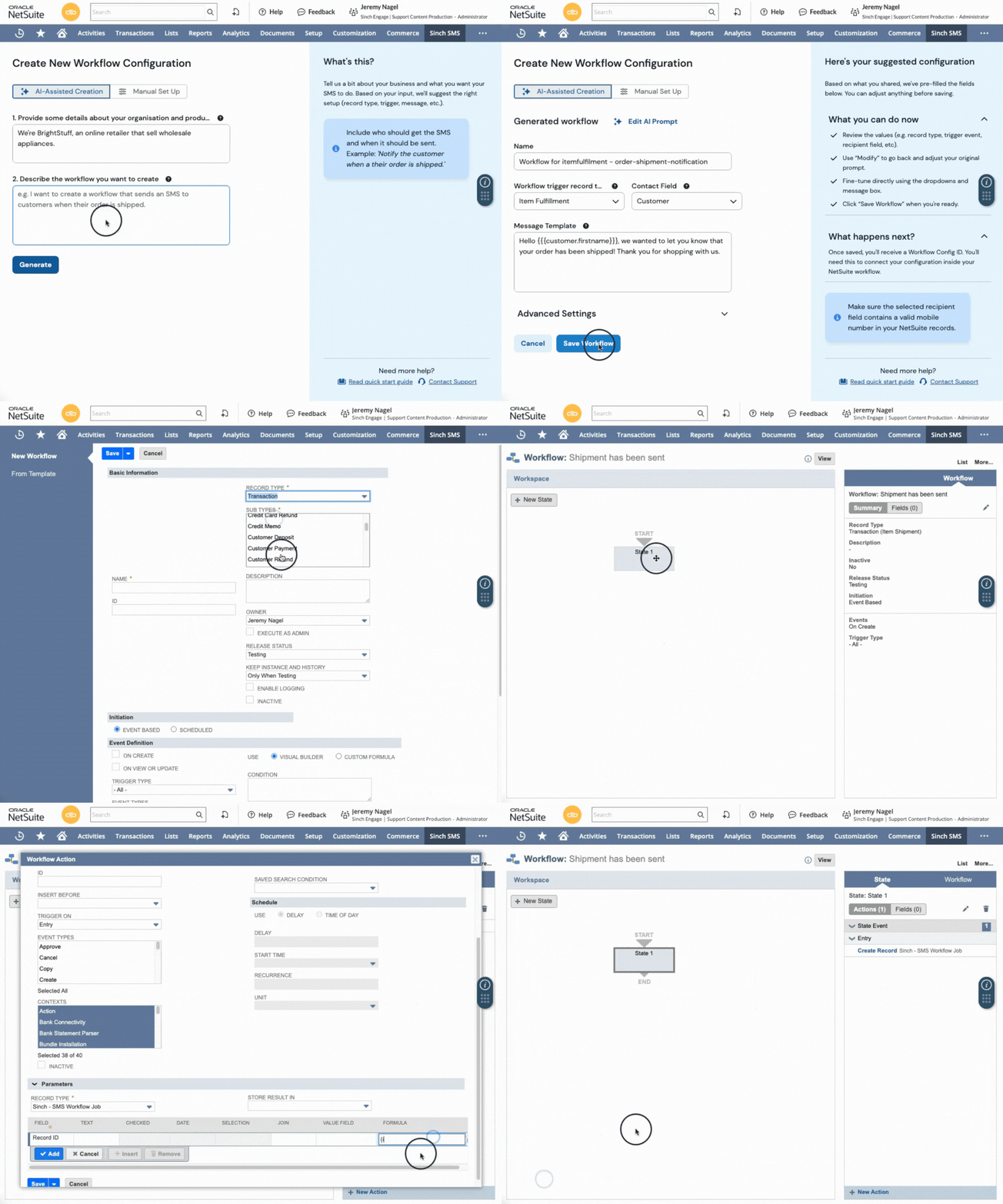
2. Trigger SMS directly from NetSuite records and events
Once connected, you can send SMS based on real NetSuite activity, such as:
- Order creation or fulfillment updates
- Invoice and payment notifications
- Support cases and status changes
- Time-sensitive alerts tied to specific records
Messages can be personalized using NetSuite fields (like customer name, order number, or delivery date), so texts stay relevant and contextual.
3. Automate common use cases with workflows
For more advanced scenarios, Sinch Engage works with NetSuite workflows, allowing you to:
- Automatically send SMS when records change
- Build multi-step notifications (for example, confirmation → reminder → follow-up)
- Standardize messaging across teams and departments
This makes it easier to scale SMS beyond one-off text alerts and into repeatable business processes.
4. See it in action
To help you envision how it all works, here’s a quick 1-minute overview of how you can automate SMS with Sinch Engage and NetSuite.
There’s tons of guidance available in our support documentation if you’ve got more questions, and you can always drop us a line with any questions.
Now, let’s move on to some text examples. Here are some text message templates across the SMS use cases we mentioned above, so you can move onto your NetSuite texting journey even faster.
15 SMS templates for NetSuite
1. Order confirmation & tracking
Replace or supplement email notifications with instant text alerts triggered directly from NetSuite workflows.
Example Templates:
Hi {firstname}, thank you for your order of {shippingitem}! Track your shipment here: {trackinglink}.
— Rich Hay, Photo Warehouse.
To unsubscribe, text STOP.
Hi {firstname}, your order is ready for pickup! View directions here: https://nxt.to/*******. Text HERE when you arrive.
— Photo Warehouse.
Tip: Use merge fields in NetSuite to personalize messages dynamically and include tracking or order detail links. Check out our help docs to learn how to include merge fields in your NetSuite SMS.
2. Appointment scheduling & confirmations
Scheduling field visits, deliveries, or curbside pickups? Text messages achieve faster confirmations and fewer missed appointments.
Templates:
Hello {firstname}, your service appointment is confirmed for {Time} on {Date}. Reply Y to confirm.
— [Your business name]
Hi {firstname}, due to equipment delays, we need to reschedule your appointment to 3 PM tomorrow. Reply Y to confirm.
— Sam from [your business name].
Best practice: Send appointment texts during business hours and allow quick “Y/N” replies for frictionless confirmations.
3. Customer support & service updates
SMS support resolves issues faster and at a lower cost than email or phone queues. It’s also an opportunity to collect feedback and increase loyalty.
Hi {firstname}, your support case #{SupportCase} has been updated to status {Status}. We’ll keep you informed as it progresses.
Hi {firstname}, please rate our service from 1 (Not helpful) to 10 (Excellent). Your feedback helps us improve!
Thanks for your feedback! Use code A20 for 20% off your next order.
Pro tip: View that customer touchpoint as an opportunity to give value. Always close a resolved case with feedback or loyalty message.
4. Automated billing reminders
With emails being so easy to ignore, SMS billing reminders reach customers faster and reduce missed payments.
Templates:
Hi {firstname}, quick reminder that your bill for {InvoiceAmount} is due on {BillDueDate}.
Hi {firstname}, payment for account #{AccountNumber} failed. Visit https://nxt.to/******* or reply P to pay by phone.
Hi {firstname}, your account #{AccountNumber} is {DaysOverdue} days past due. Reply P to pay now.
5. Promotions & Special Offers
Use time-sensitive SMS promotions to drive urgency and conversions.
Templates:
Hi {firstname}, your custom quote from {QuoteDate} for {QuoteAmount} is valid until {OfferExpDate}. Approve now and get 10% off!
Hi {firstname}, ACME’s fall sale ends tonight! Use code AC20 for 50% off: https://nxt.to/*******.
Hi {firstname}, your VIP code {CustCode} gets you 35% off all shoes. Shop before midnight: https://nxt.to/*******.
Best practice: Include a deadline or expiration date to encourage immediate action.
Start getting business ROI with real-time and automated SMS in NetSuite
When you’re already doing so much of your operations from NetSuite, adding SMS to your workflows can improve every stage of the customer journey – from order tracking to retention.
By following these best practices and using the pre-built templates above, NetSuite-powered organizations can reduce operational friction, increase engagement, and turn text messaging into a competitive advantage.
Explore how Sinch Engage helps you do all of the above with our NetSuite SMS integration, or book a demo to get a walkthrough from our team of experts.
Explore more SMS automation guides:

Author: