Resources
A guide to setting up Salesforce SMS drip campaigns
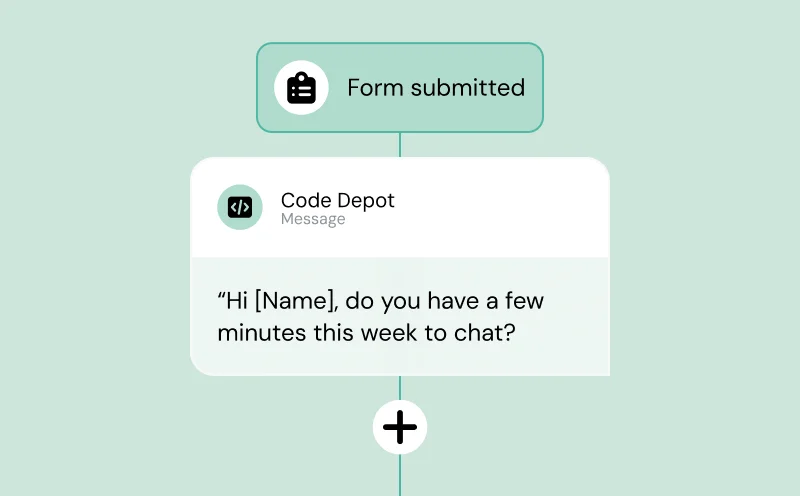
The term “drip campaign” may often be most often associated with email marketing, but it’s actually one of the sharpest outreach tactics you can do by text.
No, seriously. With the SMS opt-in rate steadily increasing year-on-year, doing customer outreach by SMS – whether for marketing, sales, or customer support – is a major untapped opportunity for a lot of businesses. This is even more true for teams using Salesforce CRM.
With automated SMS drip campaigns right from Salesforce (powered by a top integration like Sinch Engage), you can nurture leads, recover abandoned carts, and re-engage dormant customers on autopilot.
This guide shows you exactly how to set up a Salesforce SMS drip campaign.
You’ll learn:
- which Salesforce tools to use (Flow Builder, Process Builder, or Marketing Cloud)
- how to structure multi-message sequences that don’t annoy people
- which campaign types actually drive revenue instead of opt-outs
The five types of SMS drip campaigns that work in Salesforce
Most companies start with one drip campaign type and then expand once they see results.
Here are the five text message sequences that consistently drive ROI across the customer journey.
1. Lead nurture sequences
Best for: Moving prospects from awareness to consideration without sales rep involvement
Typical length: 5-7 messages over 14-21 days
New leads need education. A lead nurture drip gives them valuable content while keeping your brand top-of-mind.
Example sequence:
Day 1: Welcome message with link to your most popular resource
Day 3: Case study from their industry
Day 7: Product demo video
Day 10: Customer testimonial
Day 14: Soft ask to schedule a call
2. Abandoned cart recovery
Best for: E-commerce, SaaS trial sign-ups, event registrations
Typical length: 3 messages over 24-48 hours
Cart abandonment rates hover around 70% across industries. A well-timed text can recover some of those lost sales.
Unlike blast campaigns that send one message to everyone at 2pm on Tuesday, drip campaigns are triggered based on individual behavior. Message 1 sends when someone abandons their cart. Message 2 sends only if they haven’t completed checkout. The timing adapts to each person’s actions.
Example sequence:
1 hour after abandonment: “Hey Sarah, you left something in your cart. Complete your order here: [link].”
12 hours later: “Still thinking it over? Here’s a 10% discount code: COMEBACK10”
48 hours later: “Last chance. This offer expires tonight: [link].”
The urgency works because texts feel immediate. Nobody ignores a text for three days the way they ignore emails. When someone gets a cart reminder text within an hour, the item is still top-of-mind, and the buying intent is still fresh.
3. Appointment reminder and no-show recovery
Best for: Healthcare, professional services, sales demos
Typical length: 2-4 messages spanning before and after the appointment
No-shows cost businesses real money and inconvenience.
That was the case with Marquis Software, a US-based software service provider. Their meeting no-show rate sat around 20%, which led to wasted time and effort for already overloaded employees.
With SMS reminders, they reduced the no-show rate by 43%.
Example sequence:
24 hours before: “Hi James, a reminder about your consultation tomorrow at 2pm. Reply YES to confirm or CHANGE to reschedule.”
2 hours before: “Your appointment is in 2 hours. See you soon!”
If no-show: 1 hour after missed appointment: “We missed you today. Life gets busy. Want to reschedule? [booking link]”
4. Customer onboarding and adoption
Best for: SaaS, membership programs, complex products
Typical length: 7-10 messages over 30-60 days
New customers need guidance. Without it, they churn. Onboarding drips keep customers engaged during those critical first weeks when they’re deciding if your product actually delivers value.
Example sequence:
Day 1: Welcome + first quick win action
Day 3: Tutorial for the most-used feature
Day 7: Check-in: “How’s it going so far?”
Day 14: Advanced feature unlock
Day 21: Customer success story
Day 30: Feedback request + upsell opportunity
5. Win-back and re-engagement
Best for: Inactive customers, cold leads, lapsed subscribers
Typical length: 3-5 messages over 7-14 days
It could be that a customer has gone cold and hasn’t engaged or used your product in months. A win-back campaign is your last shot before you write them off completely.
Example sequence:
Day 1: “We miss you! Here’s what you’ve been missing: [recent wins/features].”
Day 4: Exclusive offer: “Come back and get [incentive].”
Day 7: “Before you go…what would it take to win you back?” [survey link]
Day 10: “Last call. This offer expires tonight.”
SMS as a messaging channel works particularly well for win-backs because it’s more apt to grab your prospects’ attention than their overloaded email inbox. Someone who has been ignoring your emails for months might actually read a text that lands directly on their phone screen.
How to set up SMS drip campaigns in Salesforce
Setting up SMS drip campaigns isn’t complicated, but there’s a right way and a wrong way to do it.
The wrong way creates compliance nightmares and broken automations. The right way gives you reliable campaigns that run without constant babysitting.
What you need first
Before you build a single workflow, get these four things in place:
1. SMS provider integrated with Salesforce
Salesforce doesn’t send text messages natively at the scale you need for drip campaigns. You’ll need a third-party SMS platform that integrates with Salesforce to handle sending, delivery tracking, and two-way conversations.
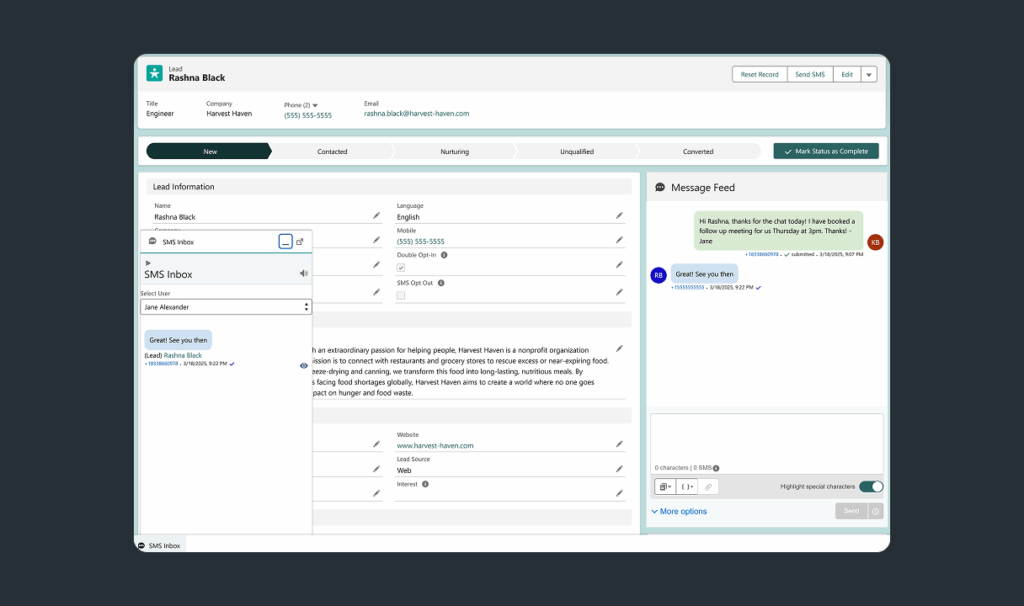
Sinch Engage’s Salesforce integration connects directly to your CRM and automatically syncs contact data, so your drip campaigns can pull from any Salesforce field for personalization. The integration also handles delivery reporting, opt-out management, and inbound message routing back to the right Salesforce records.
The integration includes pop-up notifications directly in Salesforce when contacts reply, keeping your team responsive without switching tools. All message history automatically syncs to contact records, giving you a complete conversation view without manual logging.
2. Native Salesforce tools: Flow Builder, Process Builder, or Marketing Cloud
The tool you use depends on your Salesforce license and technical comfort level. Your options are:
- Flow Builder: It is the most flexible option. Flow Builder handles complex logic and is available in most Salesforce editions
- Process Builder: It has a simpler interface and is suitable for straightforward triggers. Salesforce is phasing it out, but it is still widely used
- Marketing Cloud: This is enterprise-grade and is built for marketing teams. It requires a separate license for you to use
Most companies start with Flow Builder. It’s powerful enough for sophisticated campaigns without requiring a Marketing Cloud budget.
3. Data hygiene check
Garbage in, garbage out. Before you launch, clean your data:
- Test contacts filtered out
- Merge duplicate records
- Ensure valid phone numbers are in the correct format
- Confirm opt-in status for each contact
Run a data quality report on your Contact and Lead objects. If more than 5% of your mobile numbers are invalid, pause and fix your data collection process first.
4. Compliance setup
You’re legally required to have explicit opt-in before texting someone. No exceptions. The penalties for getting this wrong include fines up to $1,500 per message under the TCPA.
Create these fields in Salesforce:
- SMS_Opt_In__c (checkbox)
- SMS_Opt_In_Date__c (date field)
- SMS_Opt_In_Source__c (text field to track where consent came from)
Set up automated opt-out handling that immediately updates records when someone replies STOP. This is a legal requirement.
Let’s now see how to set up your SMS drip campaign.
Step 1: Map your campaign strategy
Don’t start building flows yet. Start with a spreadsheet.
Map out your entire campaign before you touch Salesforce:
- Trigger: What starts this campaign? (Form submission? Deal stage change? Date-based?)
- Audience: Who gets these messages? (Leads only? Customers? Both?)
- Exit criteria: What stops the campaign? (Conversion? Opt-out? Time limit?)
- Message sequence: How many messages? What’s the delay between each?
- Personalization: Which Salesforce fields will you reference?
Example for a lead nurture SMS campaign:
- Trigger: Lead Status changes to “Downloaded Whitepaper”
- Audience: Leads with a valid mobile number and SMS_Opt_In = TRUE
- Exit criteria: Lead converts to Contact OR Lead Status = “Unqualified” OR replies STOP
- Messages: 5 messages over 14 days (Day 0, 3, 7, 10, 14)
- Personalization: First Name, Industry, Lead Source
This 10-minute planning exercise prevents hours of rebuilding broken workflows later.
Step 2: Build the flow in Salesforce
Open Flow Builder (Setup → Flows → New Flow) and create a Record-Triggered Flow.
Configure your trigger:
- Object: Lead (or Contact, or custom object)
- Trigger: When a record is created or updated
- Entry conditions: The mobile phone field is not null, and the SMS opt-in field equals true.
- Optimize for: Actions and Related Records
Add decision elements for your exit criteria:
Check if the contact should exit the campaign before each message. Common exit checks:
- Has the lead converted?
- Is SMS_Opt_In still TRUE?
- Has the status changed to disqualified?
If any exit criteria are met, end the flow. If not, proceed to send the message.
Add scheduled paths for each message:
This is where your drip timing comes to life. For each message in your sequence, create a scheduled path:
- Path 1: 0 hours (immediate send)
- Path 2: 3 days
- Path 3: 7 days
- And so on
In each path, add your SMS send action (using your SMS provider’s Flow action) and pull data from Salesforce fields for personalization.
Sinch Engage provides native Flow actions that work directly in Salesforce Flow Builder. You can trigger SMS sends, check delivery status, and handle inbound responses all within the same workflow. That way, there’s no need to call external APIs or write custom code.
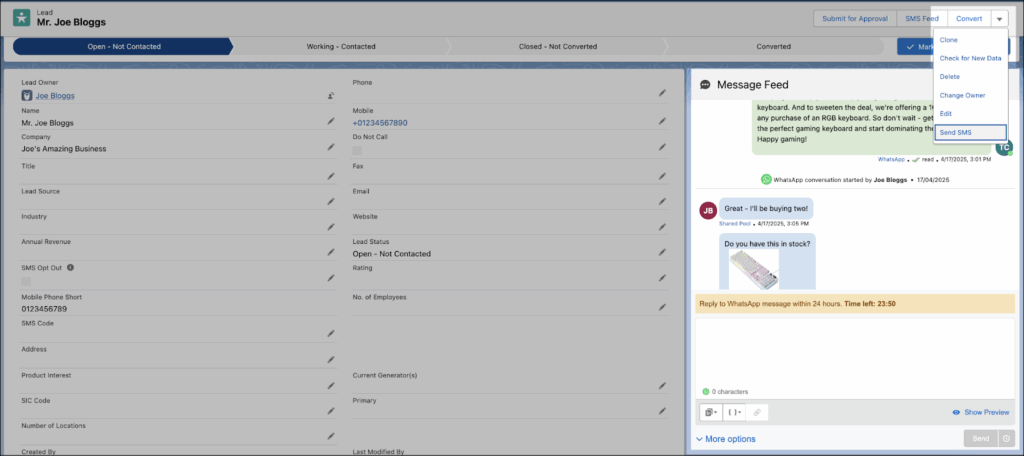
Pro tip: Use separate text templates for each message instead of hardcoding message copy in the flow. This lets marketing teams update message content without touching the flow logic.
Step 3: Write clear and engaging messages
Nobody wants to receive texts that feel like they came from a marketing automation tool. Even though that’s exactly what they are.
To write a good SMS message:
- Use first names naturally
- Refer to specific actions the person took
- Keep it under 160 characters when possible
- Have one clear call-to-action
- Make it read like something a helpful human would actually text
Compare these two versions of the same message:
Which of these messages would you like to receive? No doubt it’s the second because it references a specific action (downloaded pricing), asks a relevant question, and uses conversational language.
Sinch Engage’s SMS templates work with any Salesforce object that has a phone field and allows activities such as Leads, Contacts, custom objects, and even Campaign Members.
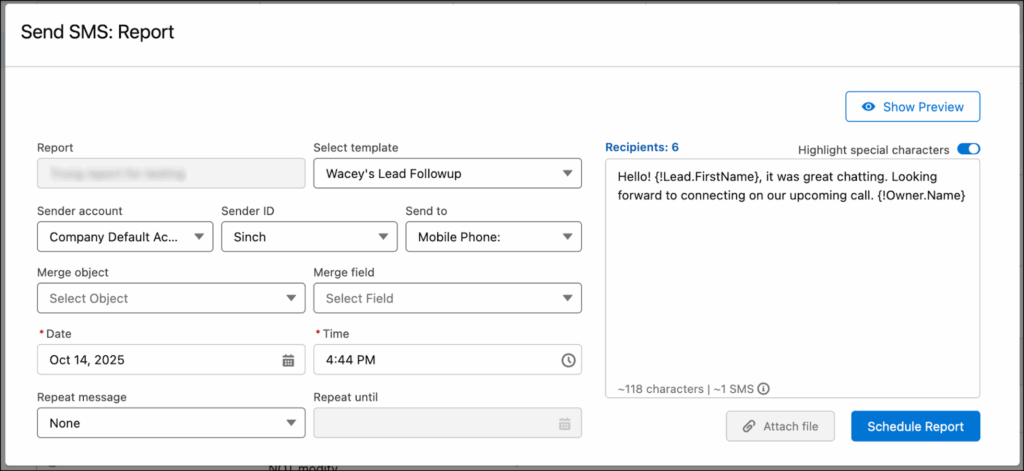
Templates include field value merging with variables like {!FirstName} or {!Company}, so you can personalize bulk SMS messages without manually typing merge fields.
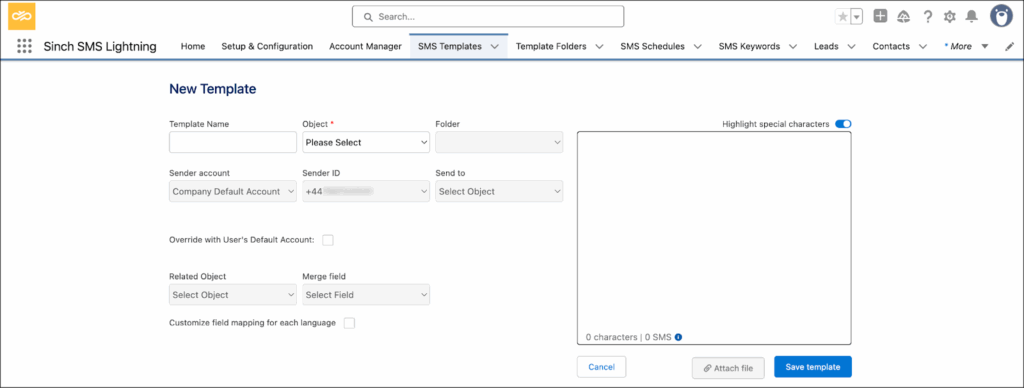
Create your templates once, organize them into folders for different teams or campaigns, then reuse them across bulk sends, 1:1 messaging, and automated workflows with automatic personalization pulled from your Salesforce data.
Step 4: Test before launch
Never launch a drip campaign to your full database without testing.
Create test records in Salesforce that match your entry criteria. Use your own mobile number.
Trigger the flow and watch what happens:
- Are the messages sent at the right times?
- Does personalization pull the correct data?
- Do exit criteria work properly?
- Does opt-out handling function correctly?
For time-based sequences, you don’t want to wait actual days to test. Temporarily change your scheduled paths to use minutes instead of days.
Message 1 sends immediately, Message 2 after 3 minutes, Message 3 after 7 minutes. This lets you test the entire sequence in under 15 minutes.
Once testing passes, change your timing back to days and activate the flow for real.
Step 5: Monitor and optimize
Launch day is only the beginning.
Watch these metrics in your first two weeks:
- Delivery rate
- Opt-out rate
- Click-through rate
- Conversion rate
Run an A/B test on message timing or copy variations to see which performs better.
Minor tweaks compound over time. A 3% jump might look small on the dashboard, but it has a significant impact on your bottom line.
Making your SMS drips smarter
Basic drip campaigns work. But once you’ve got the fundamentals running, these advanced tactics take performance to another level.
Behavioral triggering beyond the basics
You can do more than send messages based on time delays. Trigger messages based on what contacts actually do.
Here are some examples of how this might play out:
- When someone clicks your pricing link but doesn’t book a demo → send a case study with ROI data
- Say a lead visits your careers page → adjust messaging to emphasize company culture
- When a contact opens three emails in a row without clicking → switch next message to ask what they’re looking for
Salesforce already tracks all this customer behavior, so use it.
Sinch Engage’s keyword handling feature can automatically update Salesforce records based on text replies.
When someone texts ‘INTERESTED’ or ‘DEMO’, the system can change their lead status, create cases, add them as campaign members, assign them to a sales rep, or trigger a new workflow, without manual intervention.
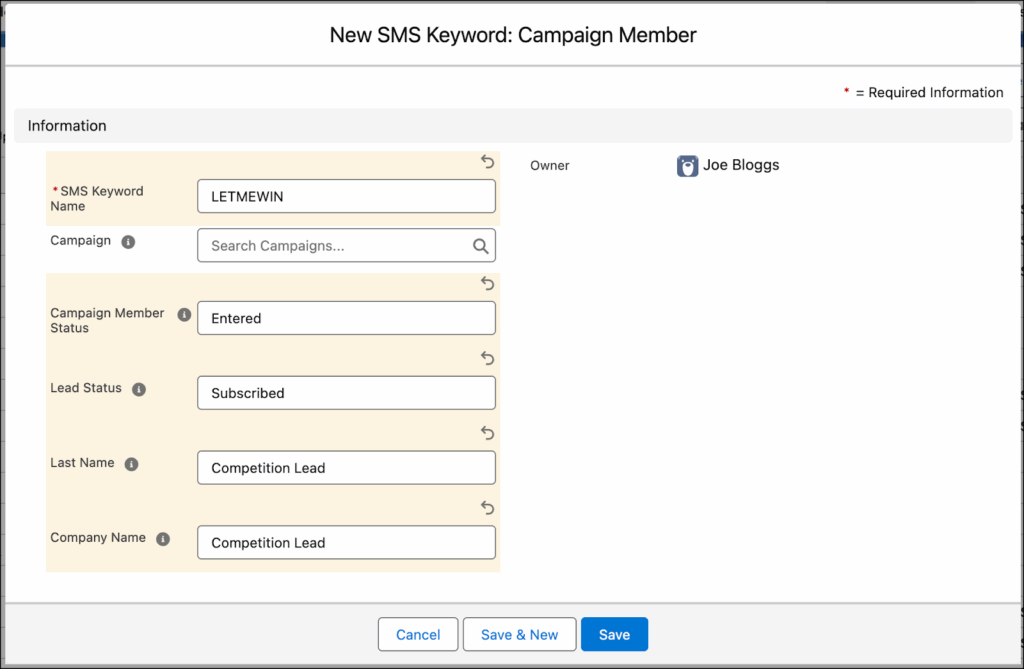
This turns inbound replies into automated actions that keep your drip campaigns responsive to real-time engagement.
Dynamic content based on Salesforce data
Your messages should look different for different segments, even within the same campaign.
Use merge fields creatively:
- Reference custom fields: “As a {Industry} company dealing with {Pain_Point}…”
- Adjust offers by company size: Show enterprise pricing to large companies, SMB pricing to small teams
- Change CTAs by lead source: Trade show leads get different messaging than inbound leads
Multi-channel orchestration
SMS shouldn’t live in isolation. The best drip campaigns coordinate across channels.
Example sequence:
Day 1: Welcome email with detailed information
Day 1 (4 hours later): SMS reminder to check email
Day 3: SMS with quick tip
Day 5: Email with case study
Day 7: SMS checking in
Day 10: Email with special offer
Day 10 (same day): SMS alerting them to check their email for the offer
The SMS messages act as nudges to drive engagement with your longer-form email content.
Sinch Engage handles both SMS and MMS in the same workflows in Salesforce, letting you send images, videos, or rich media when a message benefits from visuals. Companies using this multi-channel approach see significantly higher conversion rates than single-channel campaigns.
Compliance and best practices for SMS drip campaigns
Getting compliance wrong ends badly. Here’s how to stay clean.
Legal requirements you can’t ignore
Commercial text messaging often requires the following:
- Express written consent: You need explicit opt-in before sending commercial texts. A phone number in your database doesn’t count as consent. Neither does “by submitting this form, you agree to our terms.” You need clear, unambiguous language: “Yes, I want to receive text messages from [Company Name].”

- Clear identification: Every message must identify who’s sending it. If you’re texting on behalf of a client, both companies need identification in early messages.
- Opt-out mechanism: Every message must include instructions for opting out. “Reply STOP to unsubscribe” is the industry standard. You must honor opt-outs immediately, within minutes, not days.
- Time restrictions: Don’t text people before 8am or after 9pm in their local time zone. This requires storing time zone data in Salesforce and checking it before each send.
Salesforce setup for compliance
Set up automatic opt-out handling through your SMS integration. When someone replies STOP, the system should:
- Immediately update SMS_Opt_In to FALSE in Salesforce
- Remove the contact from all active drip campaigns
- Log the opt-out in the consent record
- Send confirmation: “You’ve been unsubscribed from SMS messages.”
Test this process monthly. Broken opt-out handling is the #1 compliance violation.
Sinch Engage’s Salesforce integration includes built-in TCPA and GDPR compliance features. The system automatically manages opt-outs across all campaigns, logs consent timestamps in Salesforce, and respects time-zone restrictions to prevent messages outside legal hours.

Message frequency guidelines
You don’t want to annoy your customers with too many messages. Neither do you want to fall out of their minds with infrequent messages.
So how many messages should you include in your Salesforce SMS drip campaigns?
Here’s what we recommend by campaign type:
- Lead nurture: Max 5-7 messages over 2-3 weeks
- Abandoned cart: Max 3 messages over 48 hours
- Re-engagement: Max 4 messages over 10-14 days
- Appointment reminders: 2-3 messages (before and after appointment)
If someone doesn’t respond after your sequence ends, wait at least 30 days before enrolling them in another campaign. Texting someone weekly when they’re not responding is how you end up with opt-outs and complaints.
Common mistakes to avoid in Salesforce SMS drip campaigns
Mistake 1: Setting up sequences without clear exit criteria
Your drip campaign converts someone to a customer on Day 5. But you forgot to add logic to stop the campaign. So they keep receiving lead-nurture messages even though they already bought.
This sounds obvious, but it happens constantly. Every drip campaign needs multiple exit points:
- When a lead is converted to a customer
- Marked as unqualified
- Replied with a negative response
- Hit maximum message count
- Opted out
Check for exit criteria before every single message in your flow. It’s tedious but necessary.
Mistake 2: Over-personalizing to the point of creepy
Personalization is good, but you don’t want to overdo it.
Good personalization looks something like this: “Hi Jennifer, saw you checked out our pricing page last week.”
While creepy personalization sounds like: “Hi Jennifer, noticed you live at 123 Oak Street and work at Acme Corp as Senior Director of Operations. Our solution is perfect for someone with your career trajectory.”
If the information feels like something you’d know from an everyday conversation, it’s fair game. If it feels like you hired a private investigator, don’t include it.
Mistake 3: Ignoring mobile carrier filtering
Mobile carriers filter messages they consider spam, even if recipients opted in. Your delivery rate crashes, and you don’t know why.
Look out for these common triggers for carrier filtering:
- Shortened links from suspicious domains
- ALL CAPS text or excessive exclamation points!!!
- Sending identical messages to thousands of recipients simultaneously
- Including certain trigger words (FREE, WINNER, URGENT, CLICK HERE NOW)
Use branded short links, vary your message templates slightly between sends, and avoid spam trigger words.
Monitor your delivery rate, too. If it suddenly drops, you’ve likely tripped a carrier filter.
Mistake 4: Not testing with actual mobile devices
Everything looks perfect in Salesforce. Then you send the messages and realize your carefully formatted text shows up as misaligned and amateurish on actual phone screens.
Always test your drip campaigns by receiving the messages on multiple devices:
- iOS and Android
- Different carriers (Verizon, AT&T, T-Mobile)
- Different phone models
Special characters, emojis, and long messages can display differently across devices. A message that’s 160 characters in Salesforce might get split into two messages on certain phones, throwing off your entire sequence timing.
Mistake 5: Treating SMS like email
SMS isn’t just a shorter email. It’s an entirely different channel with different expectations.
Email recipients expect long messages, multiple links, and marketing polish. SMS recipients expect brevity, single CTAs, and conversational tone.
If you’re copying your email drip content and just cutting it down to fit in 160 characters, you’re doing it wrong. Write SMS-first content that takes advantage of the medium’s immediacy and personal feel.
Setting up your first Salesforce SMS drip campaign
Now that you’ve seen what’s possible with text drip campaigns in Salesforce, it’s time to put it into action. Sinch Engage’s Salesforce integration makes it easy to set up and launch automated Salesforce SMS campaigns without custom code or complex setup.
Thousands of businesses who rely on Salesforce trust and use Sinch Engage for:
- Fast, easy setup
- Enterprise-grade security and compliance for all users
- Industry-leading deliverability worldwide
- 24/7 human-to-human customer support
Book a demo to see how SMS drip campaigns work in Salesforce, or get started with Sinch Engage to start building your first campaign today.

Author: