Resources
5 HubSpot SMS workflows for sales teams that save time and close more deal
Missing revenue targets remains a persistent challenge for sales teams, with 49% of companies failing to meet their revenue goals in the first half of 2024. How are sales leaders and their reps adapting to solve this challenge? The answer is incorporating SMS automation into the sales journey.
61% of high-performing sales leaders using their CRM to automate critical parts of their sales process, and for sales teams using HubSpot workflows already, adding SMS is one of biggest opportunities to improve sales outcomes – and they’re easier to implement than you think.
Read on to learn how you can also save admin time and boost lead engagement and sales with SMS workflows, right from HubSpot.
Why SMS works better than email for sales
You might be wondering – does sales texting actually work? I’m already sending emails, so would adding SMS really make a difference? Yes, and yes. The reality is text messaging offers distinct advantages over traditional email outreach:
open rate compared to email’s 20% open rate.
of messages read within 90 seconds for immediate engagement.
for SMS vs. 6% for email leading to more booked meetings.
of consumers prefer to be contacted via text rather than phone call from unfamiliar companies.
For example, Vinomofo, a major wine retailer, achieved a 21% increase in conversions simply by adding SMS to existing email workflows in HubSpot, powered by the Sinch Engage SMS integration.
Overall, SMS works best for bite-sized communications like sale announcements, appointment reminders, and quick follow-ups. It’s also a great way to nudge your audience to go read an important email. For longer messages or complex communications, email remains the way to go and can work even better when paired with SMS..
5 HubSpot SMS workflows for sales success
1. Prospect nurturing workflows
Use case: Keep prospects engaged as they move through your sales pipeline.
How it works: Set up automated SMS notifications at key stages in the deal process to maintain momentum and build relationships.
Example messages:
After initial contact:
“Hi [Name], I’m looking forward to seeing you soon. In the meantime, if you have any questions, you can email name@company.com or reply back to this message. From [Sales Owner]”
After sending a quote:
“Hi [Name], Thanks for your time earlier. Here’s your quote: https://nxt.to/*******. Regards, [Sales Owner]”
For re-engagement:
“Hi [Name], I haven’t been able to get in touch recently. You can book a chat with me anytime: https://nxt.to/*******. Regards, [Sales Owner]”
Pro tip: As deals progress through stages, notify customers about their account status to improve satisfaction and maintain transparency.
2. Lead follow-up sequences
Use case: Increase conversion rates by following up with leads who’ve shown interest.
How it works: Automate timely follow-up messages after key actions like content downloads, webinar attendance, or free trial sign-ups.
Example messages:
After content download:
“Hi [Name], Thanks for downloading our eBook ‘How to delight your customers’. To hear about companies we are working with, feel free to book a chat: LINK. Reply STOP to opt out.”
For inactive trial users:
“Hey [Name], I noticed you haven’t used any of your free credits yet. Would you like some help getting started? Reply back anytime. To unsubscribe: LINK*”
Post-webinar follow-up:
“Hi [Name], Thanks for attending our latest webinar. I’d love to get your feedback and discuss how [Brand Name] can help [Company] get better results. Do you have time for a chat? Reply YES or NO. To unsubscribe: LINK*”
Pro tip: Create urgency with date-based workflows that trigger messages at strategic intervals. Consider tailoring follow-up sequences based on specific actions or behaviors.
3. Sales meeting reminder workflows
Use case: Reduce no-show rates and improve meeting attendance.
How it works: Send automated confirmation requests before scheduled meetings with easy options to confirm or reschedule.
Example workflow:
Initial reminder:
“Hi [Name], Please confirm your appointment with [Sales rep name] for [Meeting Date]. Reply YES or NO. Alternatively, you can reschedule here: LINK******”
If YES:
“Thanks for confirming your meeting. If anything changes, you can reschedule here: LINK*******”
If NO:
“Sorry you can’t make it. You can always book another meeting when you are ready: LINK”
Pro tip: Include a direct meeting link in your reminder messages so customers can easily reschedule without back-and-forth communication.
4. Onboarding and handover process automation
Use case: Create seamless transitions for new customers and account handovers.
How it works: Automate welcome messages, account setup notifications, and sales representative introductions to ensure no customer falls through the cracks.
Example messages:
Welcome message:
“Hi [Name], Thanks for signing up to [Brand Name]. Our sales team will be in contact shortly to help you get started. Thanks, [Brand Name]”
Account ready notification:
“Hi [Name], Your account is ready to go! If you need any further help, simply reply to this message to speak to our support team.”
Account manager introduction:
“Hi [Name], My name is [Sales rep name] and I’m your account manager and main point of contact. Feel free to reply back with any questions. Thanks, [Sales rep name]”
Pro tip: Use SMS as a supplementary follow-up to important emails. This reinforces your key message and directs customers back to detailed information, improving overall engagement rates.
5. Internal sales notification system
Use case: Keep your sales team informed and responsive in real-time.
How it works: Send automated notifications to sales team members for new lead assignments, completed purchases, or required follow-up actions.
Example messages:
New lead assignment:
“Hi [Sales rep name], You have a new lead assigned. View details: LINK”
Purchase notification:
“Hi [Sales rep name], Your account [Company] recently completed a purchase. View record: LINK”
Follow-up reminder:
“Hi [Sales rep name], It’s time to follow up [Lead] to get a few more details about their account. Please schedule a call with them next week.”
Pro tip: Just like your customers, your team members prefer different communication channels. Experiment with SMS notifications to improve internal response times and follow-up processes.
Best practices for HubSpot SMS Workflows
Keep your message concise
SMS works particularly well for short, high-impact communications. Use it for sale announcements, appointment reminders, and quick check-ins. For complex information that needs more context and detail, stick with email.
Continuously test and optimize
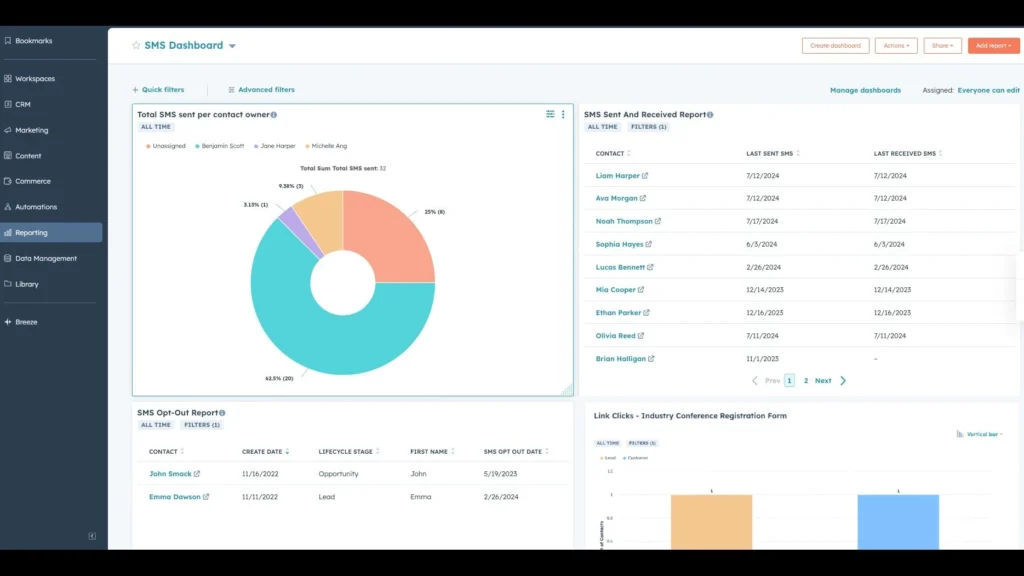
Analytics are crucial in marketing. Continuously test your SMS workflows to optimize performance. Use SMS analytics and message reports ( a built-in feature you get in Sinch Engage’s HubSpot SMS integration) to assess whether text messaging delivers results for your specific business and audience.
Ask for reviews via SMS
Customer reviews significantly influence purchasing decisions, but many businesses struggle to collect testimonials. SMS is highly effective for requesting feedback, outperforming email in both response rates and completion rates. You can even include direct links to review platforms using short trackable URLs.
Diversify your communication channels
Meeting customer needs requires diversity in how you communicate. Every customer wants to engage differently with your brand, and combining SMS with other channels creates a better customer journey.
Here’s an example:
Say you’re a residential building company, and your team typically captures customer information through online or in-person sign-up forms and then manages them in HubSpot.
Rather than sending paper brochures to customers and potential new tenants, you can use HubSpot to send text messages with links to digital floor plans. Not only does it save your company in operational time and expenses of snail mail, it also engages customers on a channel that they actually pay attention to: text messaging.
Getting started with SMS for HubSpot
The SMS for HubSpot app integrates directly into your existing workflows, allowing you to send and receive text messages without leaving your HubSpot account. Key features include:
- Add SMS triggers or actions to contact automations
- Build SMS actions into deals workflows
- Send and receive messages directly within contact records
- Automatic activity tracking in contact history
- Multi-step workflow builder for complex automation sequences
Learn more about triggering text messages in our HubSpot SMS automation guide.
Ready to transform your sales process?
SMS represents one of the most effective channels for cutting straight through to your audience and engaging prospects at the right moment. With HubSpot’s automation plus text messaging’s high open rates and immediate delivery, your sales team can work smarter, not harder.
Ready to get started on these sales SMS ideas with HubSpot’s leading SMS provider? Book a demo or try Sinch Engage for free.

Author: